

Below are all of the latest feature updates coming to Microsoft 365.
Automated Security Assessments and Policy Management
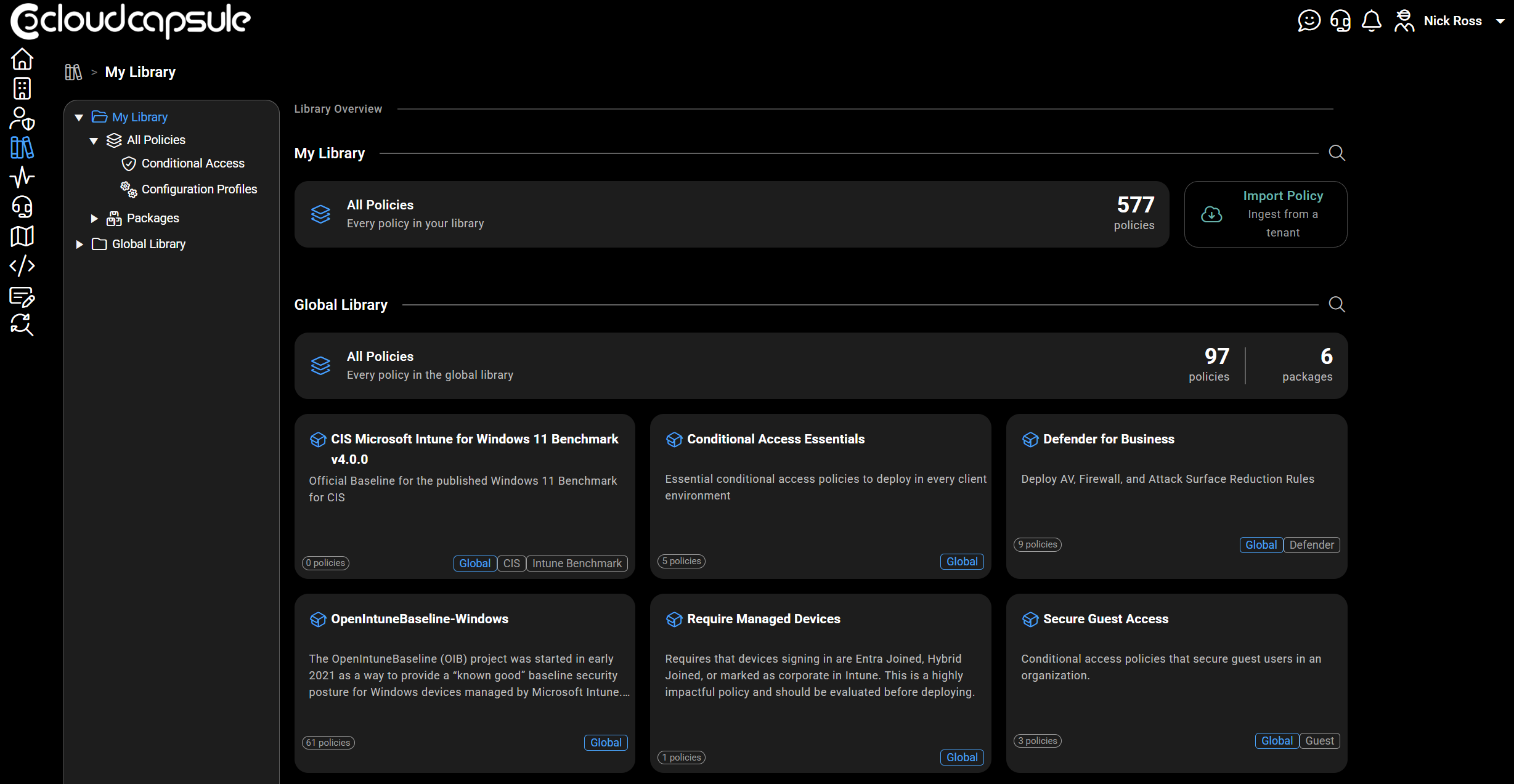
CloudCapsule is a tool I built purpose built for MSPs looking to scale their security practice on Microsoft 365. Scans of tenants take on average 60 seconds where we collect over 250 data points. We now provide remediation and policy management capabilities, allowing you to deploy fixes right from within our portal.

Microsoft Teams
1. Users can temporarily pause all notifications
How this will affect your organization
Microsoft Teams will introduce a new capability that allows users to temporarily pause notifications for a selected period of time. This feature gives users greater control over interruptions, helps reduce notification overload, and enables focused work, meetings, and other activities without requiring changes to existing notification settings.
When will this happen:
early October 2026 and is expected to complete by late October 2026.
2. Collect information with List Form in Workflows
How this will affect your organization
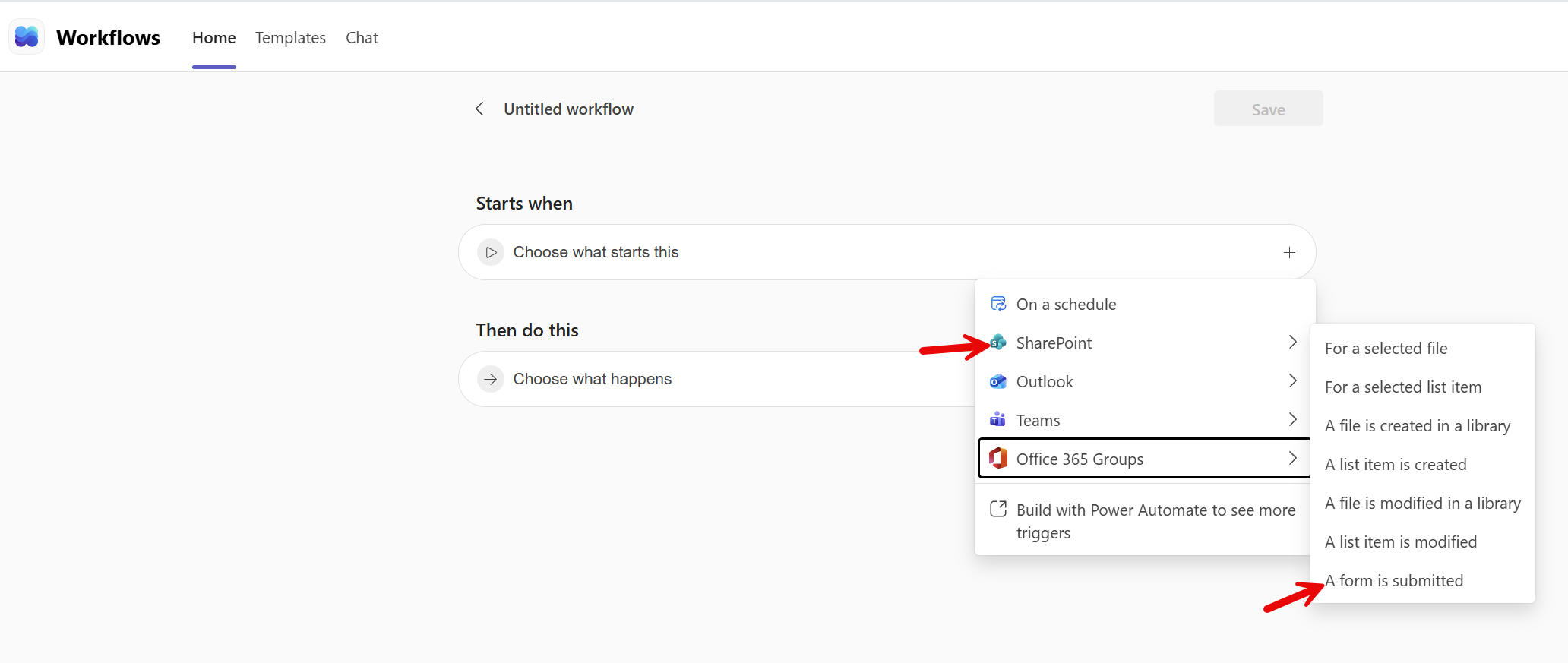
This trigger enables organizations to automate actions when users submit responses to forms built on SharePoint lists. Individual form responses can be used as workflow variables, enabling creators to post selected responses to a Teams channel and include additional details as threaded replies.
When will this happen:
late September 2026 and is expected to complete by late October 2026.
3. Lobby visibility will align with the “Who can admit from lobby” meeting option
How this will affect your organization
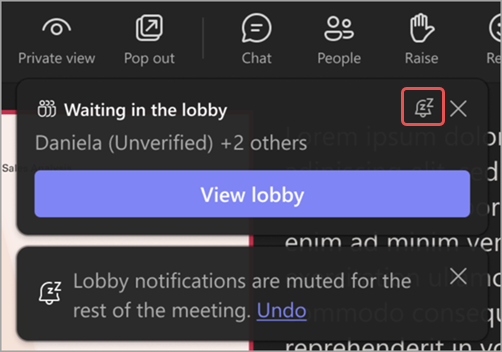
Introducing a new Report a meeting capability that allows meeting participants to report suspicious, malicious, or potentially fraudulent activity directly from Teams meetings. Information about user-submitted reports will also be available in the Teams admin center under Protection reports > User-reported security submissions. This change creates a more consistent and privacy-focused experience by aligning lobby visibility with lobby management permissions.
When will this happen:
early September 2026 and expected to complete by early October 2026 (previously mid-September)
4. QR code protection for messages from external users
How this will affect your organization
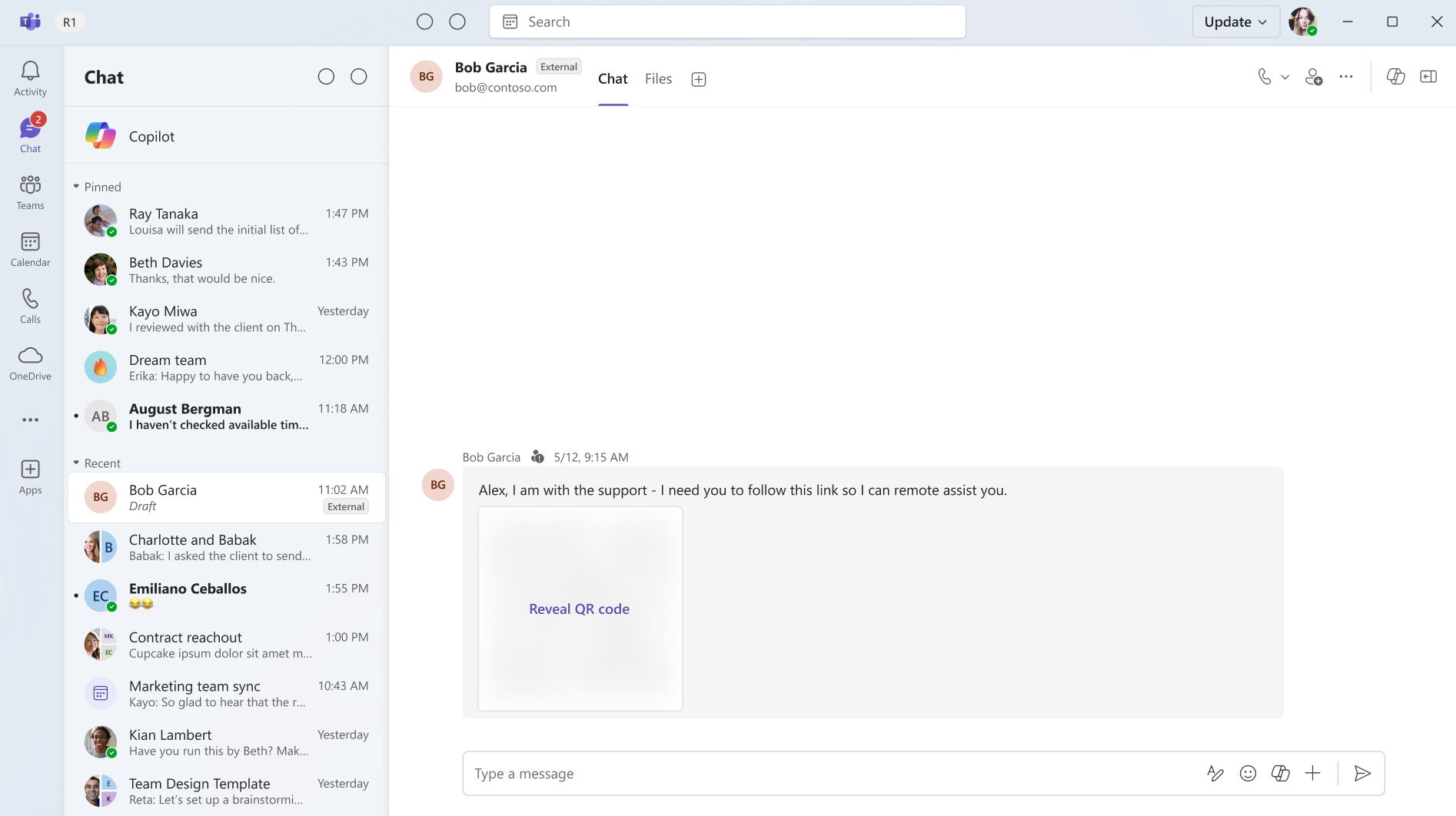
To help reduce the risk of phishing and fraud, images containing QR codes from external senders will be obscured by default. Users can choose to reveal the image before viewing or scanning the QR code.
When will this happen:
mid-October 2026 and expected to complete in mid-October 2026
5. Personal message reminders for chat and channels
How this will affect your organization
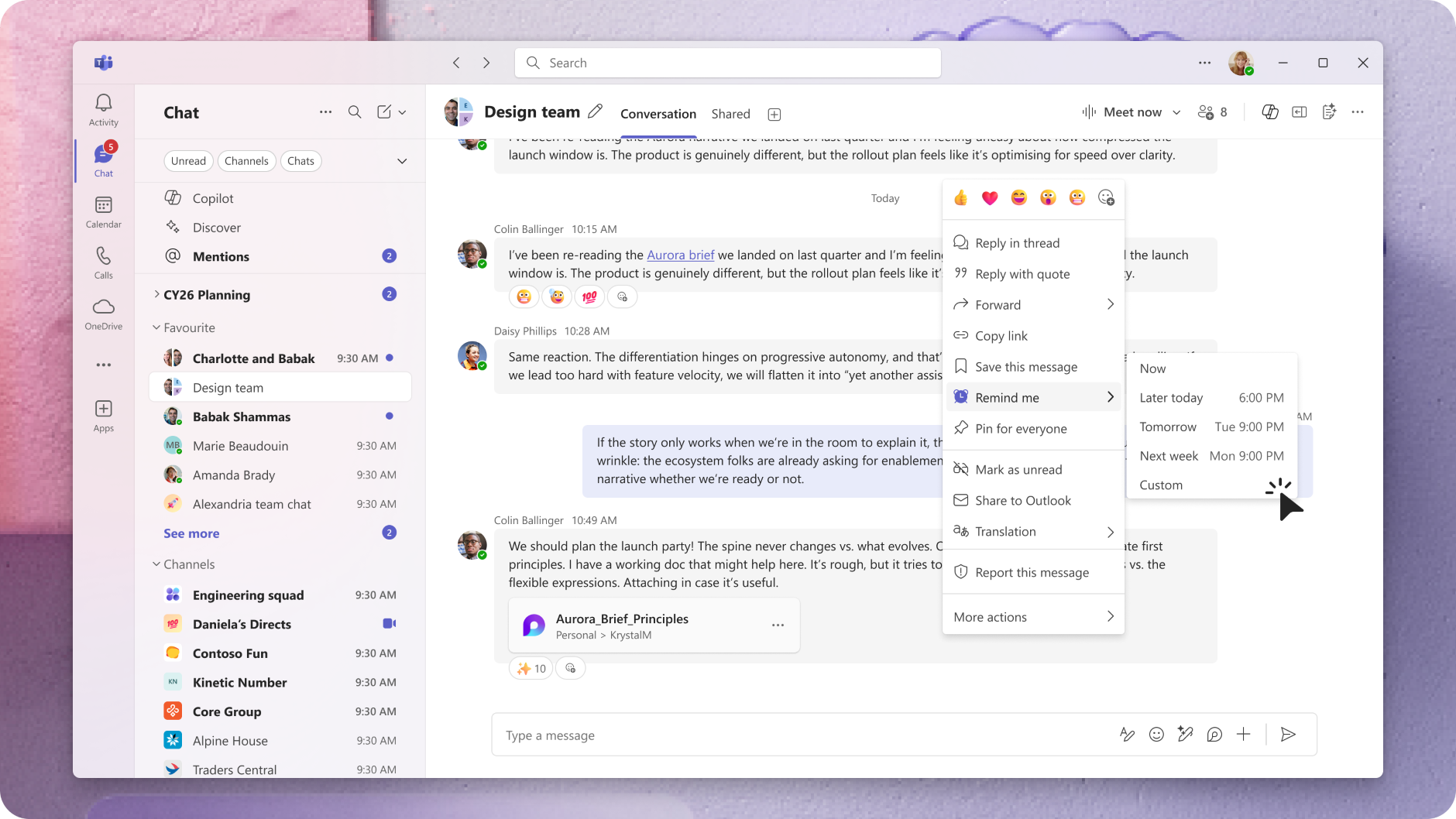
Microsoft Teams is introducing personal message reminders for chat and channel messages to help users track follow-ups and stay organized. Users can turn messages into actionable reminders, improving productivity and ensuring important conversations are not missed.
When will this happen:
Beginning and completing in October 2026
6. Admins can control profanity filtering in meeting transcripts
How this will affect your organization
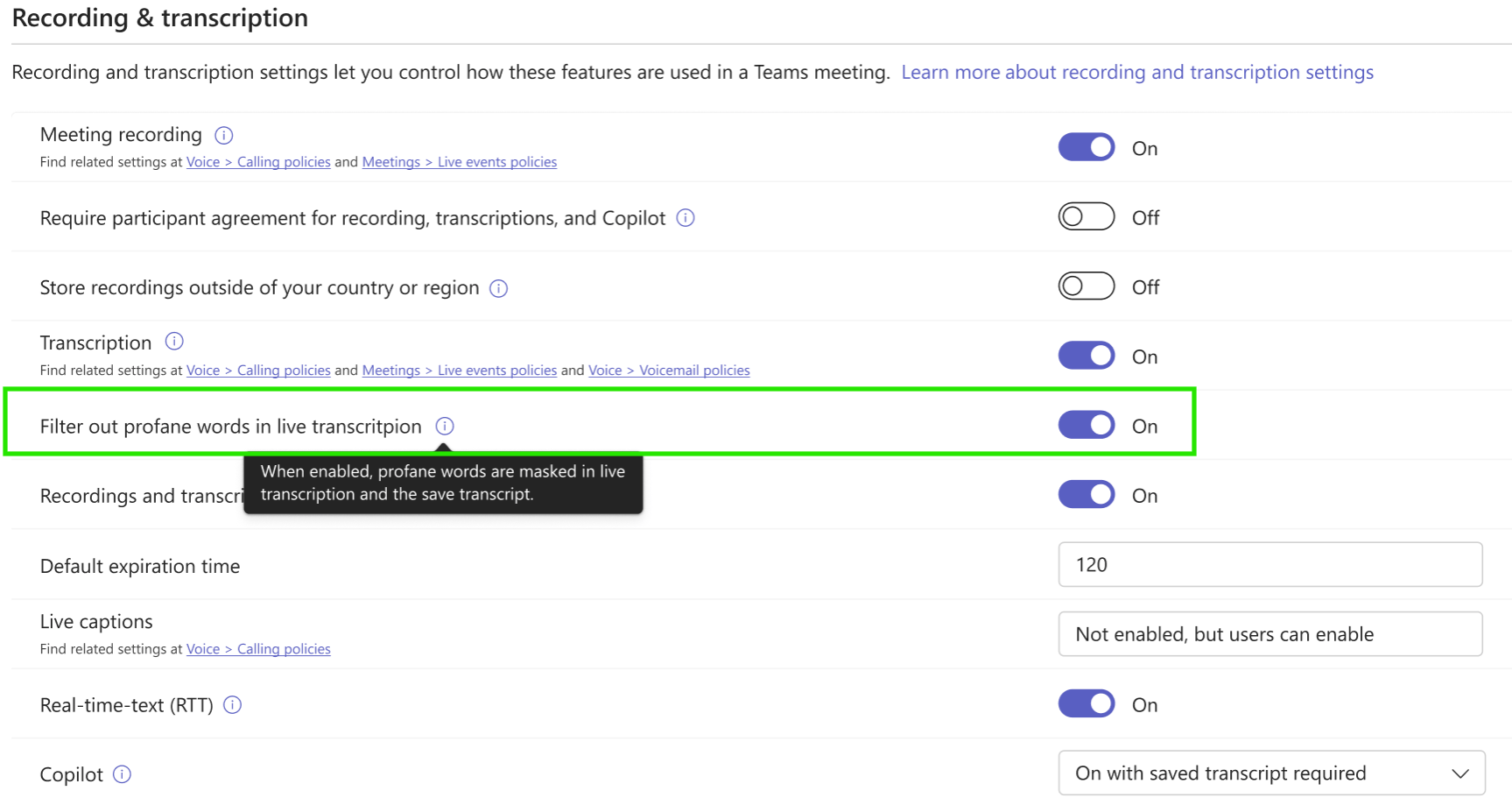
Microsoft Teams is adding a meeting policy that lets administrators control whether profane words are masked in live transcription and saved meeting transcripts.
When will this happen:
mid-October 2026 and expect to complete by late October 2026.

Microsoft Outlook
1. Change the organizer of meetings
How this will affect your organization
Microsoft is introducing Change organizer for eligible Outlook meetings and recurring meeting series. Users can ask another person in their organization to become the organizer, and the selected person must accept before ownership changes.
When will this happen:
Phase 1 supports eligible non-online meetings: Late September through late October 2026. Phase 2 will add eligible online meetings. For Teams meetings, the transfer will generate a new Teams meeting link owned by the new organizer. Phase 3 will add transfer support for eligible Teams meeting artifacts, including chat, meeting options, transcripts, recordings, agenda, notes, and attendance reports. Phase 2 and Phase 3 timing will be announced separately.
2. Enhanced security and access controls for Outlook attachments
How this will affect your organization
Conditional Access policies are now enforced for Outlook attachment operations. Users who don’t meet company policies won’t be able to download, preview, or upload classic attachments (this includes inline images).
When will this happen:
Available now.
3. Auto-expanding archive capacity increases to 3 TB for eligible mailboxes
How this will affect your organization
Microsoft Purview Data Lifecycle Management is increasing the maximum auto-expanding archive capacity for eligible Exchange Online archive mailboxes from 1.5 TB to 3 TB. This enhancement helps organizations retain and manage larger volumes of archived email content without requiring manual archive expansion processes or support requests
Eligible licensing includes:
- Office 365 E5, A5, and G5
- Microsoft 365 E5, A5, and G5
- Microsoft 365 Purview Suite
- Microsoft 365 Purview Suite FLW, EDU, and GOV
- Microsoft Defender + Purview Suite FLW
- Microsoft 365 F5 Compliance
- Microsoft 365 F5 Security + Compliance
- Combination of the eDiscovery & Audit and Insider Risk Management mini suites together with the Information Protection & Governance mini suite
When will this happen:
mid-October 2026 and expected to complete by late October 2026

Microsoft 365 Apps
1. Microsoft OneDrive and SharePoint: Anchored comments in the PDF viewer
How this will affect your organization
Users can attach a comment to a specific spot on a page, or to selected text, and collaborate through replies and @mentions — bringing PDF review to parity with commenting in Office documents.
When will this happen:
mid-October 2026 and expect to complete by mid-November 2026.
2. [Whiteboard] Standalone app deprecation (Windows, Mobile)
How this will affect your organization
Microsoft Whiteboard is retiring the standalone Whiteboard applications for Windows, iOS, and Android. Beginning October 16, 2026, the standalone Microsoft Whiteboard apps will no longer be supported for work or school accounts and personal Microsoft accounts. Users should access Whiteboard through Microsoft Teams and supported web experiences going forward.
Full Announcement: Whiteboard Standalone App Retirement | Microsoft Support
3. Archive SharePoint files under retention policies
How this will affect your organization
This helps organizations reduce storage costs by moving inactive content to Microsoft 365 Archive while maintaining compliance and discoverability. Archived content is excluded from Copilot indexing, which can improve the relevance of Copilot responses by focusing results on current, active data.
When will this happen:
early October 2026 (previously mid-September) and expected to complete by early November 2026
4. Microsoft OneDrive: New pay-as-you-go storage billing option
How this will affect your organization
We are introducing a pay-as-you-go, consumption-based billing option for additional OneDrive storage. This capability gives administrators more flexibility to manage storage growth by allowing selected OneDrive accounts to exceed their licensed storage quotas when needed, while helping organizations control which users can consume additional storage beyond their licensed storage quotas. OneDrive pay-as-you-go storage is $0.20/GB/month.
When will this happen:
early November 2026 and is expected to complete by early December 2026.
5. Microsoft OneDrive: OneDrive sync supports up to 1 million items on macOS
How this will affect your organization
Moving from 300,000 items to 1 million items per sync instance, per device. This increase is designed to help organizations with large OneDrive and SharePoint libraries sync more content reliably across devices.
When will this happen:
early October 2026 (previously mid-September) and expected to complete by early November 2026

Microsoft Intune
1. Health Attestation Migration to Microsoft Azure Attestation
How this will affect your organization
Microsoft Intune will migrate Windows Health Attestation compliance evaluation from the current Device Health Attestation (DHA) service to Microsoft Azure Attestation (MAA). This change affects evaluation of Windows compliance policies that rely on Health Attestation signals. Action is required to avoid interruption. Organizations that don’t allow access to the required Azure Attestation endpoints will experience issues with Health Attestation-based compliance evaluation after the migration is completed.
When this will happen
end of Q1 in 2027.
2. Stage app and policy rollout with deployment plans
How this will affect your organization
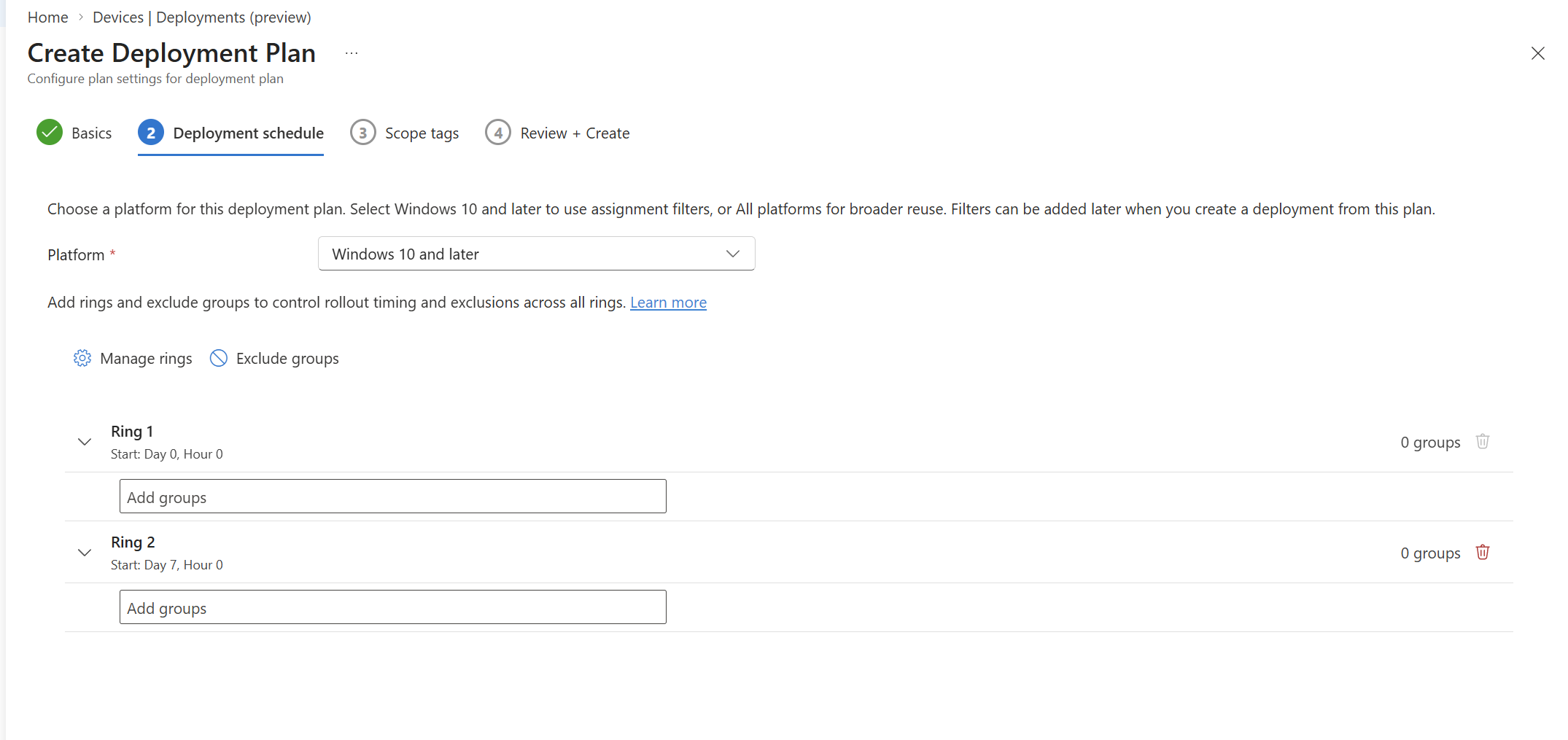
Deployments in Microsoft Intune allow administrators to create gradual, controlled, and predictable rollouts of Intune payloads, such as apps or policies. Rollouts use rings, which are group assignments that progress according to specific date and time criteria.
Full Article: Deployment plans and deployments overview in Microsoft Intune – Microsoft Intune | Microsoft Learn
When this will happen
Public Preview

Microsoft Entra
1. Microsoft Entra Resource Accounts for Teams Devices
How this will affect your organization
Password-less Teams Shared Space device Resource Accounts enable a Teams device to sign in using a secure device bound resource account credential instead of relying on stored username and password credentials.
Full Article: https://learn.microsoft.com/en-us/microsoftteams/rooms/passwordlessentraresourceaccounts
When will this happen:
GA
2. Manage identity lifecycle from the cloud with Microsoft Entra Cloud Sync
How this will affect your organization
Microsoft Entra Cloud Sync now enables organizations to provision users, groups, and group memberships from Microsoft Entra ID to on-premises Active Directory Domain Services (AD DS), helping cloud-first organizations manage identities from the cloud while maintaining access to AD-dependent applications. Administrators can provision cloud-native users, SOA-converted users, B2B guests, security groups, and memberships into AD, preserve key identity attributes for continuity, and use Microsoft Entra ID Governance to manage user lifecycle processes and access governance from a unified cloud-based experience.
When will this happen:
Public Preview
3. Microsoft Entra Global Secure Access MCP Firewall
How this will affect your organization
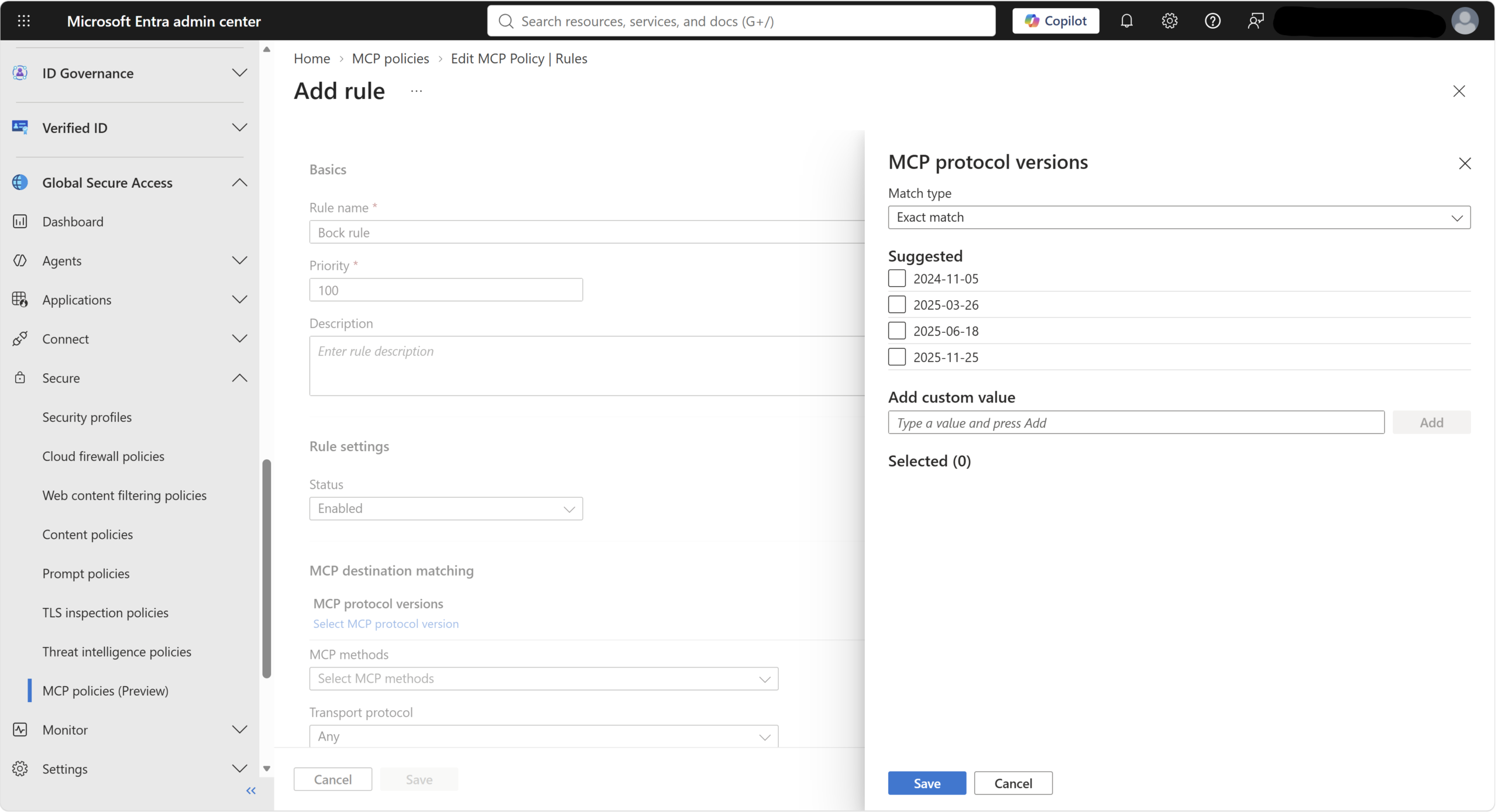
The Global Secure Access MCP firewall is a network-based, identity-centric security control that provides centralized visibility, policy enforcement, and runtime protection for MCP traffic between AI agents and remote MCP servers
Full Article: https://learn.microsoft.com/en-us/entra/global-secure-access/how-to-configure-mcp-firewall
When will this happen:
Public Preview
4. Replace MemberOf-Based Configurations by November 3, 2026
How this will affect your organization
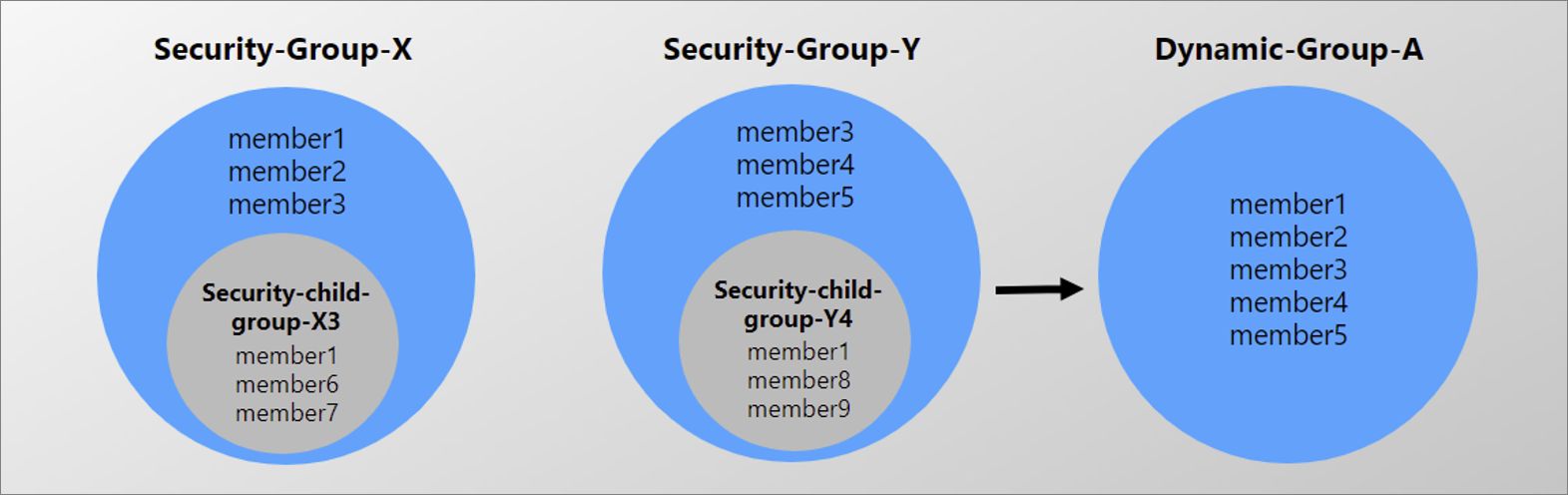
The Public Preview of the MemberOf rule operator in Microsoft Entra ID is ending. Organizations using the MemberOf rule operator in dynamic groups, dynamic administrative units (AUs), or entitlement management auto-assignment policies must replace these configurations by November 3, 2026. During Public Preview, Microsoft has observed that MemberOf can affect dynamic membership processing across a tenant and is therefore not recommended for production use.

Microsoft Copilot
1. Microsoft Copilot: SpaceXAI subprocessor admin setting
How this will affect your organization
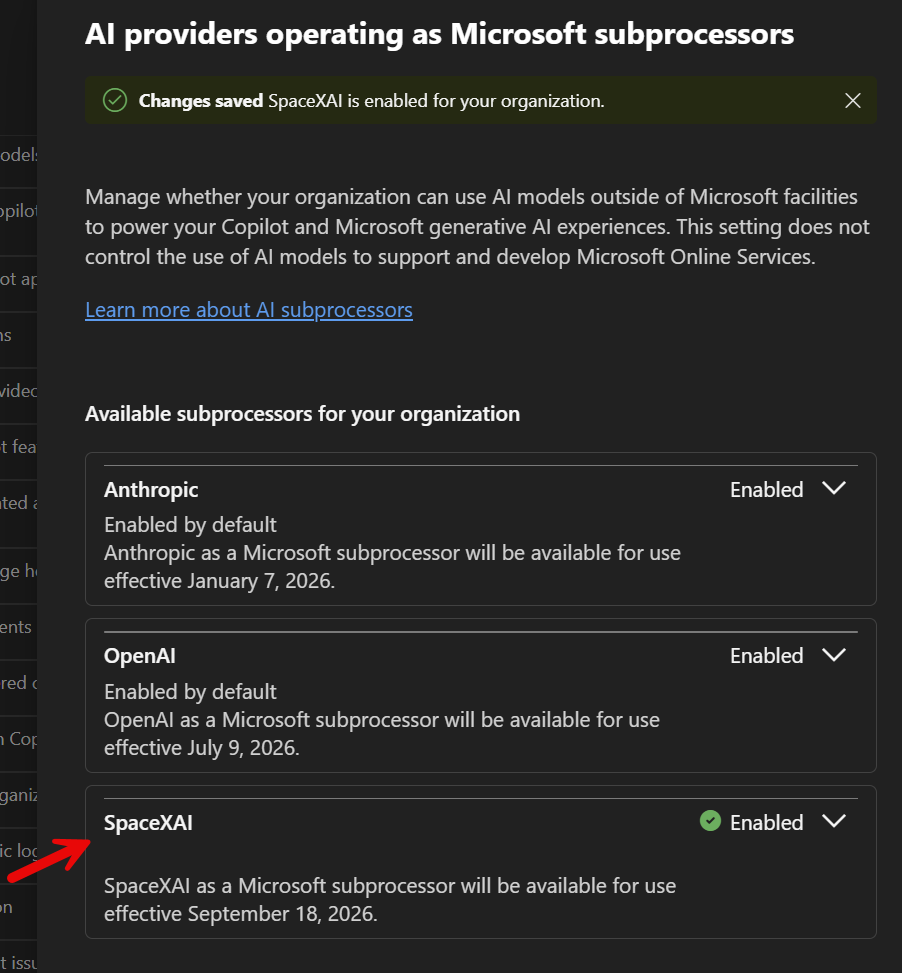
SpaceXAI is added as a Microsoft Copilot subprocessor, enabling Grok models in Word, Excel, and PowerPoint for eligible Frontier customers starting September 18, 2026
2. Introducing the new Copilot with Home, Code and Autopilot
How this will affect your organization
More rebranding….
Full Announcement: Introducing the new Copilot with Home, Code and Autopilot – The Official Microsoft Blog
When this will happen
Rolling out in the Frontier Program now. No GA Timelines yet.
3. Build apps in Microsoft Copilot Studio and Copilot Cowork
How this will affect your organization
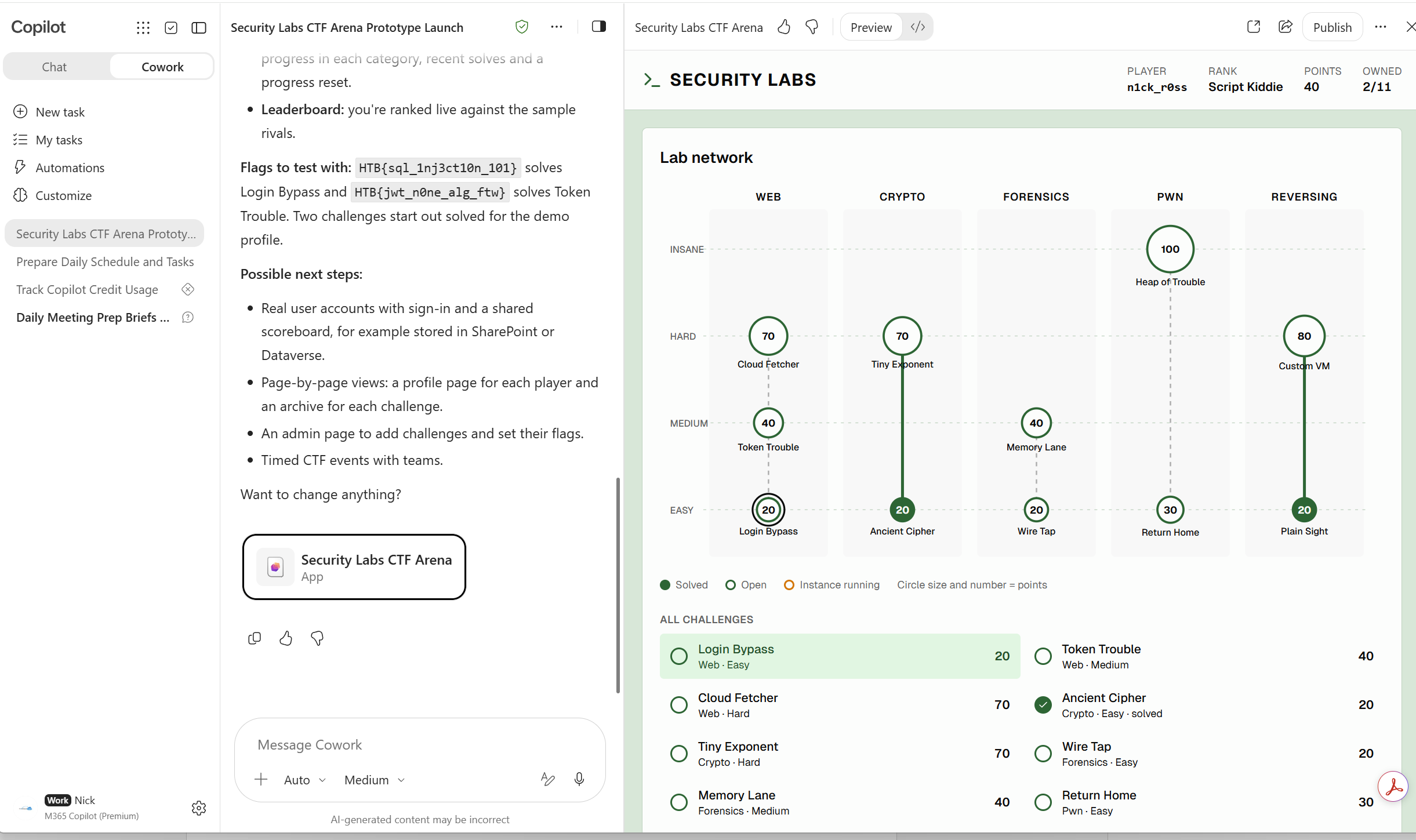
These experiences make it easier for people to turn ideas into apps using natural-language guidance and generative AI. Makers can create a working first draft through natural-language conversation, refine it, preview and test it, and then publish and share it. Apps can use organizational data through connectors permitted by your organization’s policies.
When this will happen
Copilot Cowork will begin on September 8, 2026, and is expected to complete by September 14, 2026.
4. Review PDFs using the Copilot context menu on OneDrive iOS
How this will affect your organization
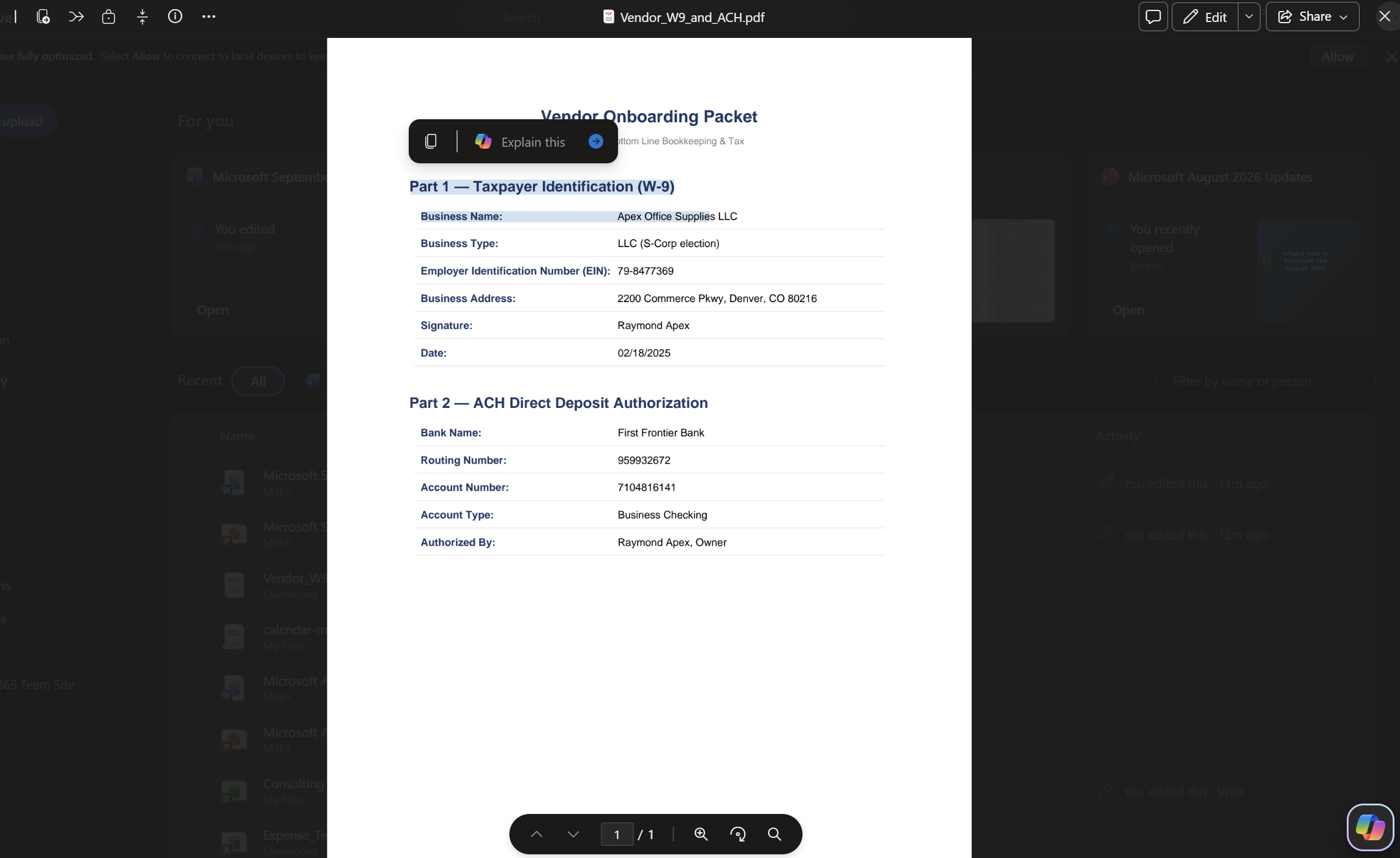
Select text in any PDF in OneDrive iOS and tap Ask Copilot to explain, summarize, translate, or ask a custom question about the selection — the same in-context Copilot experience already generally available on desktop, now on OneDrive iOS.
When will this happen:
Rolling out gradually; expected completion late March 2026.
5. Microsoft Copilot Cost Management: September Updates
How this will affect your organization
September 2026 updates to Microsoft Copilot Cost Management introduce auto-application of new services to spending policies, user spending alerts, expanded and enhanced consumption reporting, custom approval workflows, and improved policy health guidance.
Auto-apply new services to spending policies
- Spending policies can now automatically apply to newly released UBB Copilot services and agents. The Auto-apply new services setting is enabled by default for all policies, helping ensure governance remains in place as new services become available.
- Important: The Auto-apply new services setting is enabled by default for all spending policies. As new services and agents become available, they will automatically inherit policy coverage.
User limit threshold email alerts
- Administrators can now configure email notifications that alert admins as users approach their spending limits
- Admin action: Configure threshold percentages and enable notifications for applicable policies
Expanded access to consumption reporting
- Consumption dashboards are now available to additional read-only roles, including AI Reader, Global Reader, and License Administrator, providing broader visibility into spending and usage trends.
Enhanced consumption reporting
- New reporting capabilities provide:
- Consumption visibility across Prepaid (P3) and Pay-as-you-Go (PayG) credit usage.
- Capacity pack consumption breakdowns across Microsoft Admin Center (MAC) and Power Platform Admin Center (PPAC).
- Admin action: Review updated dashboards and reporting processes.
Policy-level reporting
- Consumption dashboards now include a dedicated policy view, enabling administrators to analyze usage and spending by spending policy.
- No Admin action needed.
Custom approval policies for Cowork credit requests
- Administrators can create custom request policies to route Cowork credit requests, and future supported service requests, to alternate approval workflows.
- Admin action: If desired, configure approval routing through the new Request Policies tab in the Credit Requests experience.
User spending follows users across policies
- User consumption now carries forward when users move between spending policies. For example, a user who has already consumed 500 credits under one policy will retain that 500-credit usage history after being assigned to another policy.
- This prevents spending limit resets and improves policy enforcement consistency.
- Admin action: No action required. Review any internal processes that rely on moving users between policies.
Healthy spending policy improvements
- New guidance and management experiences help administrators maintain effective and sustainable spending policies. Organizations may receive recommendations when policies are identified as potentially unhealthy or misconfigured with respect to limits and cost guardrails.
- Admin action: Review and update policies when prompted.
When will this happen?
Early September
6. Guide Presentation Creation with Notes Steering and Strict Brand Adherence
How this will affect your organization
Strict brand adherence (Strict Mode) allows Brand Managers to control whether Copilot can create new layouts or must use only approved template and slide master layouts. When enabled, Copilot follows the template exactly and does not add or remove placeholders or create new layouts.
When will this happen?
GA
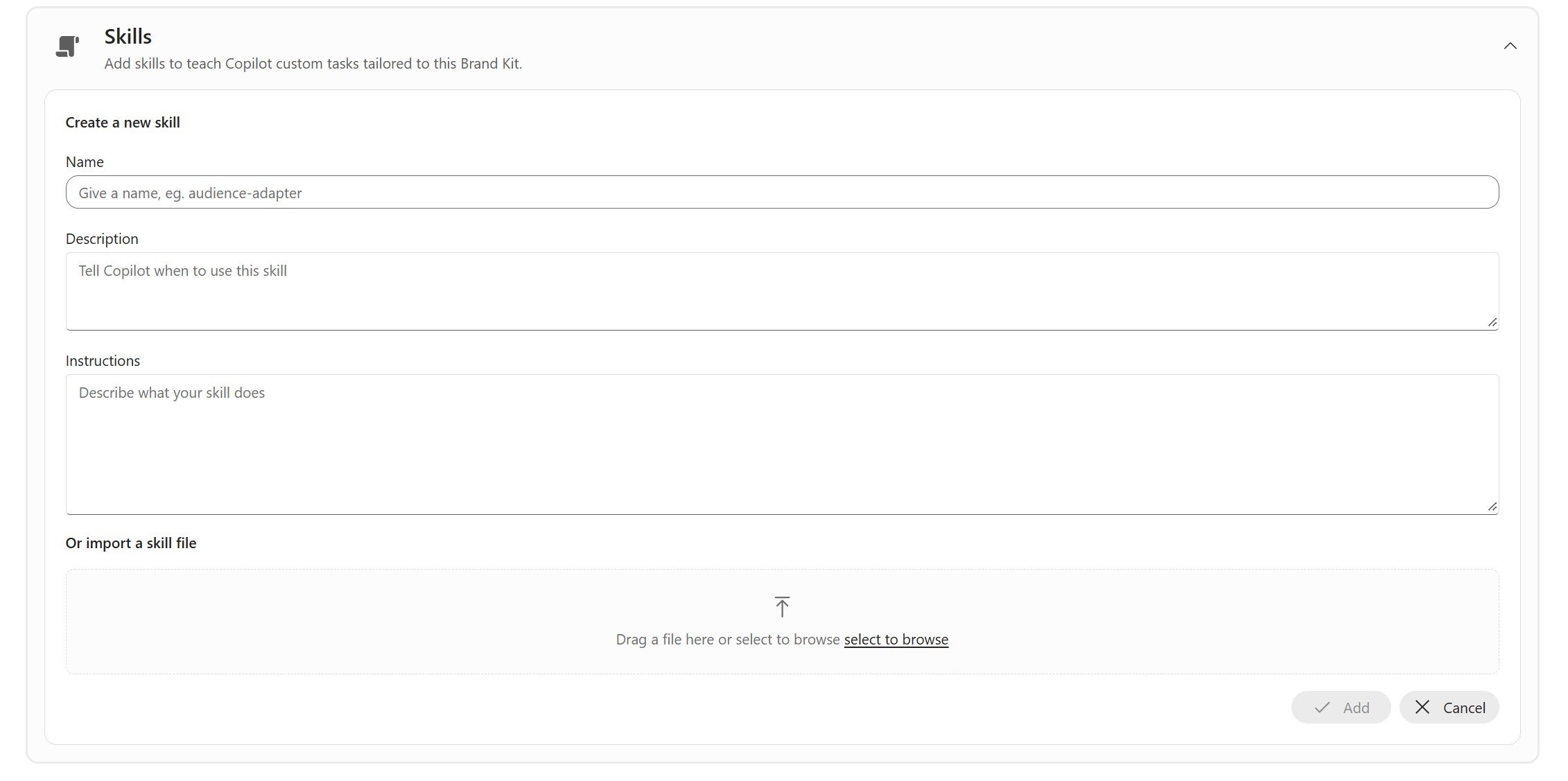
7. Brand Skill support now available in PPT Copilot
How this will affect your organization
Brand managers will be able to upload custom presentation skills as Markdown (.md) files to Brand Kit and share them across their organization for use with Copilot in PowerPoint. This capability helps organizations provide reusable, organization-approved instructions that guide presentation creation, supporting more consistent and efficient content development.
When will this happen?
late September 2026 and expect to complete the rollout by the end of September 2026.
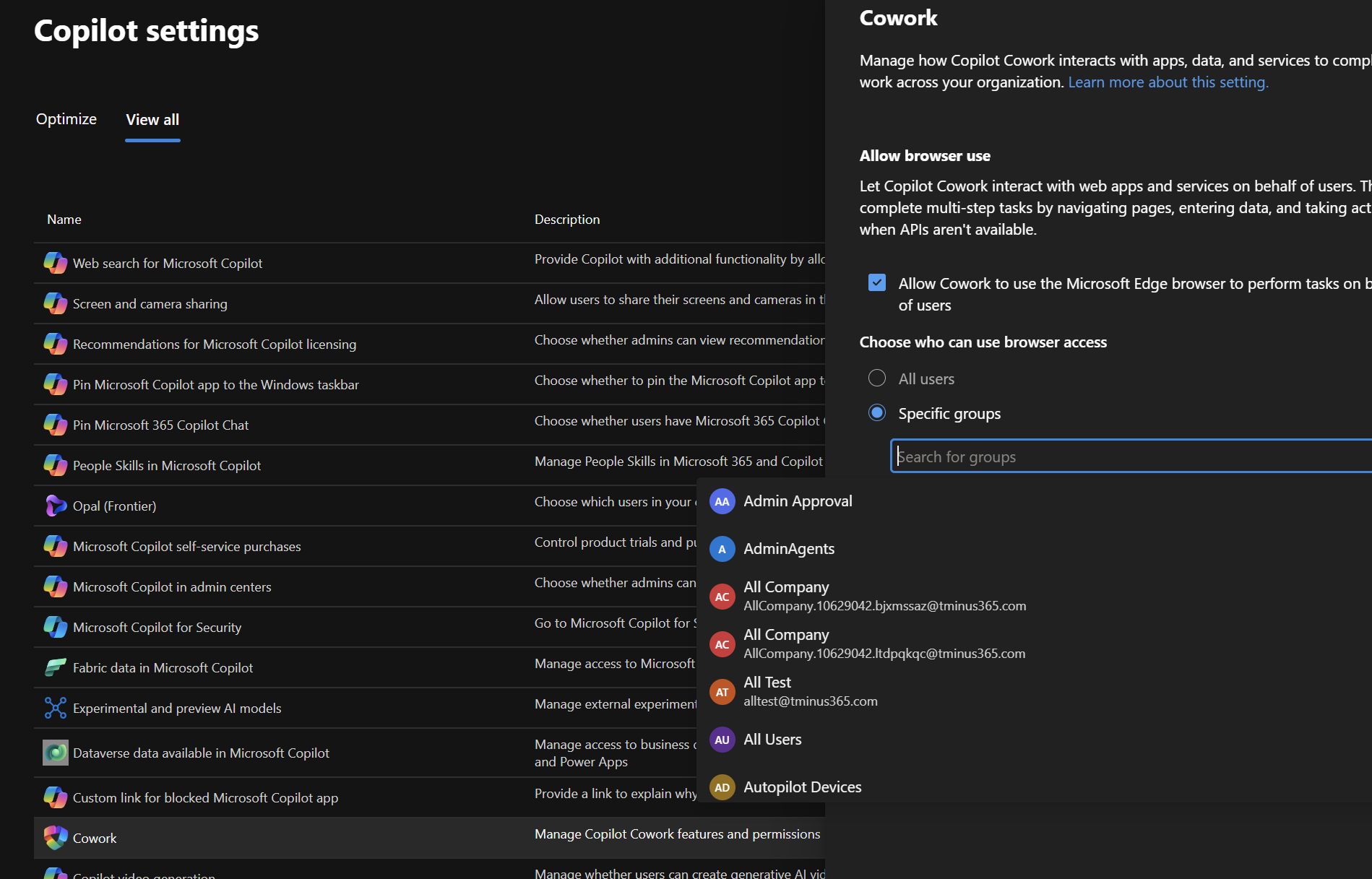
8. Browser Use Admin Control for Copilot Cowork
How this will affect your organization
As part of this rollout, we’re also introducing more granular access controls, allowing admins to enable the capability for specific users or security groups instead of managing access at the tenant-wide level
When will this happen?
mid-September 2026 and expect to complete by late September 2026.
9. Federated Copilot connectors support create, update, and delete actions
How this will affect your organization
Federated Copilot connectors currently allow Microsoft 365 Copilot to retrieve data from third-party services in real time. With this update, supported connector tools that create, update, and delete content in those services will become available in Microsoft 365 Copilot experiences, helping users complete tasks without leaving Copilot.
When will this happen?
early October 2026 and expected to complete by late October 2026
5. Usage-based billing is default on for new Microsoft 365 Copilot Business licenses
How this will affect your organization
Starting November 2, 2026, new Microsoft 365 Copilot Business licenses that you purchase through Cloud Solution Provider (CSP) include usage-based billing by default. Pay-as-you-go is the default billing configuration to help customers access eligible usage-based experiences, including Copilot Cowork, Work IQ APIs, and GitHub Copilot Harness, with less billing setup

Microsoft Admin
1. Microsoft Secure Score: New AI-readiness recommendations for device security
How this will affect your organization
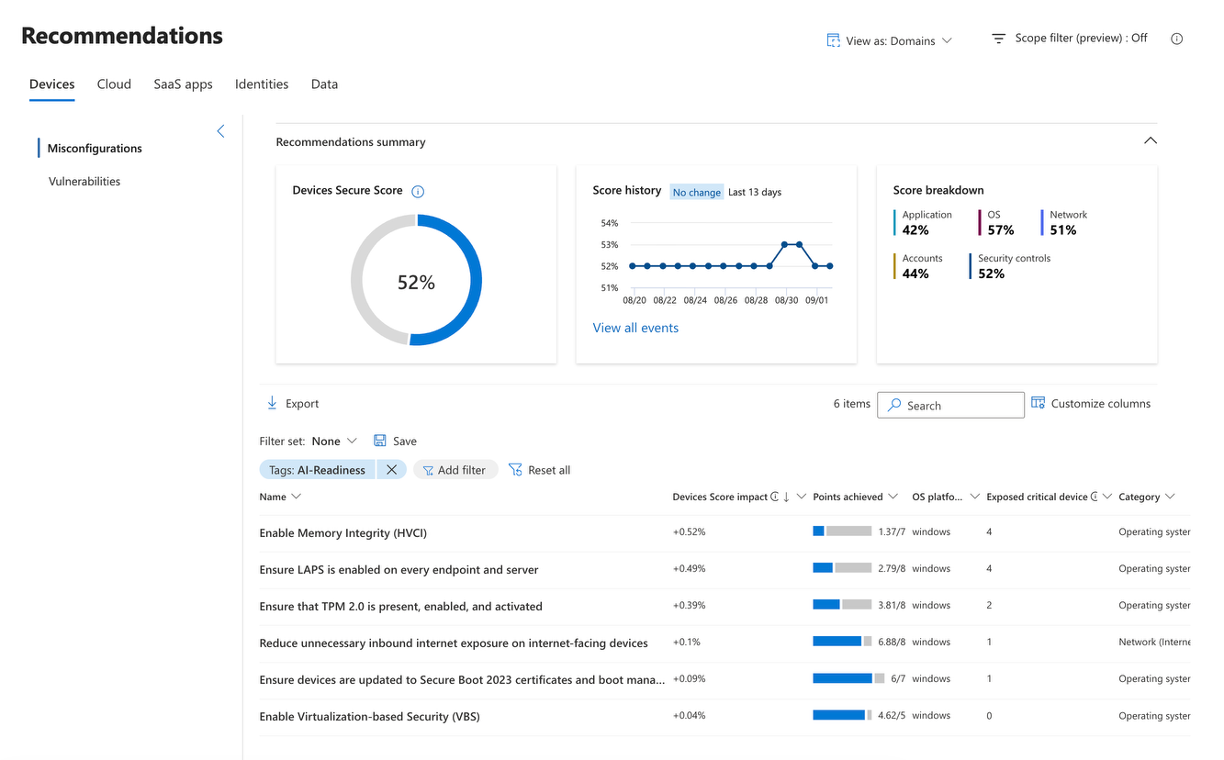
Microsoft is adding four new Microsoft Secure Score recommendations in Microsoft Defender for Endpoint to help organizations assess device readiness for AI accelerated threats and strengthen foundational device security.
The new recommendations identify eligible Windows devices that do not have key security capabilities enabled:
- Trusted Platform Module (TPM) 2.0
- Virtualization-based Security (VBS)
- Hypervisor-Protected Code Integrity (HVCI), also known as Memory Integrity
- Windows Local Administrator Password Solution (LAPS)
When will this happen?
mid-September 2026 and expected to complete by late September 2026
2. Microsoft Defender XDR: DLP alerts will be set as behaviors by default
How this will affect your organization
Microsoft Defender XDR will set Microsoft Purview DLP alerts as behaviors by default starting October 12, 2026, reducing alert volume while keeping DLP data accessible in Advanced Hunting and Purview.
Administrators can disable the rule if they prefer DLP events to continue generating standard alerts and appearing in the incident queues in Microsoft Defender XDR portal.
3. Integrated Security Operations Center in Microsoft Defender
How this will affect your organization
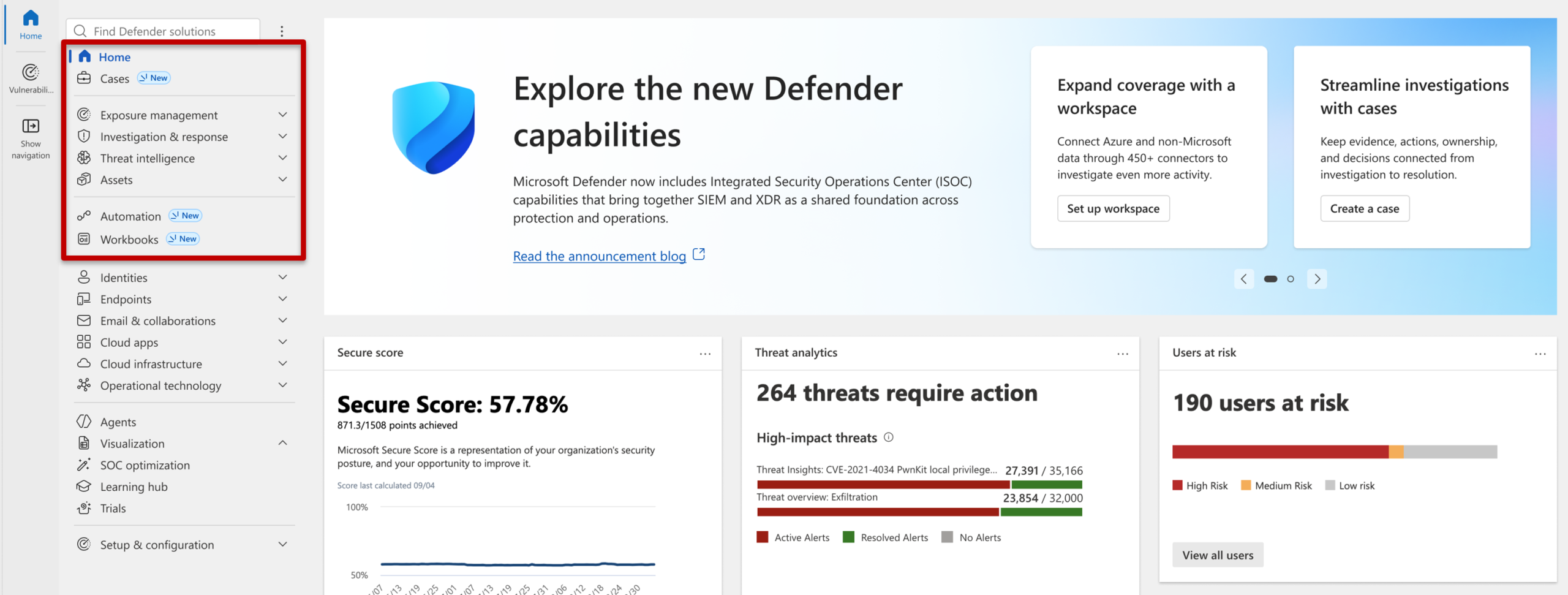
Public preview of Integrated Security Operations Center (ISOC) in Microsoft Defender. The ISOC benefit enables eligible Microsoft Defender Suite, Microsoft 365 E5 and E7 customers to unlock more value from their existing investments by bringing XDR, SIEM, threat intelligence, automation, and AI together in Microsoft Defender.
When will this happen:
September 23rd Public Preview