
Below are all of the latest feature updates coming to Microsoft 365.
Automated Security Assessments and Policy Management
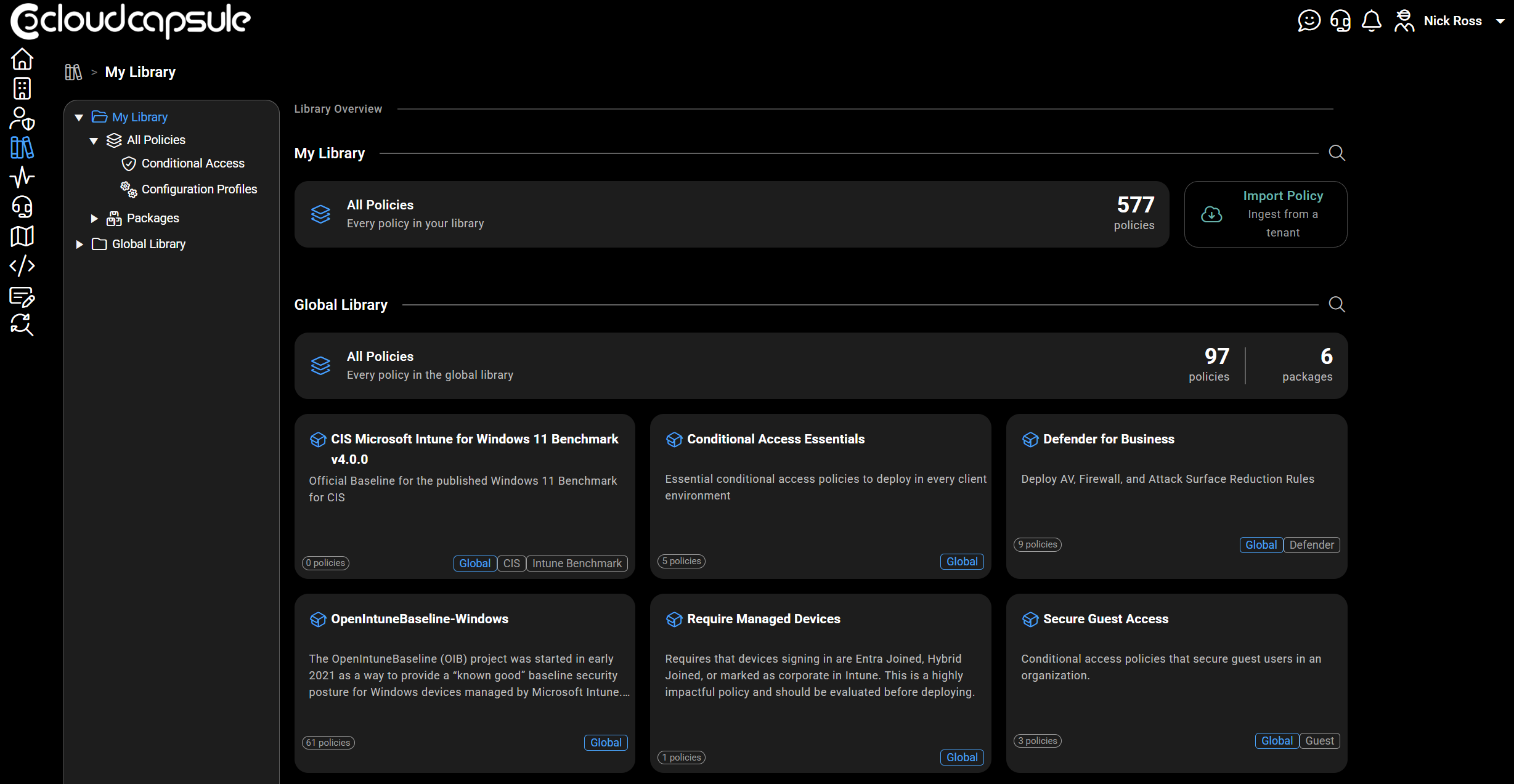
CloudCapsule is a tool I built purpose built for MSPs looking to scale their security practice on Microsoft 365. Scans of tenants take on average 60 seconds where we collect over 200 data points. We now provide remediation and policy management capabilities, allowing you to deploy fixes right from within our portal.

Microsoft Teams
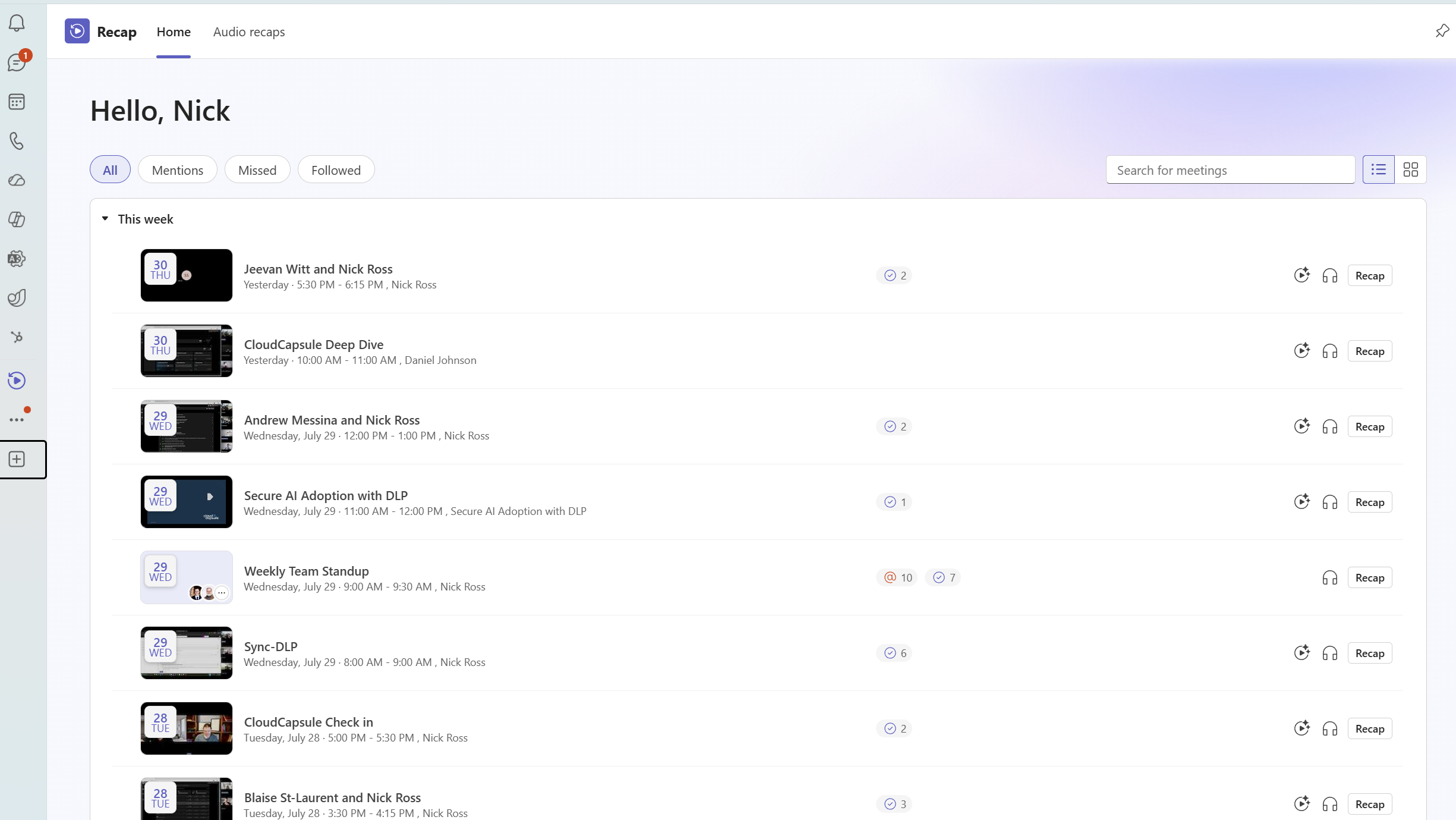
1. Recap app consolidates meeting recaps in one place
How this will affect your organization
The Recap app in Microsoft Teams provides a centralized experience for users to find, review, and catch up on meeting recaps. By bringing recordings, transcripts, and AI-powered summaries together, this feature improves personal productivity and helps users quickly stay informed across meetings.
When will this happen:
early July 2026 and is expected to complete by early August 2026 (previously late July).
2. AI meeting archive file generation
How this will affect your organization
Microsoft Teams is introducing AI generated meeting archive files that capture key insights from meetings. These archives help Microsoft 365 Copilot and Facilitator deliver more accurate context aware responses while maintaining strong privacy controls by not storing raw meeting content. This capability supports enterprise ready AI by improving knowledge grounding while keeping data secure and manageable.
More info: https://learn.microsoft.com/en-us/microsoftteams/ai-archive-teams-meetings?branch=main
When will this happen:
mid-September 2026 (previously late August) and expected to complete late September 2026.
When will this happen:
early May 2026; expected completion in early May 2026.

Microsoft 365 Apps
1. Microsoft OneDrive: Exclude specific folders from syncing
How this will affect your organization
Microsoft is introducing a new OneDrive capability that allows organizations to exclude specific folders from syncing to OneDrive. This helps ensure machine-specific or development-related folders—such as PowerShell modules, Visual Studio configuration folders, and node_modules—remain local to the device instead of being uploaded to the cloud.
Learn more: IT Admins – Use OneDrive policies to control sync settings | Microsoft Learn (will be updated before rollout)
When will this happen:
mid-August 2026 and expect to complete by late August 2026.
2. Microsoft Edge enforces screen capture restrictions for sensitivity-labeled PDFs in OneDrive and SharePoint
How this will affect your organization
We are enhancing protection for sensitive documents by enforcing Do Not Allow Screen Capture in the OneDrive and SharePoint web PDF viewer when accessed through Microsoft Edge.
When will this happen:
mid-August 2026 and expect to complete by late August 2026
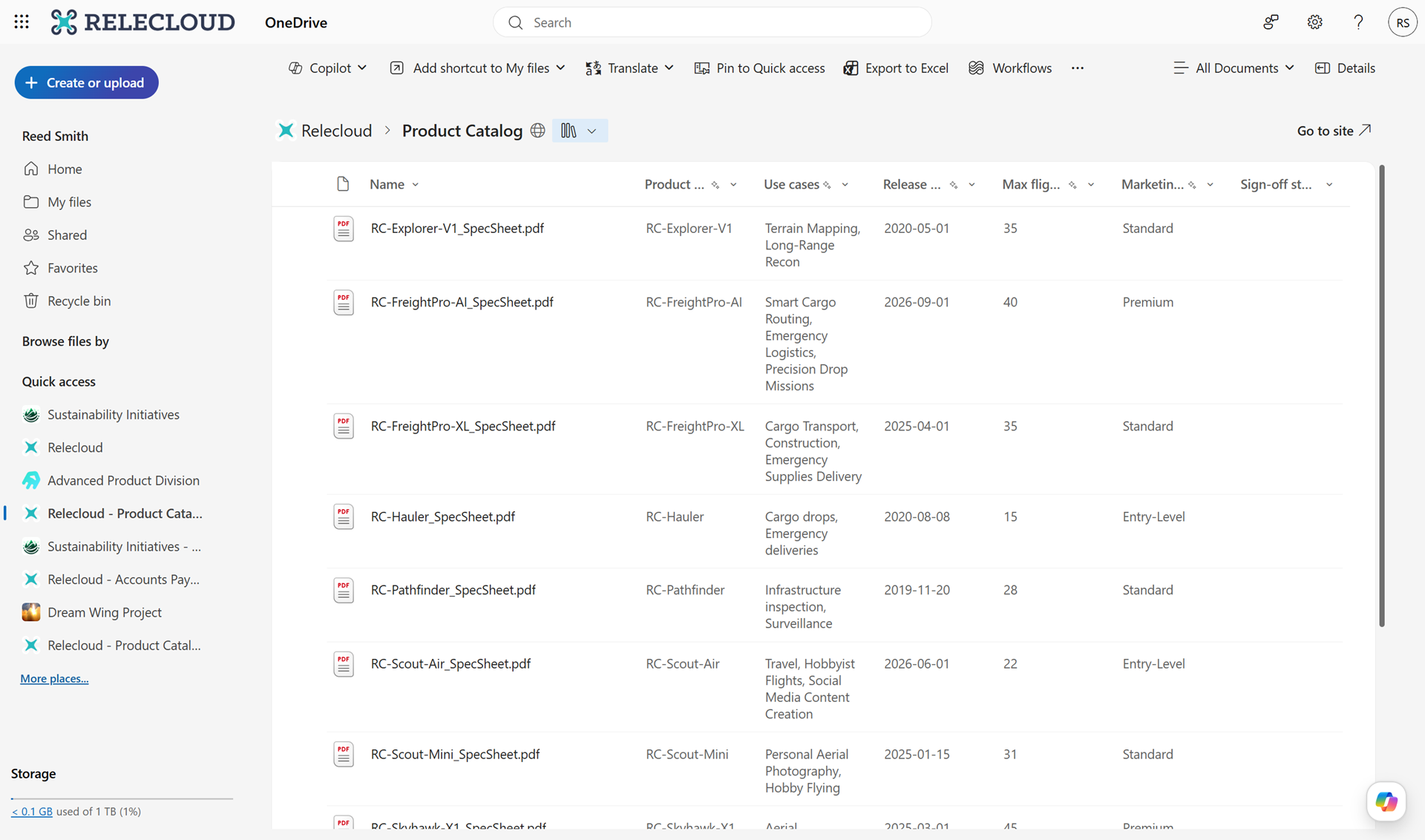
3. OneDrive for the web: Document library views now available in OneDrive
How this will affect your organization
We’re enhancing the OneDrive experience by enabling users to access and manage SharePoint document library views directly within OneDrive.
When will this happen:
mid-July 2026 and expected to complete by late July 2026

Microsoft Intune
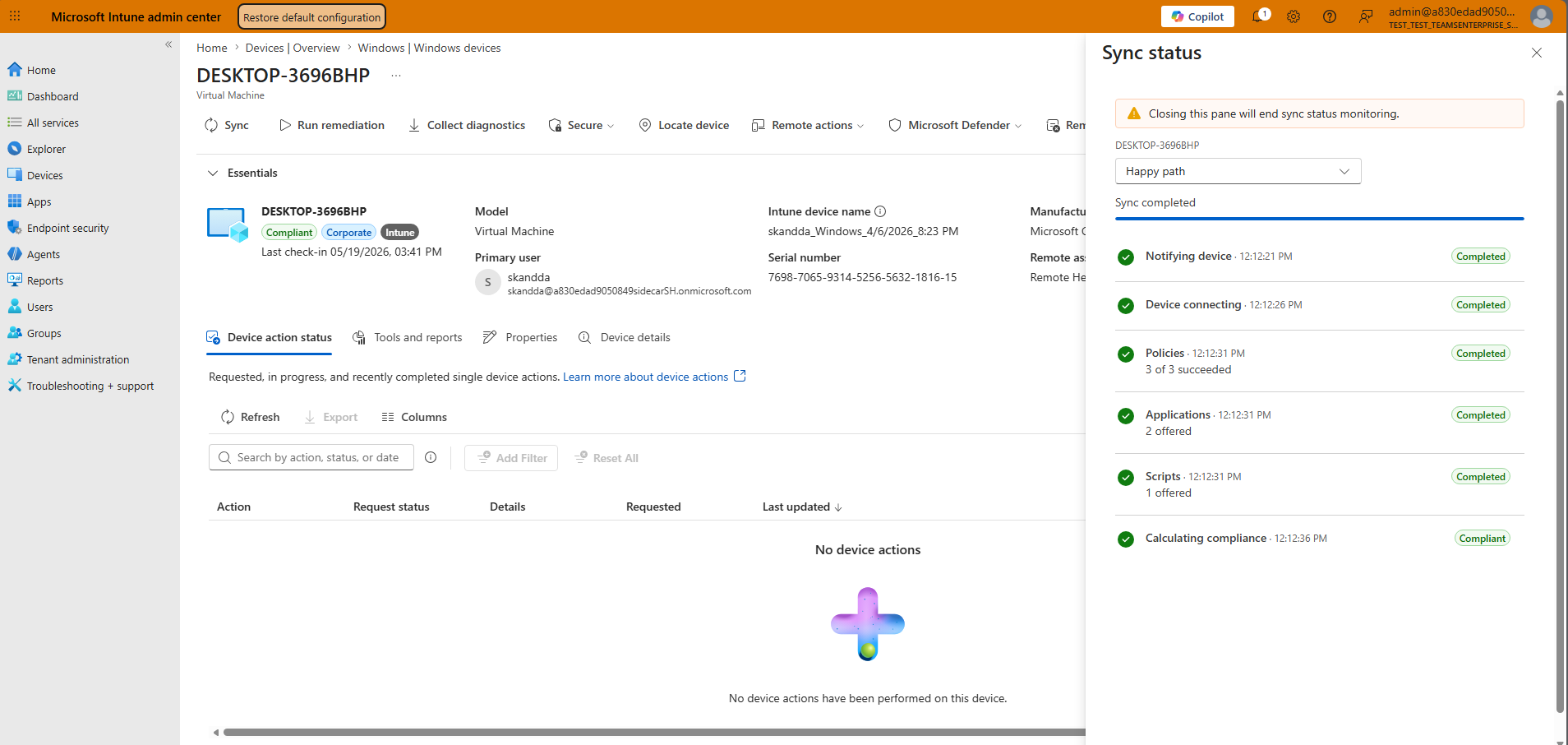
1. Demystify Windows device sync status
How this will affect your organization
The updated per-device sync experience in the Intune admin center now shows progress, making it easier for admins to confirm actions are running and understand where they are in the process. The updated sync action also triggers both the mobile device management check-in and the Intune Management Extension (Windows only) check-in. One sync can now pull-down policy, app, and script changes in a single pass.
Full Article: https://techcommunity.microsoft.com/blog/microsoftintuneblog/what%E2%80%99s-new-in-microsoft-intune-%E2%80%93-july/4537392
When this will happen
July 2026

Microsoft Entra
1. Passkeys by default and retirement of Microsoft-provided SMS and voice authentication
How this will affect your organization
Passkeys will become the default authentication experience in Microsoft Entra on September 1, 2026. Telecom-based methods (SMS and voice) will transition to customer-configured providers through the Microsoft Security Store.
Learn More: https://learn.microsoft.com/en-us/entra/identity/authentication/concept-sms-voice-retirement
When will this happen:
- September 1, 2026:
- Rollout begins. Changes may take time to reach all tenants and will be deployed gradually.
- Passkeys will be automatically enabled for users currently enabled for SMS or voice.
- Registration Campaign will be set to Microsoft-Managed targeting passkeys for all users in eligible tenants.
- Users will be prompted to register a passkey during MFA sign-in; users will be able to skip.
- September 18th, 2026:
- review the telecom providers and related information available through the Microsoft Security Store to evaluate which optiohn best meets your regional and compliance requirements.
- October 30, 2026:
- Customers who need to continue to use SMS or voice will be able to choose from a list of telecom providers available through the Microsoft Security Store.
- February 1, 2027:
- Microsoft-provided SMS and voice authentication will be retired.
- Only customer-configured telecom providers will support SMS and voice going forward.
- Passkeys become the default, recommended authentication method.
2. Optimizations for passkey registration experience
How this will affect your organization
The updated registration logic will more consistently:
- Guide users to register passkey types that comply with administrator configured passkey profile restrictions, reducing unsuccessful or non-compliant registration attempts.
- Prioritize registration of a passkey that is local to the user’s current device when permitted by policy.
When will this happen:
late August 2026 and expected to complete in late August 2026
3. Improved restore experience for Authenticator passkeys on iOS
How this will affect your organization
This update provides a clearer and more guided restore flow when users move to a new device. It also improves user understanding of cross-device sign-in with passkeys
- This change applies to iOS devices only. Android is not included in this release and will be supported later.
- Users with iCloud and iCloud Keychain backup enabled, and passkeys stored on their previous device, will see the updated experience during device restore.
- Users restoring Authenticator on a new device will see an updated restore experience.
- The restore flow will include:
- A new user interface that guides users based on whether they are setting up a new device or restoring from an existing one
- Improved guidance for using Authenticator passkeys with cross-device sign-in
- The feature is enabled by default.
- No changes to existing admin configurations or policies.
When will this happen:
August 2026
4. Passwordless password change in My Sign-Ins
How this will affect your organization
Microsoft Entra will enable passwordless users to change their passwords via My Sign-Ins using strong credentials like passkeys or Windows Hello, without knowing the current password or using SSPR. Many organizations are adopting passwordless authentication but still maintain passwords for legacy applications and services
When this will happen
late October 2026 and expected to complete by late October 2026
5. Retirement of custom CSS positioning properties in custom branding
How this will affect your organization
This update helps further reduce opportunities for deceptive or misleading sign in page layouts and supports trusted sign in experiences that better protect users from phishing attacks while maintaining brand customization capabilities.
When this will happen
October 2026 and expected to complete by late November 2026

Microsoft Copilot
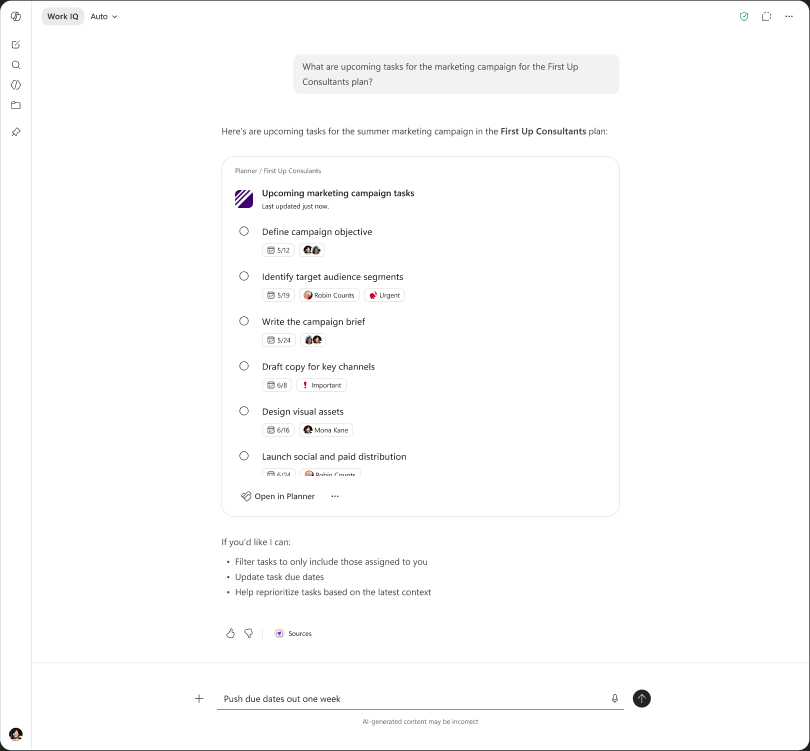
1. Planner capabilities in Copilot chat
How this will affect your organization
Users will be able to create, update, QnA Planner tasks and plans using natural language within Copilot Chat, helping them manage work without switching between applications.
When this will happen
early September 2026
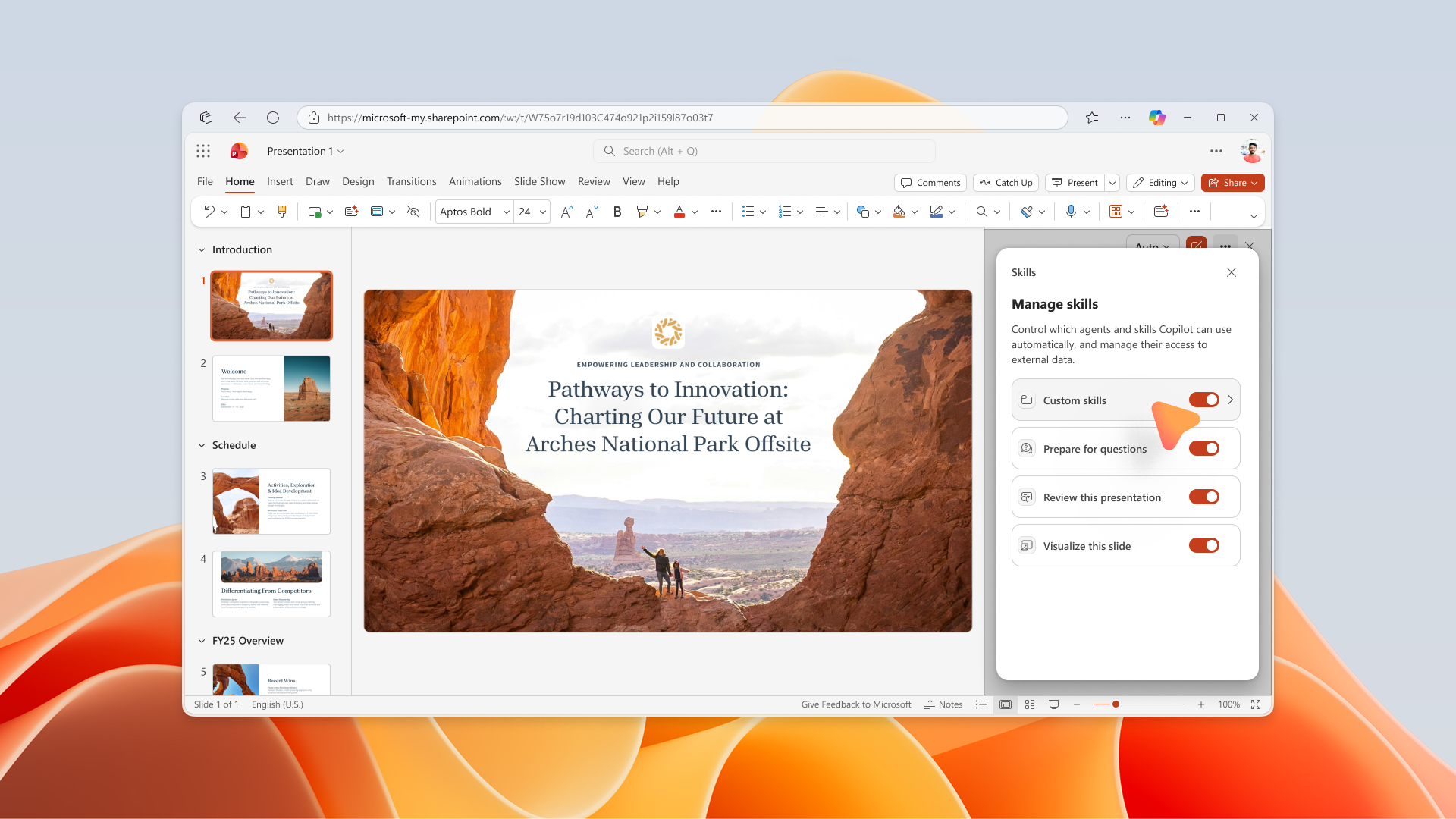
2. Use OneDrive stored user defined custom skills in PowerPoint Copilot
How this will affect your organization
PowerPoint Copilot on the web is introducing support for personal, user-defined custom skills stored in OneDrive. Users can upload skill folders containing a SKILL.md file to a designated OneDrive location, and those skills will automatically appear in the Copilot Skills menu within PowerPoint
When this will happen
late July 2026 and is expected to complete by late July 2026.
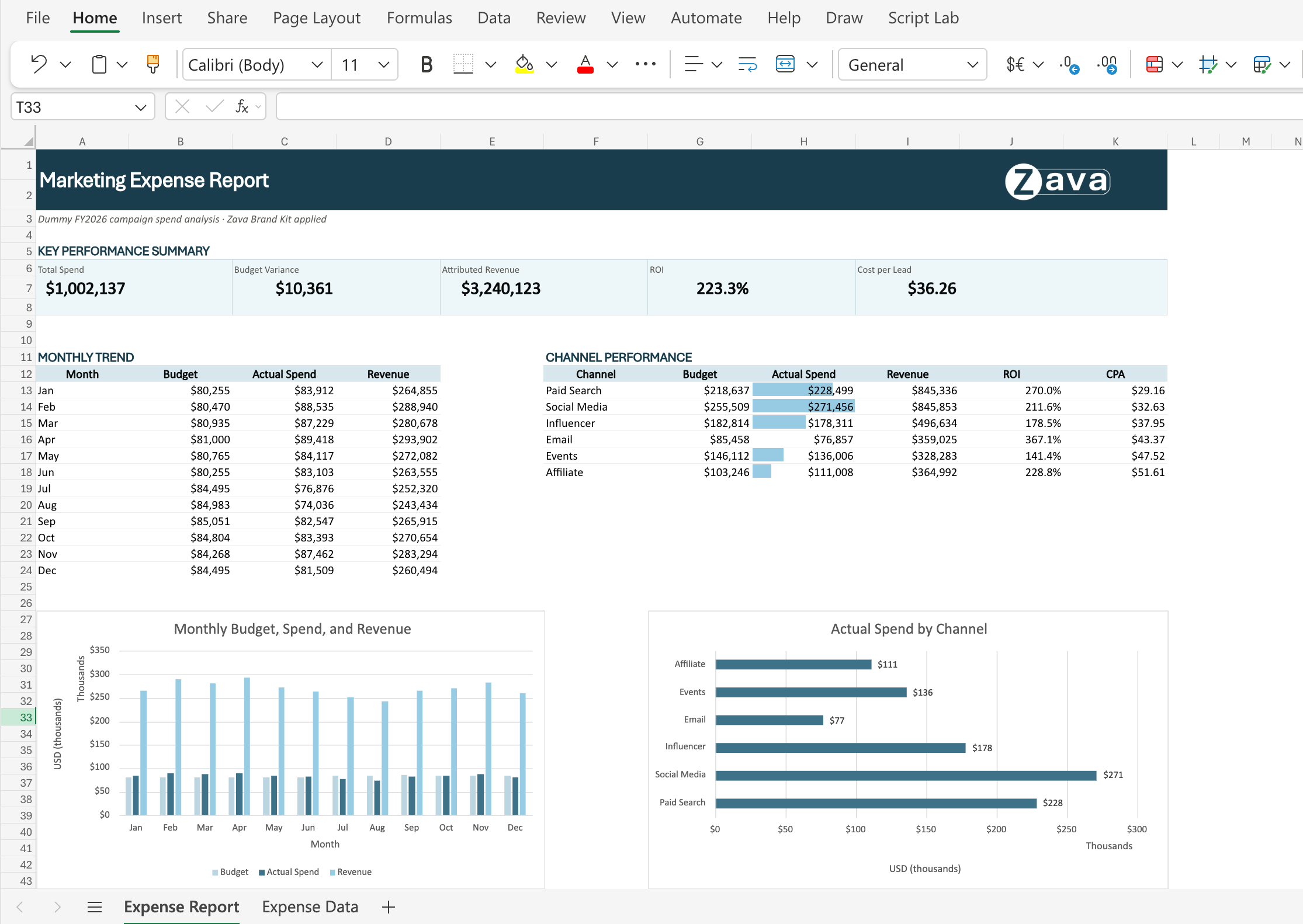
3. Copilot in Excel: Brand Kit skill
How this will affect your organization
Copilot in Excel is introducing a new Brand kit skill that applies your organization’s approved branding directly to workbook content. Using brand assets from Microsoft 365 Brand Center, Copilot can automatically format tables and charts with approved colors, fonts, and logos, helping users create consistent, professional reports without manual styling.
When will this happen?
mid-July 2026 and is expected to complete by mid-August 2026.
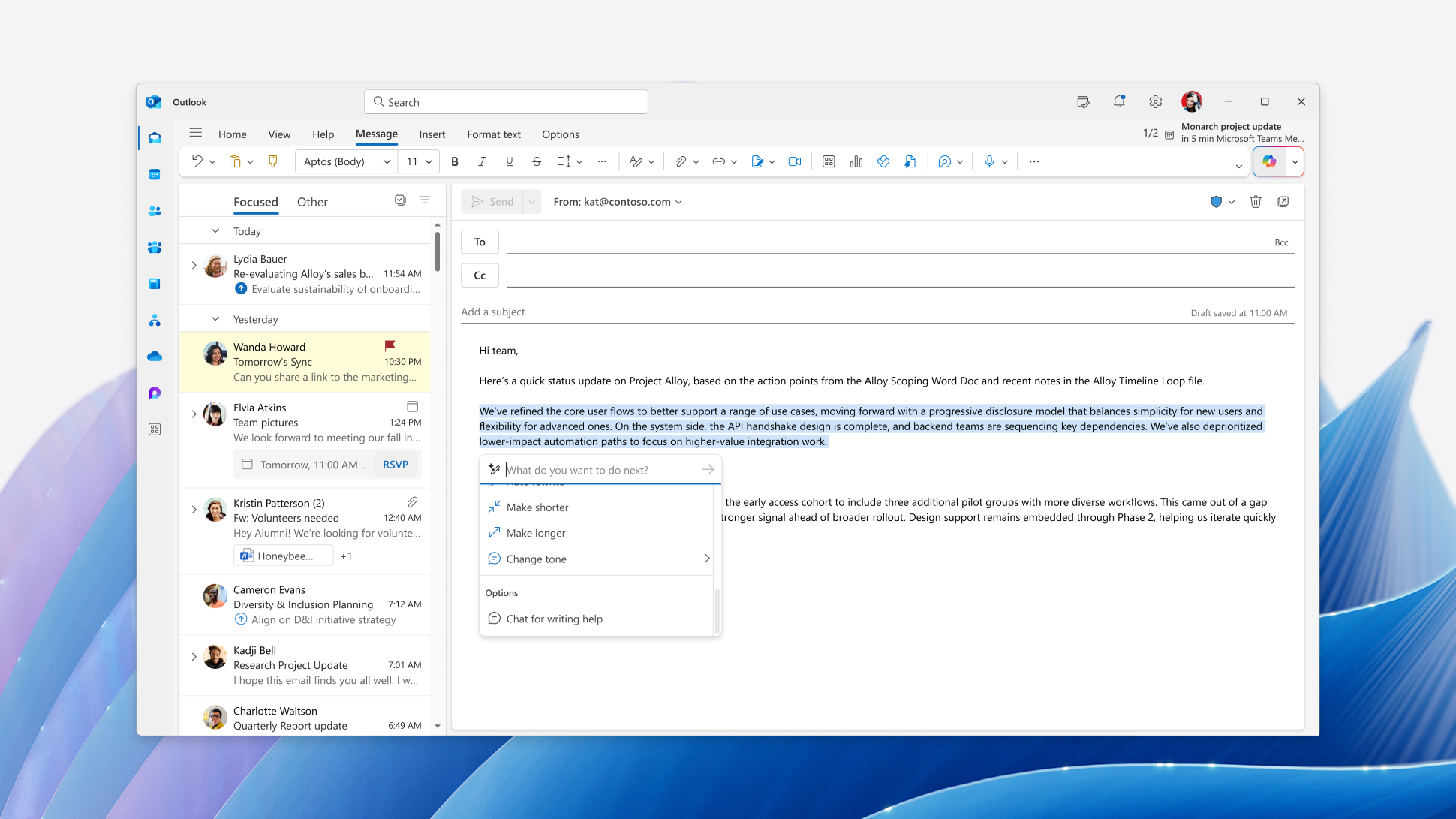
4. Microsoft Outlook: Collaborate with Copilot while drafting email
How this will affect your organization
We are enhancing the email drafting experience in Microsoft Outlook by integrating Microsoft 365 Copilot directly into the compose experience.
When will this happen?
mid-July 2026 and expected to complete by early August 2026
5. M365 Copilot Agent now support multiple users
How this will affect your organization
Microsoft 365 Copilot agents now support multiple owners, enabling collaborative management and reducing dependency on a single creator
When will this happen?
Mid-August 2026
6. Copilot Studio – Share autonomous agents to end users
How this will affect your organization
With this feature, you can create triggers for autonomous agents that run using end-user credentials. This enables agents to operate fully in the background, respond to external events, and be shared with end users so the agents can run on their behalf.
When will this happen?
public preview on July 30, 2026.

Microsoft Admin
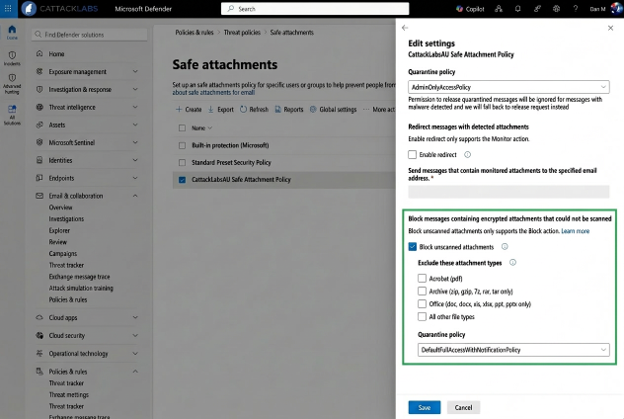
1. MDO Encrypted email attachment protection
How this will affect your organization
To help organizations reduce risk from unscanned content, Microsoft is introducing a new opt-in setting in Safe Attachments policies. This setting allows administrators to automatically quarantine email messages that contain password-protected attachments when Microsoft Defender for Office 365 cannot complete scanning or detonation. This enhancement provides administrators with greater control over potentially risky content while preserving business workflows through controlled release options.
When will this happen:
Early August 2026 through Late August 2026
2. Microsoft Defender for Office 365: Prompt injection protection for email
How this will affect your organization
We are introducing prompt injection protection for email in Microsoft Defender for Office 365. This capability detects and blocks malicious prompt injection content embedded in email messages that attempt to manipulate AI assistants and agents. It helps protect enterprise data by identifying attacks designed to exfiltrate information, discover tools, or expose system prompts. High confidence threats are automatically quarantined before they can be processed by AI powered workflows. This enhancement strengthens enterprise ready AI security and aligns with evolving threat patterns.
When will this happen:
early September 2026 and expected to complete by early September 2026
3. Microsoft Purview compliance portal: Admin assignment time limit
How this will affect your organization
Microsoft Purview is introducing the ability to assign a time limit when adding users or security groups to role groups. Administrators can specify an expiration date from 1 day up to 2 years, enabling temporary administrative access and supporting least-privilege security practices. This enhancement helps organizations improve governance and compliance while reducing the risk of unnecessary long-term privileged access.
When will this happen:
late July 2026; expected to complete by late August 2026
4. Introducing Copilot in 30
How this will affect your organization
Built for organizations with fewer than 300 employees, Copilot in 30 combines a new 25-user, 30-day Microsoft 365 Copilot Business trial with resources and guidance that partners can use to help customers get started and assess potential value.
Full Announcement: https://learn.microsoft.com/en-us/partner-center/announcements/2026-july#introducing-copilot-in-30
When will this happen:
starting August 1, 2026
5. Now available: Microsoft 365 Business with Copilot SKUs
How this will affect your organization
Microsoft 365 Business Standard with Copilot: 23.50 USD per user per month (300-license maximum, annual subscription with annual billing)
Microsoft 365 Business Premium with Copilot: 32 USD per user per month (300-license maximum, annual subscription with annual billing)
Full Announcement: https://learn.microsoft.com/en-us/partner-center/announcements/2026-july#now-available-microsoft-365-business-with-copilot-skus
6. FY27 Microsoft Incentives Updates
How this will affect your organization
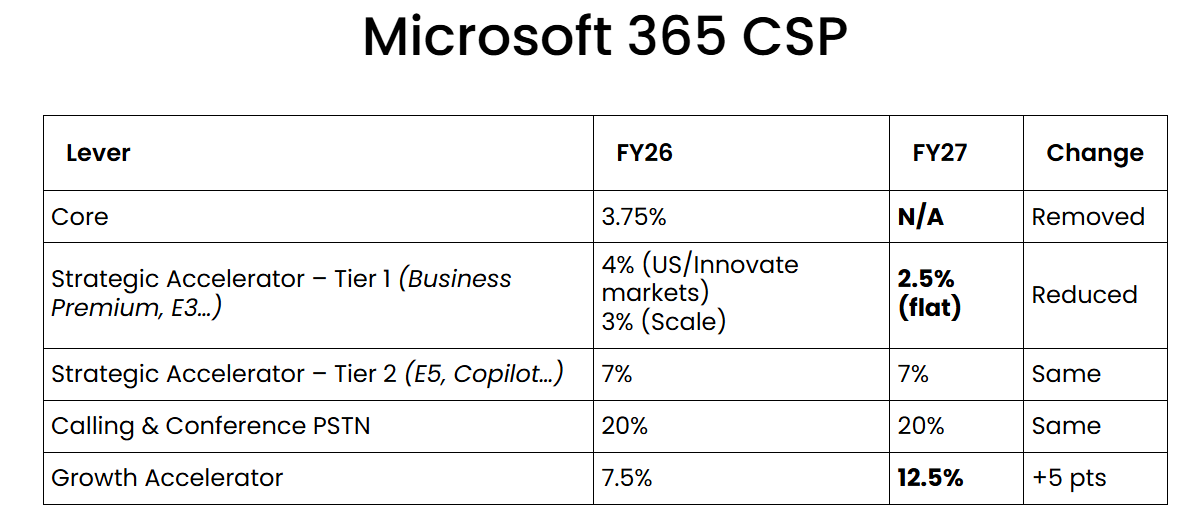
CSP partners earning incentives from reselling M365 services have major changes in the model.