

Below are all of the latest feature updates coming to Microsoft 365 and highlights from Microsoft ignite.
Automated Security Assessments mapped to the CIS Controls
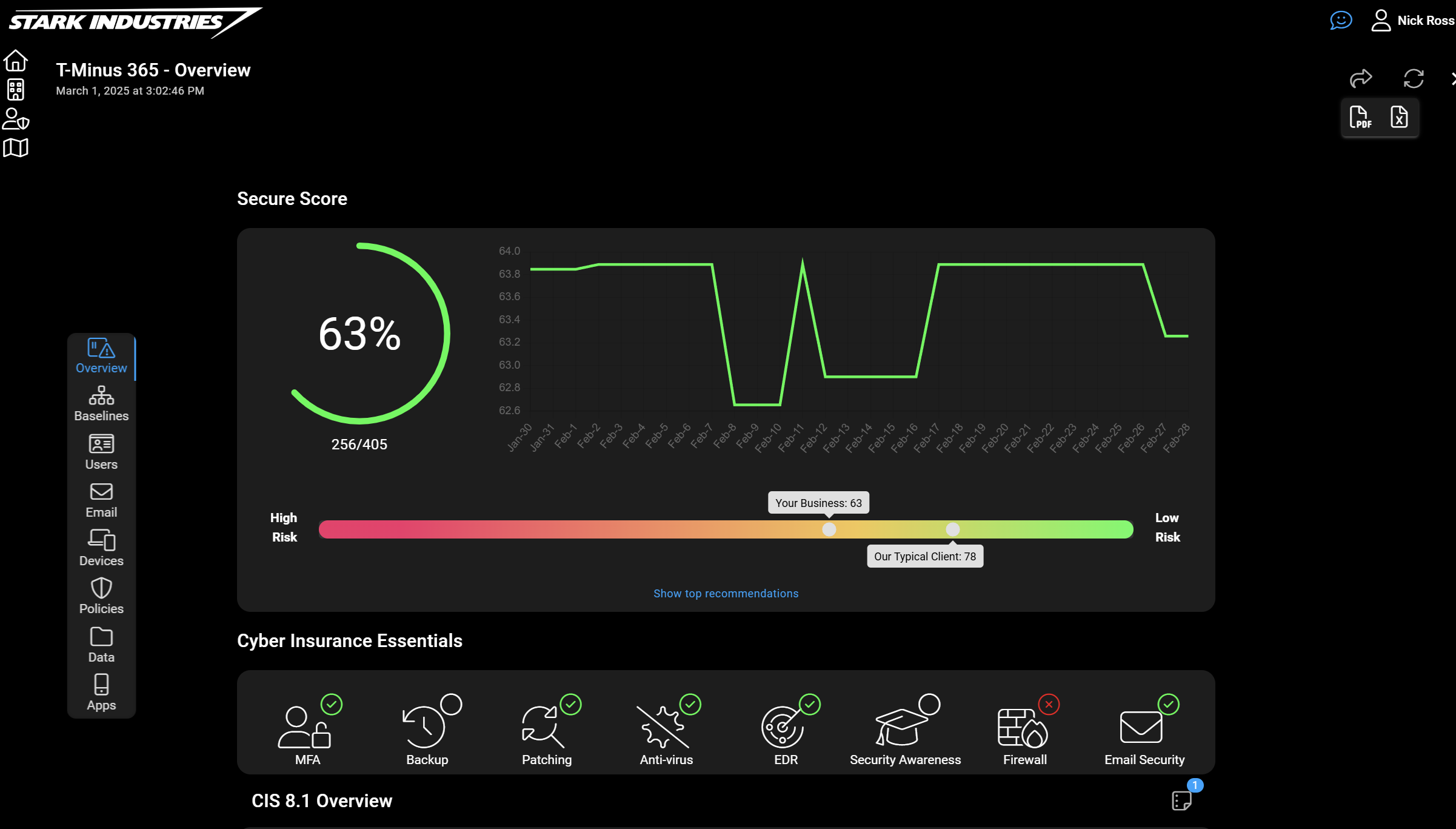
CloudCapsule is a tool I’ve been working on over the past year that automates your M365 security assessments against the CIS Controls. I started CloudCapsule because I saw the need to streamline the assessments of Microsoft 365 tenants to a trusted standard like the CIS Controls.

Microsoft Teams
1. Message preview for channels, mentions, and reactions notifications
How this will affect your organization
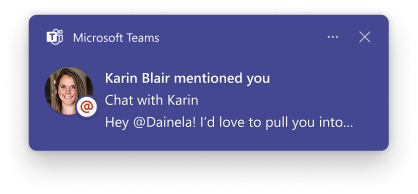
Microsoft Teams is improving the notification experience by adding message previews to more types of notifications, including channels, mentions, and reactions.
When will this happen:
mid-January 2026; expected to complete by mid-January 2026
2. Autocorrect in Microsoft Teams compose
How this will affect your organization
- Commonly misspelled words will be automatically corrected during message composition.
- The feature is enabled by default; no admin configuration is required.
When will this happen:
mid-January 2026 and expect to complete by late January 2026.
3. Select multiple messages to forward
How this will affect your organization
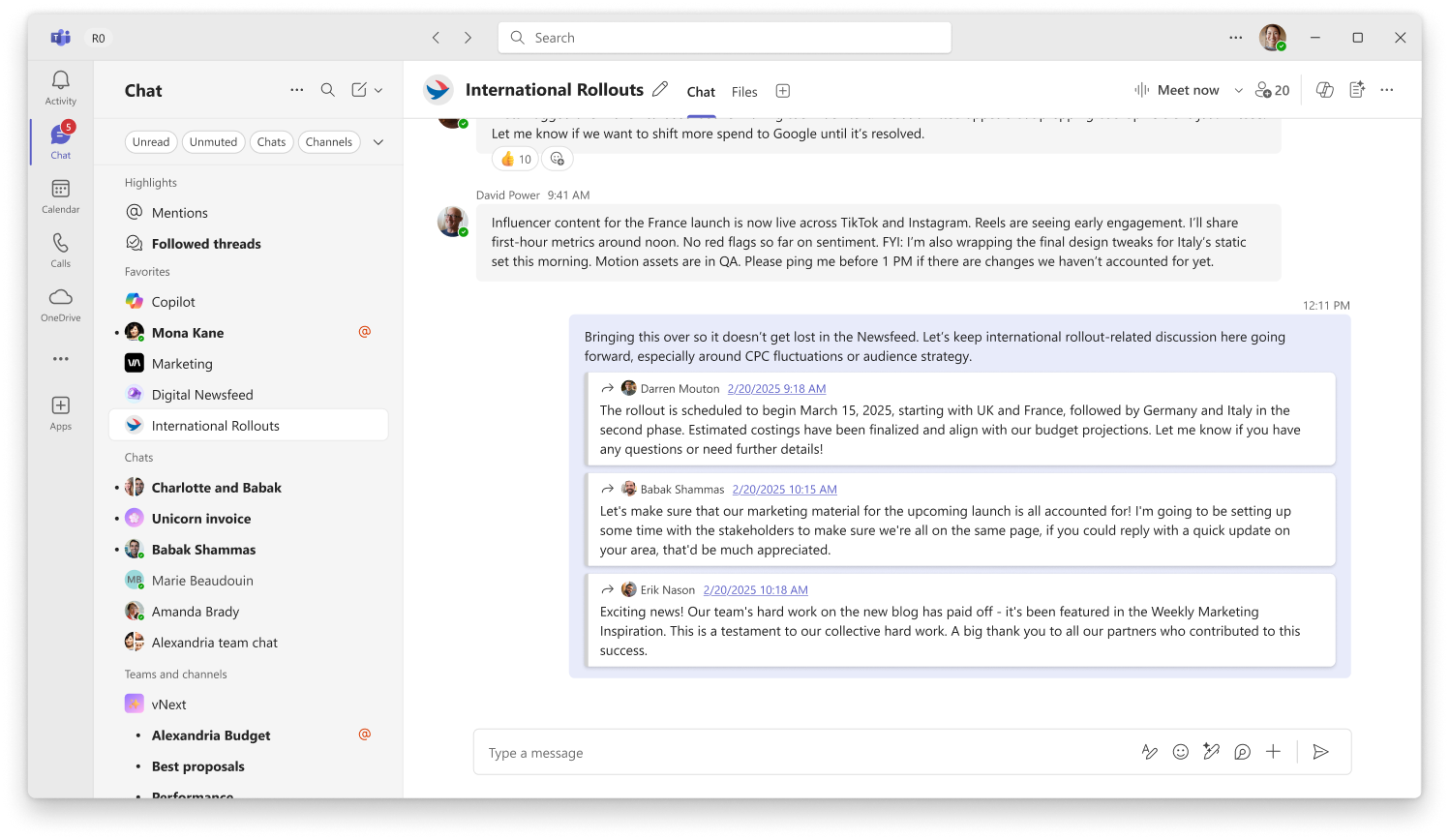
This feature lets users select up to five messages from a chat or channel and forward them together in one message, preserving context and order.
When will this happen:
mid-January 2026 and expect to complete by late January 2026.
4. Express voice enrollment in Microsoft Teams
How this will affect your organization
A voice profile enables features such as voice isolation, speaker recognition, identification in meeting rooms, improved transcripts, and enhanced meeting recaps and insights powered by Microsoft 365 Copilot. If you haven’t enrolled, you’ll receive an in-product prompt to opt in and enroll simply by speaking during a meeting. Admins can enable or disable this feature for their organization.
Affects All enterprise Microsoft Teams customers except Education (EDU) tenants.
When will this happen:
mid-February 2026 and is expected to complete by end of February 2026.
5. IT admins will be able to customize recording and transcription notifications in Teams
How this will affect your organization
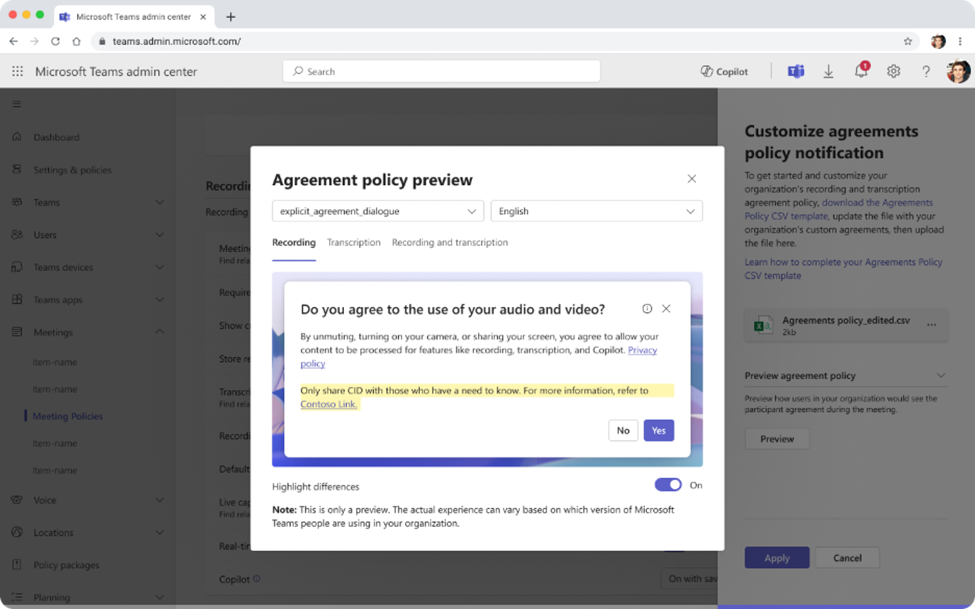
IT admins can customize the message and privacy link shown in Teams notifications when recording or transcription is used
When will this happen:
early January 2026 and is expected to complete by late January 2026.
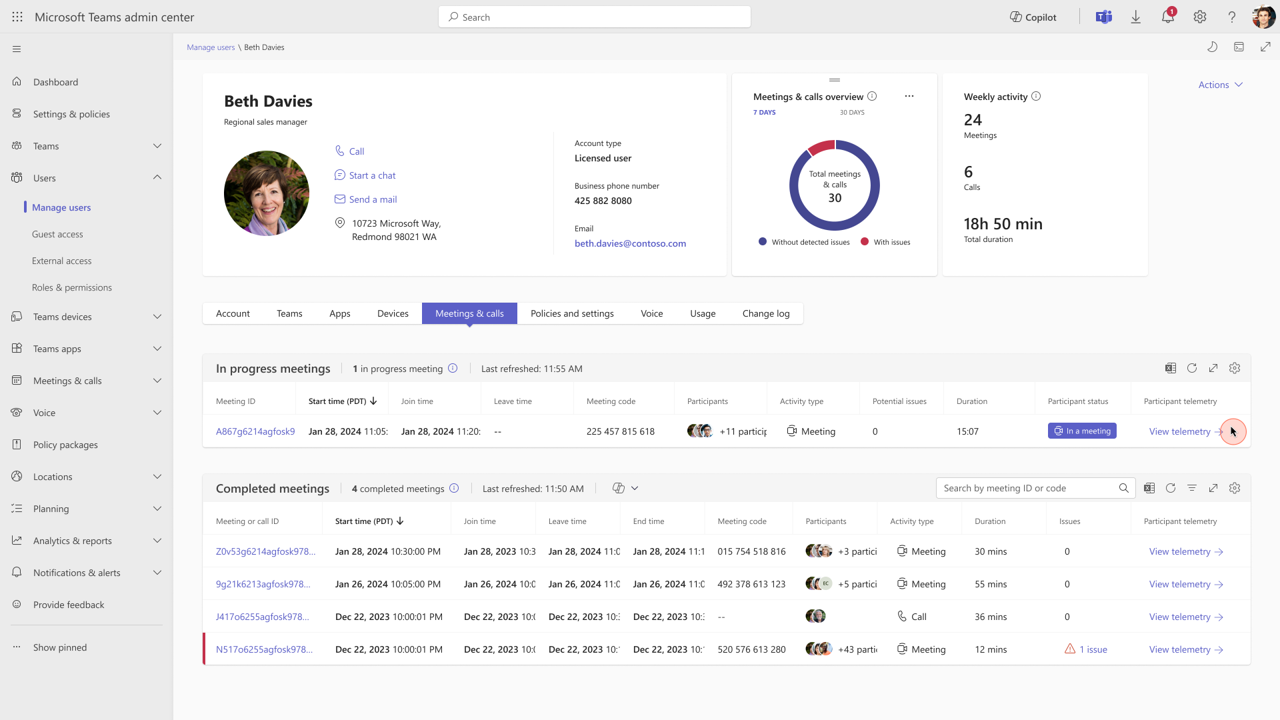
6. Troubleshoot meetings and calls with automatic issue identification and recommendations
How this will affect your organization
These updates make it easier and faster for administrators to identify issues during meetings and calls, understand root causes, and take action with confidence.
When will this happen:
late January 2026 and is expected to complete by mid-February 2026.

Microsoft Outlook
1. Wait on Send for Data loss Prevention
How this will affect your organization
New Outlook for Windows will support Wait on Send for Oversharing, allowing admins to block email sending if Data Loss Prevention (DLP) policy evaluation is not completed for labeled or sensitive content. The new experience allows for multi-tasking and does not block the user from using New Outlook even when mail is in evaluation.
More info: https://learn.microsoft.com/en-us/purview/dlp-osp-get-started#steps-to-configure-wait-on-send
When will this happen:
Early January 2026 – Late January 2026

Microsoft 365 Apps
1. New permissions report available in SharePoint admin center
How this will affect your organization
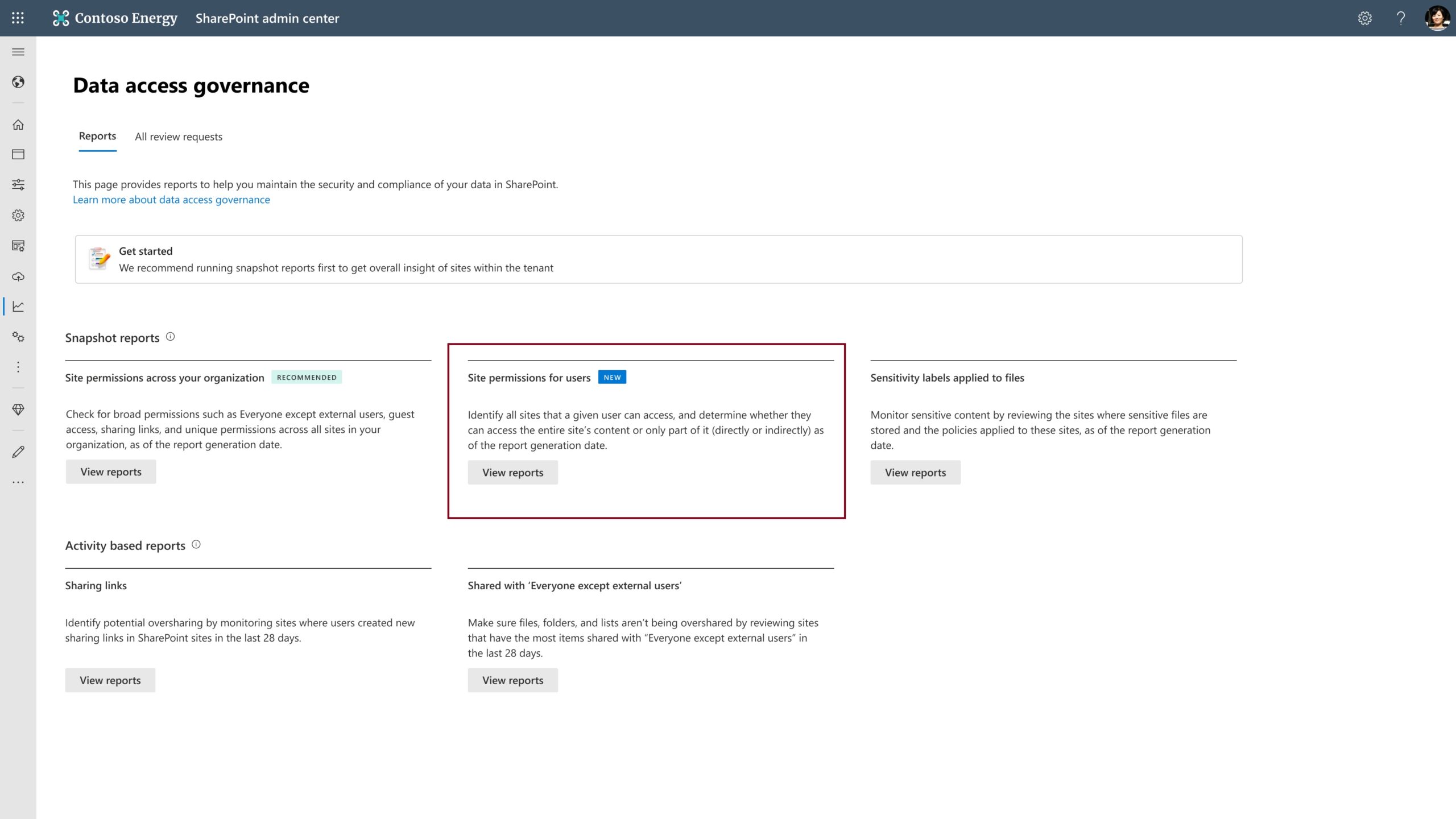
New Permissions report in the SharePoint admin center under Data access governance. This report helps SharePoint admins quickly identify which sites a specific user can access, including whether access is granted directly or through group membership.
Learn more: Discover sites accessible by a given user with the snapshot report
When will this happen:
mid-December 2025 and completes by mid-January 2026.
2. Microsoft Excel: Enabling M365 subscribers to use Copilot Chat in locally stored modern workbooks
How this will affect your organization
We’re enabling Microsoft 365 subscribers to use Copilot Chat when working in Microsoft Excel modern workbooks (.xlsx, .xlsb, .xlsm, .ods, .xltx, .xltm, and .xlam files) stored locally.
When will this happen:
mid-December 2025 and is expected to complete in January 2026.
3. SharePoint catalog management
How this will affect your organization
This feature will give customers a centralized, intelligent view of their content landscape helping them understand how information is distributed and governed across the organization. By intelligently organizing SharePoint sites into clusters based on site metadata and admin-defined attributes, this feature enables scalable, context-aware management.
When will this happen:
mid-December 2025, expected to complete by late February 2026.

Microsoft Intune
1. Latest on Windows quality updates out of the box – now disabled by default
How this will affect your organization
Starting with the January 2026 security update, the AllowOOBEUpdates CSP policy will be available and disabled by default. It shows up as a new setting on the Windows Autopilot Enrollment Status Page (ESP). This policy allows you to install the latest Windows quality updates during the out-of-box experience (OOBE) on eligible devices. Devices must be Microsoft Entra joined or Microsoft Entra hybrid joined and running Windows 11, version 22H2 or later.

Microsoft Entra
1. Cross-tenant security group synchronization
How this will affect your organization
New capability that enables organizations to synchronize security groups across Microsoft Entra tenants. This feature simplifies collaboration scenarios by allowing shared access to resources across tenants while maintaining centralized group management.
Learn more: Configure cross-tenant synchronization – Microsoft Entra ID | Microsoft Learn
When will this happen:
late April 2026 and completes by late April 2026.

Microsoft Copilot
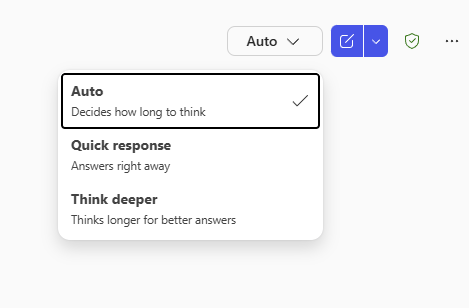
1. GPT-5 Mode selector adds Auto, Instant, and Thinking modes
How this will affect your organization
- Default mode is Auto; users can switch to Quick response or Think deeper.
- User’s choice is remembered and retained for new chats.
- No admin configuration changes required. There are no admin controls for this feature.
- Feature is enabled by default for all tenants.
When will this happen?
December 4, 2025, and we expect to complete by December 8, 2025.
2. Microsoft 365 admin center: Copilot settings – readiness
How this will affect your organization
To support IT admins in navigating the fast-paced AI landscape, Microsoft is introducing Copilot Readiness Packages in the Microsoft 365 Admin Center. These packages offer a centralized experience to discover Microsoft’s recommended admin presets, grouped by key administrative outcomes.
When this will happen
mid-January 2026; completes late February 2026.
3. Email triage with pin, flag, archive, and mark read
How this will affect your organization
Microsoft 365 Copilot now supports natural language commands to help users pin or unpin important messages, flag or unflag items, mark tasks complete, archive clutter, and mark emails as read or unread.
When will this happen?
mid-December 2025 and is expected to complete by late January 2026.
4. Calendar Search in M365 Copilot Search
How this will affect your organization
Find meetings and everything connected to them in seconds with Calendar Search in Microsoft 365 Copilot. This feature makes it effortless to locate any meeting, even if you only remember a few details. Just type what comes to mind, like “last week’s design review,” “budget sync with marketing,” or “next quarterly planning session,” and Copilot instantly finds the right event.
When will this happen:
early October 2025 and is expected to complete by late December 2025.
5. RSVP to meetings directly in Copilot chat
How this will affect your organization
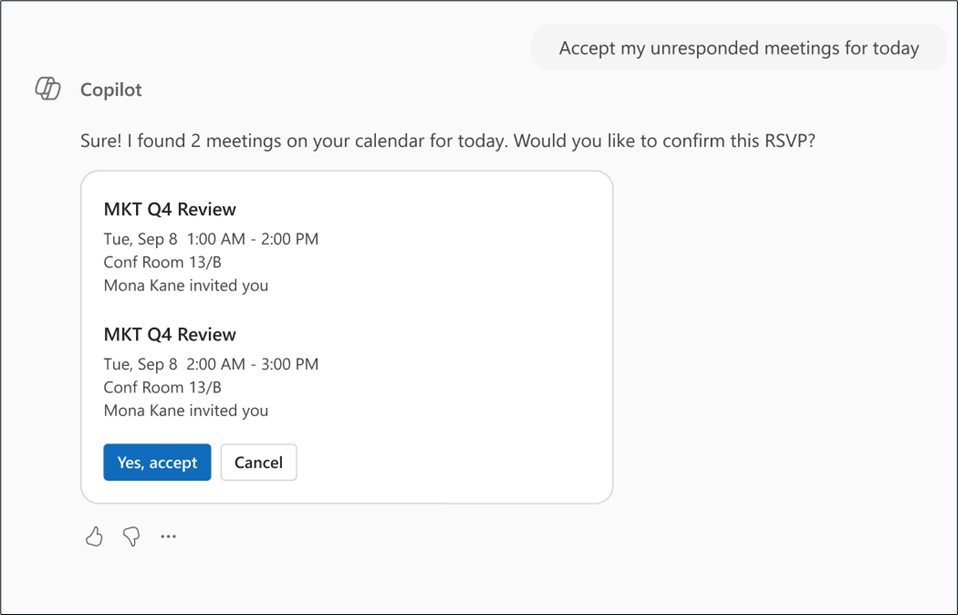
We’re introducing a new capability in Microsoft 365 Copilot chat that allows users to RSVP to meetings directly within the chat experience.
When will this happen:
early January 2026 (previously mid-December 2025) and is expected to complete by end of January 2026 (previously late December 2025).

Microsoft Admin
1. Migrate User Data Across Tenants: Mailboxes, OneDrives, and Teams Chats
How this will affect your organization
To simplify cross-tenant migrations, we’re introducing a unified interface that enables administrators to move user data—including Exchange mailboxes, OneDrive files, and Teams chats and meetings—across Microsoft 365 tenants.
Learn more: Migration orchestrator overview – Microsoft 365 Enterprise | Microsoft Learn
Only Available for E3/E5 licensing.
When will this happen:
Public Preview (Worldwide): Begins early December 2025.
2. Microsoft Purview | Data lifecycle management – Auto archive for Exchange Online
How this will affect your organization
We’re introducing Auto Archiving for Exchange Online to help prevent mail flow disruptions caused by mailboxes reaching their storage quota. This update ensures real-time mailbox health monitoring by automatically moving the oldest items to the archive when mailbox usage exceeds 96% of its quota.
When will this happen:
early January 2026 and is expected to complete late January 2026
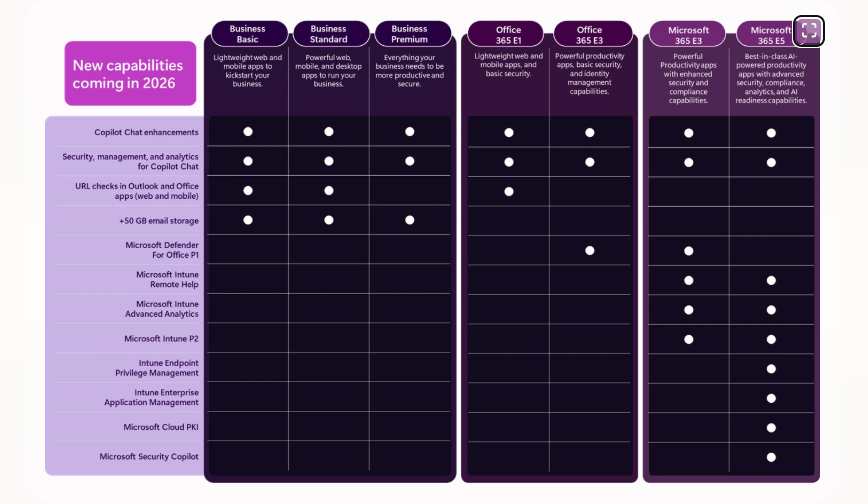
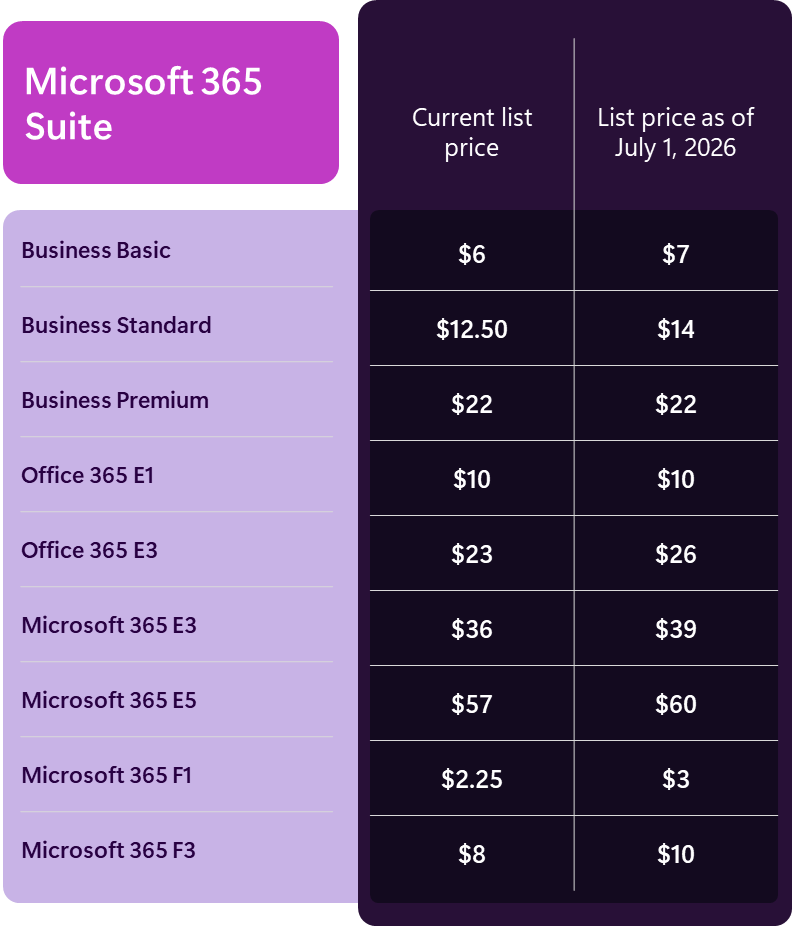
3. New capabilities coming to Microsoft 365 suites in 2026
How this will affect your organization
Microsoft is bringing powerful capabilities of the Microsoft Intune Suite to Microsoft 365 E3 and Microsoft 365 E5.
Updated Pricing July 2026
Full Announcement: https://www.microsoft.com/en-us/microsoft-365/blog/2025/12/04/advancing-microsoft-365-new-capabilities-and-pricing-update/
For the 2026 planned product additions to Microsoft 365, a Microsoft 365 admin center notification will be posted for administrators of eligible organizations 30 days in advance of the effective change.
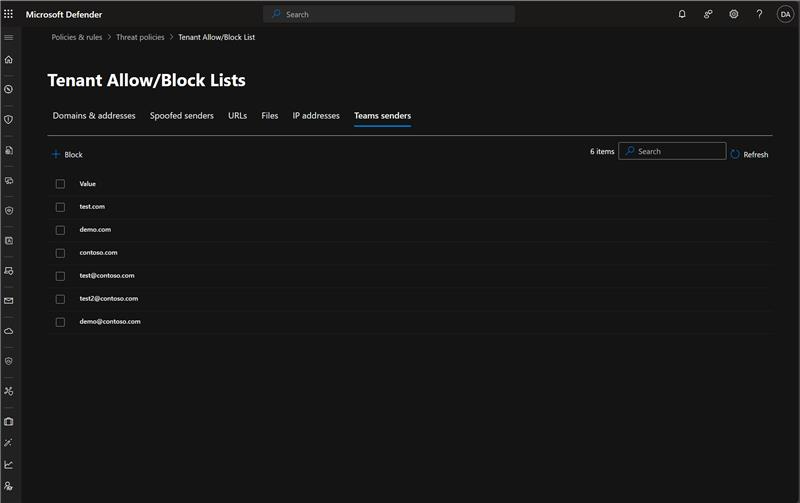
4. Microsoft Defender for Office 365: Admins can block external users in Microsoft Teams from Defender Portal
How this will affect your organization
Introducing an integration between Microsoft Teams and Microsoft Defender for Office 365 that allows security admins to manage blocked external users in Teams through the Tenant Allow/Block List (TABL) in the Microsoft Defender portal
When will this happen?
early January 2026 and is expected to complete by mid-January 2026.
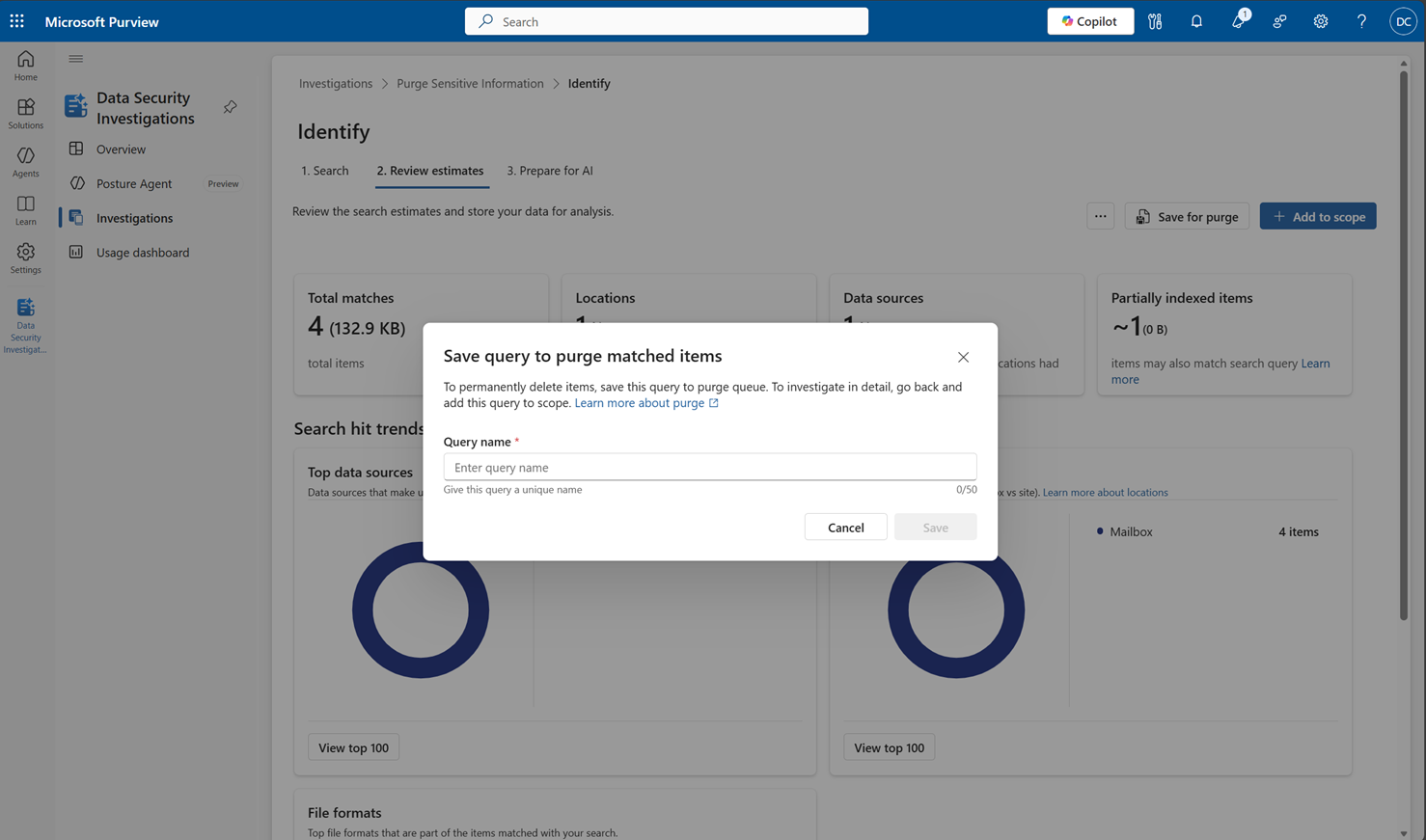
5. Microsoft Purview | Data Security Investigations – Introducing new purge mitigation action
How this will affect your organization
We’re introducing a new purge mitigation action in Microsoft Purview Data Security Investigations (DSI). This feature enables admins to quickly and efficiently delete sensitive or overshared content during investigations, directly within the product experience. The purge action complements DSI’s AI-powered capabilities—such as categorization, AI search, and risk analysis—helping organizations reduce data exposure and mitigate leaks faster.
When will this happen?
early March 2026 and complete by late March 2026.