

Microsoft has officially announced pricing updates coming to Microsoft 365 in 2026.
This isn’t speculation. These are confirmed changes that IT teams, MSPs, and business leaders should be planning for right now.
There are three major updates you need to understand:
Commercial SKU price changes
Government SKU increases
International currency adjustments
Let’s break it down.
1. Major Commercial SKU Pricing Updates (Effective July 1, 2026)
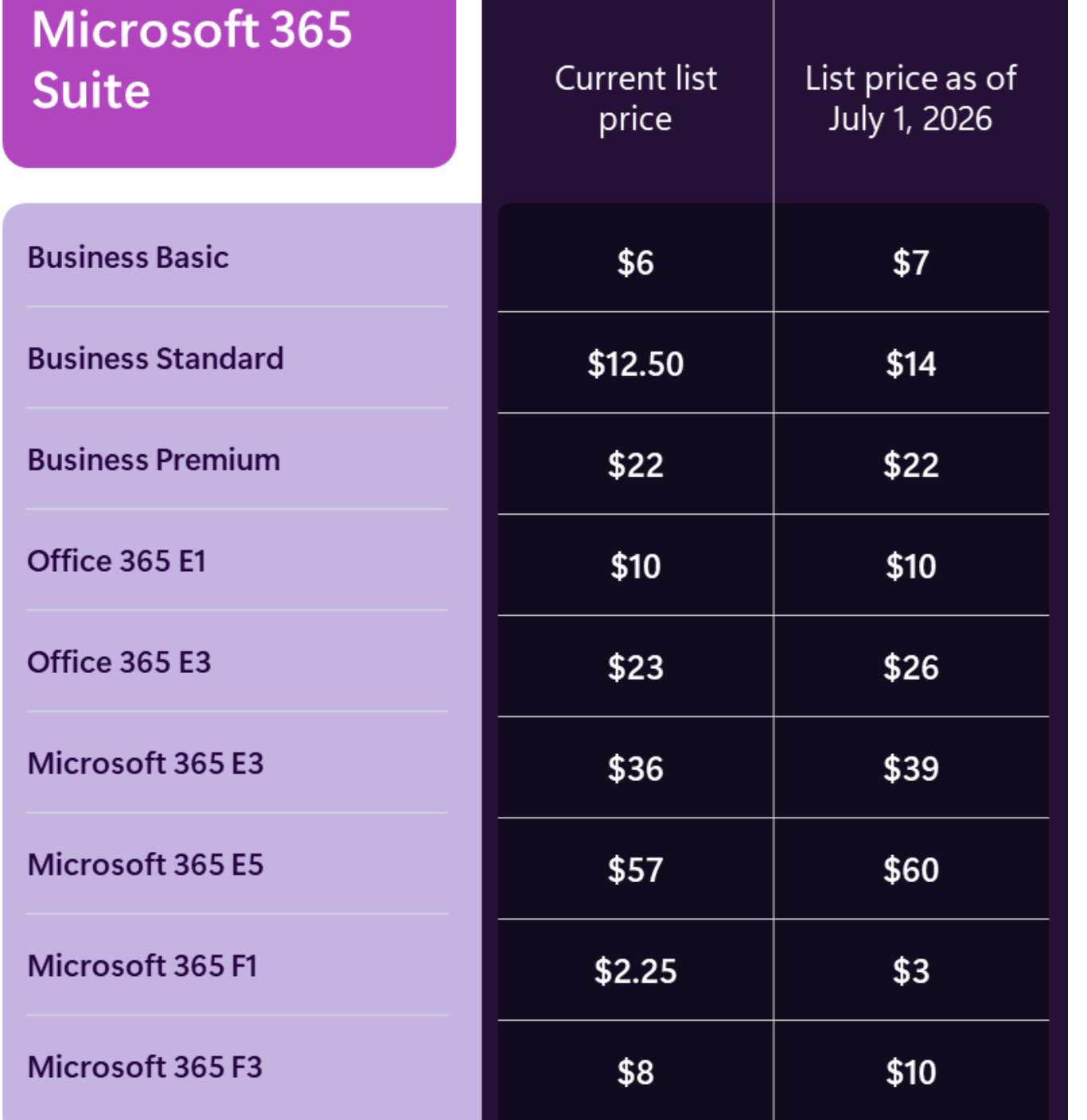
Annual Commit Pricing. Monthly commit is 20% more. Ref: Advancing Microsoft 365: New capabilities and pricing update | Microsoft 365 Blog
Most plans are increasing.
But two stand out:
Business Premium — no change
Office 365 E1 — no change
Why This Matters
Business Premium continues to be one of the strongest value propositions in the entire Microsoft portfolio.
For MSPs, this makes the Business Standard → Business Premium conversation even easier.
Previously:
$12.50 → $22 felt like a large jump.
Now:
$14 → $22 narrows that gap.
The value of Business Premium (Intune, Defender for Business, Conditional Access, device compliance, etc.) becomes even more compelling, especially since it is not increasing in price.
If you manage dozens or hundreds of seats, these changes can significantly impact renewal budgets.
Microsoft also noted that nonprofit pricing may be impacted in the future, though final details have not yet been released.
2. What’s Being Added? More Value in the Suites
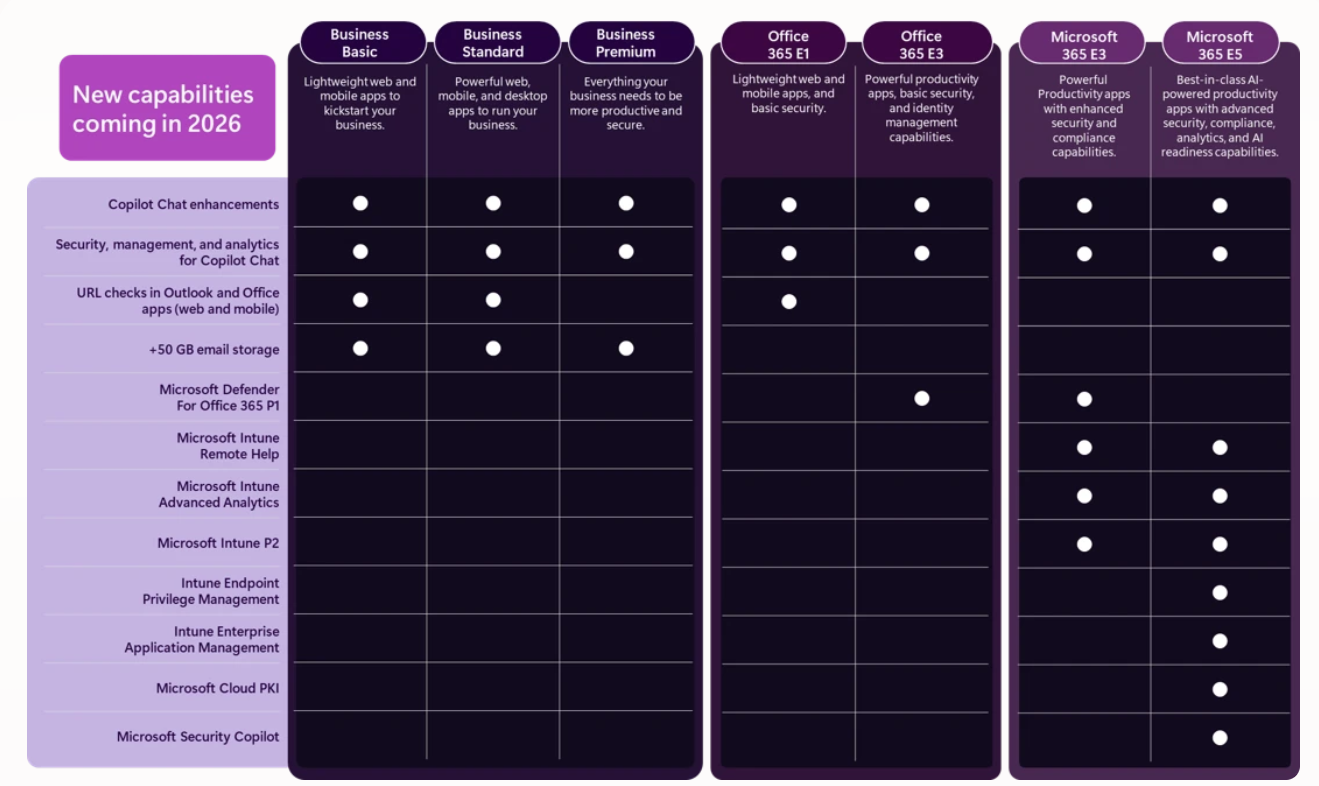
Expanded Intune Suite Capabilities
Advanced endpoint management features that were previously add-ons are being further integrated into higher-tier plans like E5 and partially into E3.
Advanced Email Protection in Office SKUs
Microsoft continues bringing advanced email security protections deeper into the Office product lines.
It’s interesting to see this evolution given the positioning of the Microsoft 365 bundles versus the legacy Office SKUs.
Increased Mailbox Storage
Based on the +50GB column, many are interpreting as expanded mailbox storage, moving toward 100 GB per user in many cases (up from 50 GB).
Copilot Capabilities Bundled at a Basic Level
Microsoft is introducing baseline Copilot functionality directly inside core SKUs.
This includes:
Email summarization
Basic drafting in Word
Light analysis in Excel
Presentation assistance in PowerPoint
This is not the full standalone Copilot add-on license.
There will still be a difference between:
Bundled “basic” Copilot capabilities
Full Microsoft 365 Copilot license
Expect confusion here. Make sure your teams understand the distinction.
3. Government SKU Increases
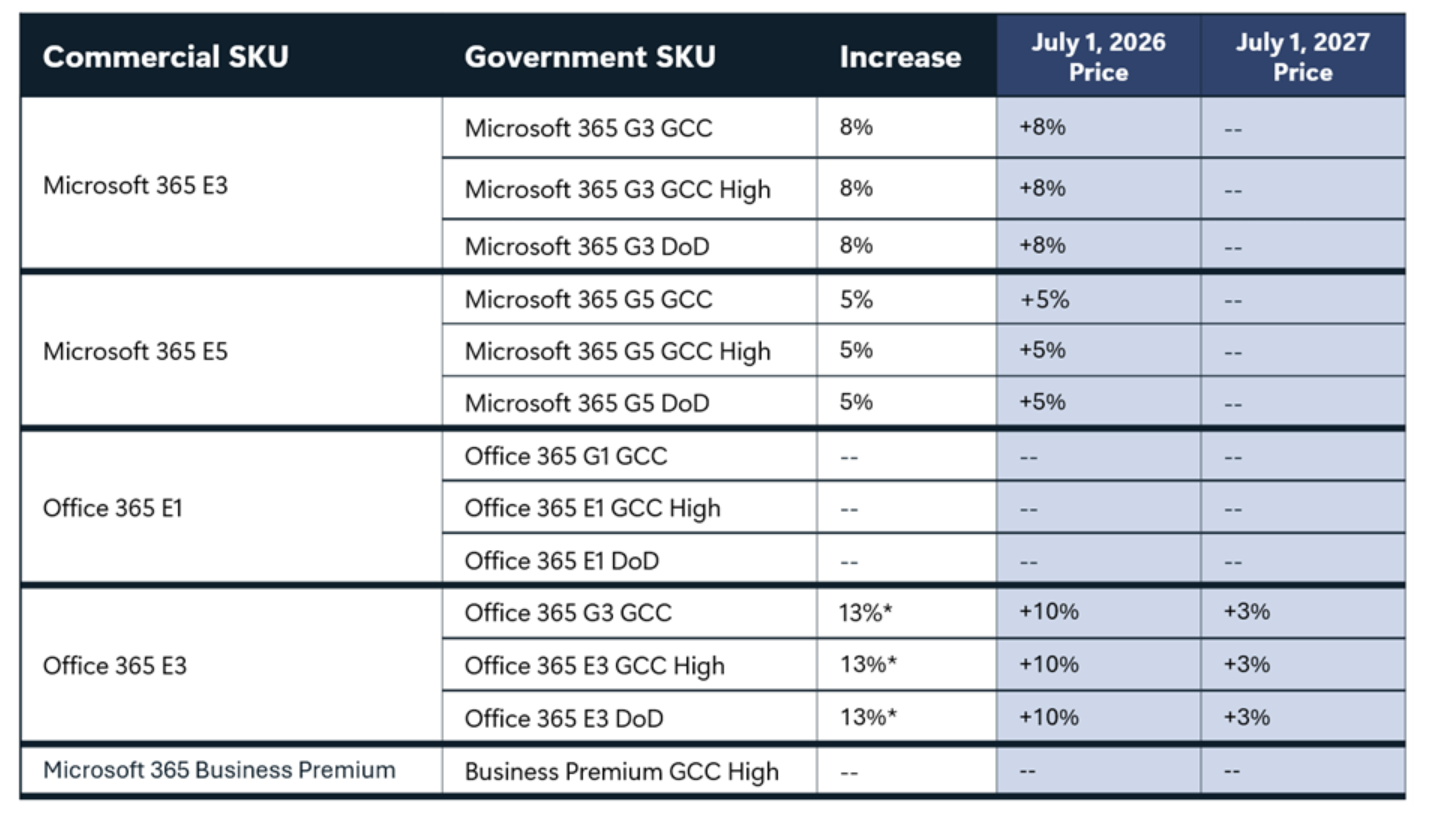
Microsoft also announced pricing changes for government SKUs.
Government Community Cloud (GCC) and GCC High offerings will see increases of approximately 8% across affected plans.
Like commercial SKUs, these changes go into effect on July 1, 2026.
Again:
Business Premium remains unchanged here as well.
If you serve public sector clients, this needs to be built into your 2026 planning conversations now.
4. International Currency Adjustments
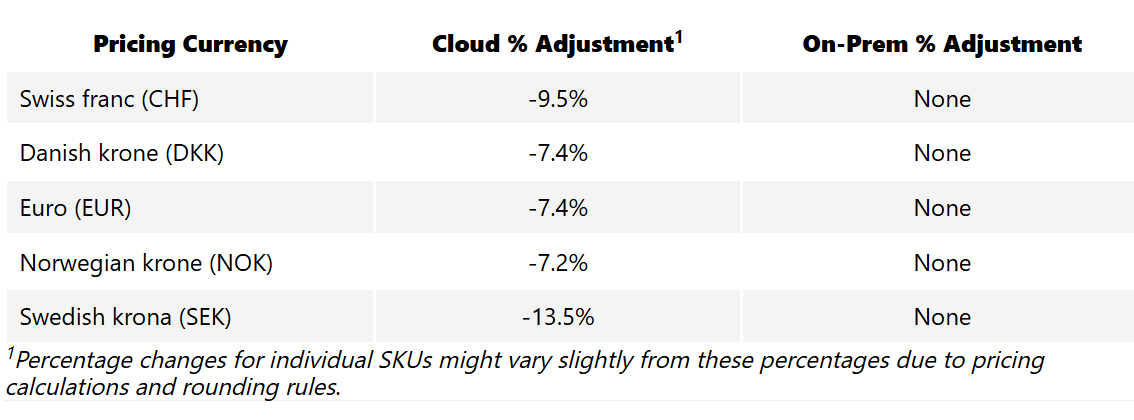
For organizations outside the United States, Microsoft will be implementing local currency adjustments.
In some regions, pricing may actually decrease slightly to better align with USD list pricing. For others, it may increase depending on exchange rate normalization. While this is a smaller announcement compared to the SKU changes, it could meaningfully impact renewals in affected markets.
5. What You Should Be Doing Right Now
Many organizations are currently in renewal season, especially those on annual New Commerce Experience (NCE) agreements.
January through March tends to be heavy renewal time.
Here’s what you should do immediately:
✅ Review Your Renewal Dates
Understand whether you renew before or after July 1, 2026.
✅ Model the Cost Impact
Calculate what these increases mean across your total license count.
✅ Evaluate License Optimization
Are you on the right SKU?
Should Business Standard users move to Business Premium?
Are you paying for unused E5 seats?
Do you have departed users still assigned licenses?
✅ Lock in Pricing Where Appropriate
If Business Premium fits your environment, it may be worth locking in before future adjustments occur.
Use CloudCapsule to Identify License Sprawl
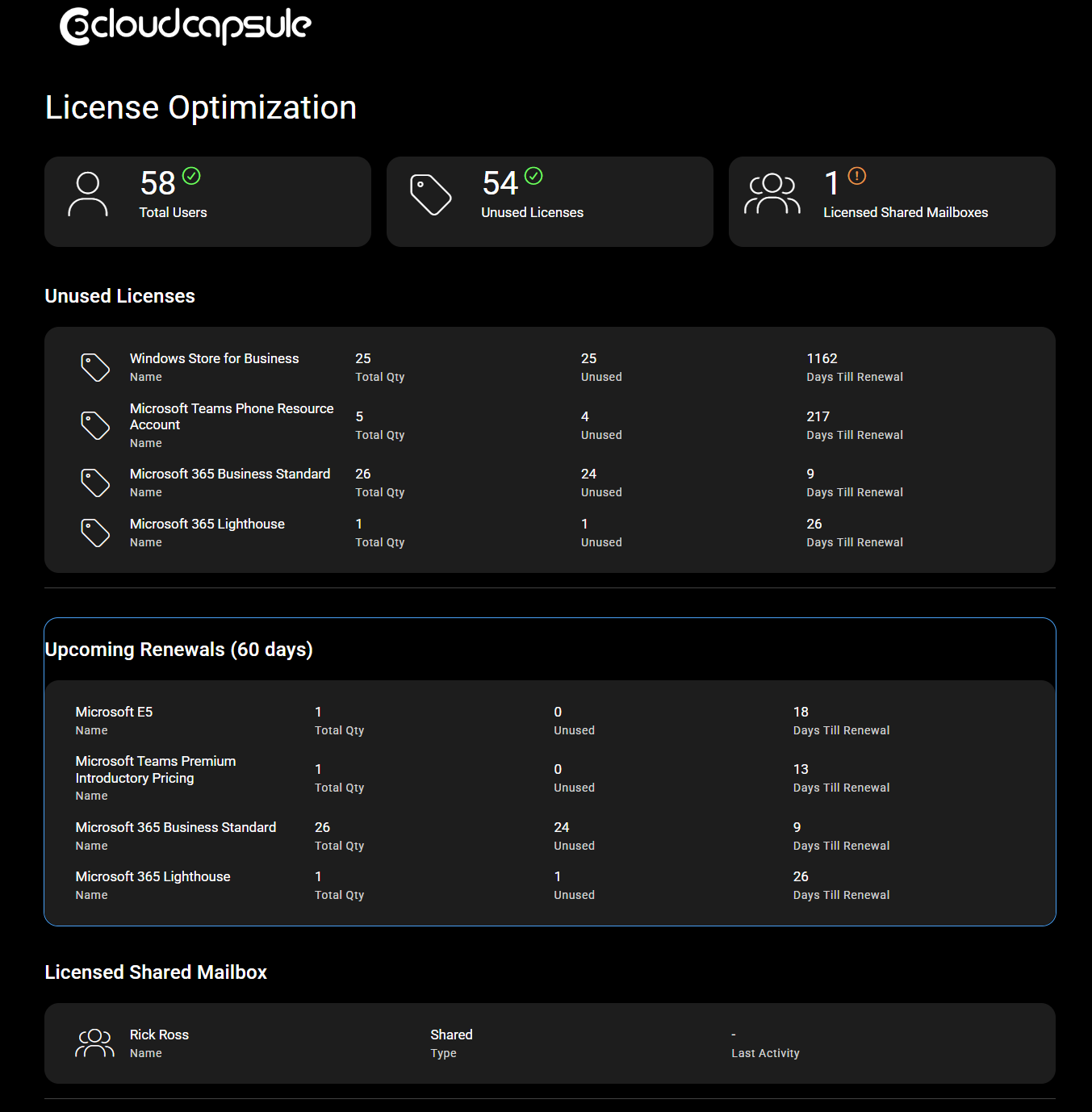
If you want a full breakdown of license usage inside your customer tenants, CloudCapsule can:
Identify unused licenses
Detect accounts assigned licenses that shouldn’t be (shared mailboxes, departed users, etc.)
Provide a full security and configuration assessment
If you’re unsure how these 2026 changes will impact your organization, this is a good time to run a review.
You can request a demo or free assessment to see exactly where you stand