

Microsoft is officially moving customers away from SMS and voice authentication in Microsoft Entra ID.
For MSPs, this is more than another Microsoft change notification. It affects how users authenticate, how they recover their accounts, and how you should plan migrations across every customer tenant you manage.
Beginning September 1, 2026, Microsoft will start automatically moving users who are still enabled for SMS or voice toward passkeys. Then, on February 1, 2027, Microsoft-provided SMS and voice authentication will be retired.
There is no opt-out from the final retirement.
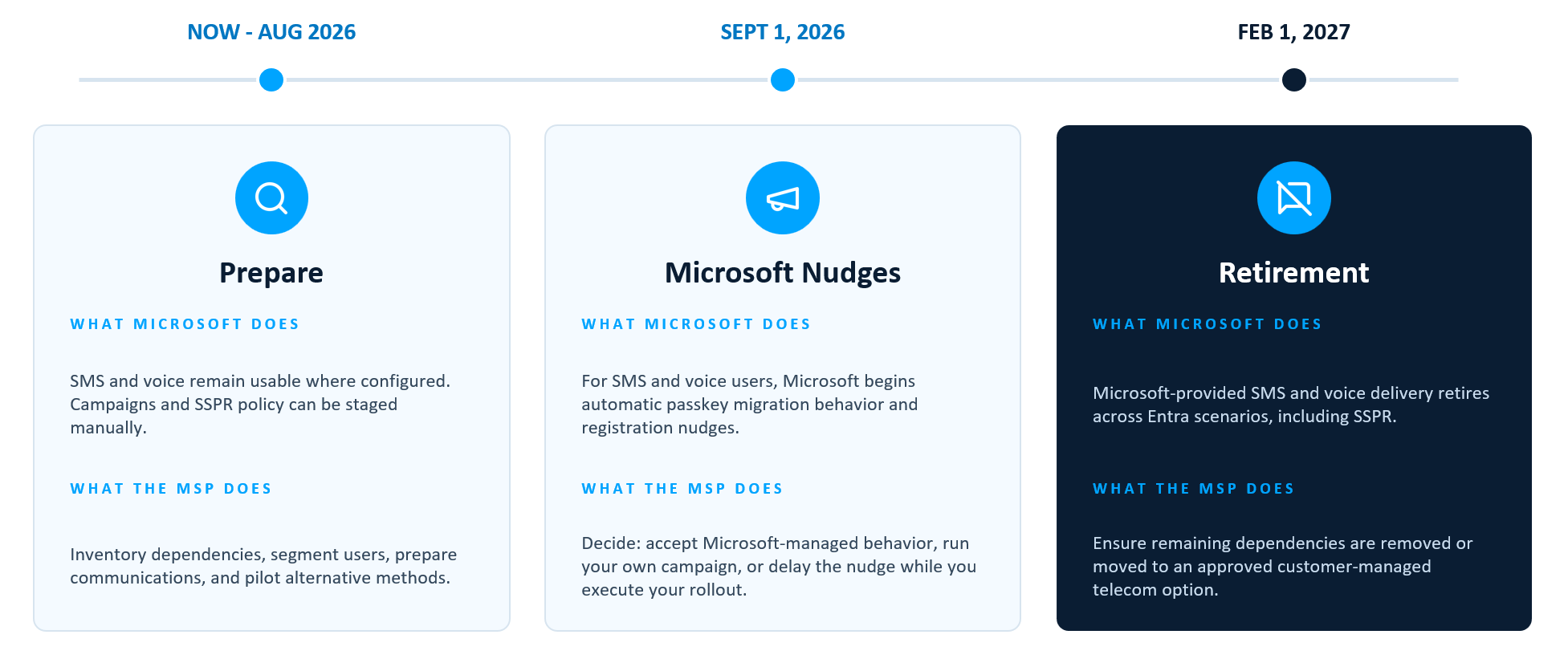
The Hidden Risk: SMS May Still Matter Even When Users Don’t Use It Every Day
A user may normally authenticate with Microsoft Authenticator and never consciously select SMS.
That does not necessarily mean SMS is irrelevant.
If SMS remains enabled in the tenant’s Authentication Methods Policy, that user can still be in scope for Microsoft’s migration and will still be nudged to set up a passkey. Microsoft’s September change specifically applies to users enabled for SMS or voice through the modern Authentication Methods Policy or applicable legacy MFA settings.
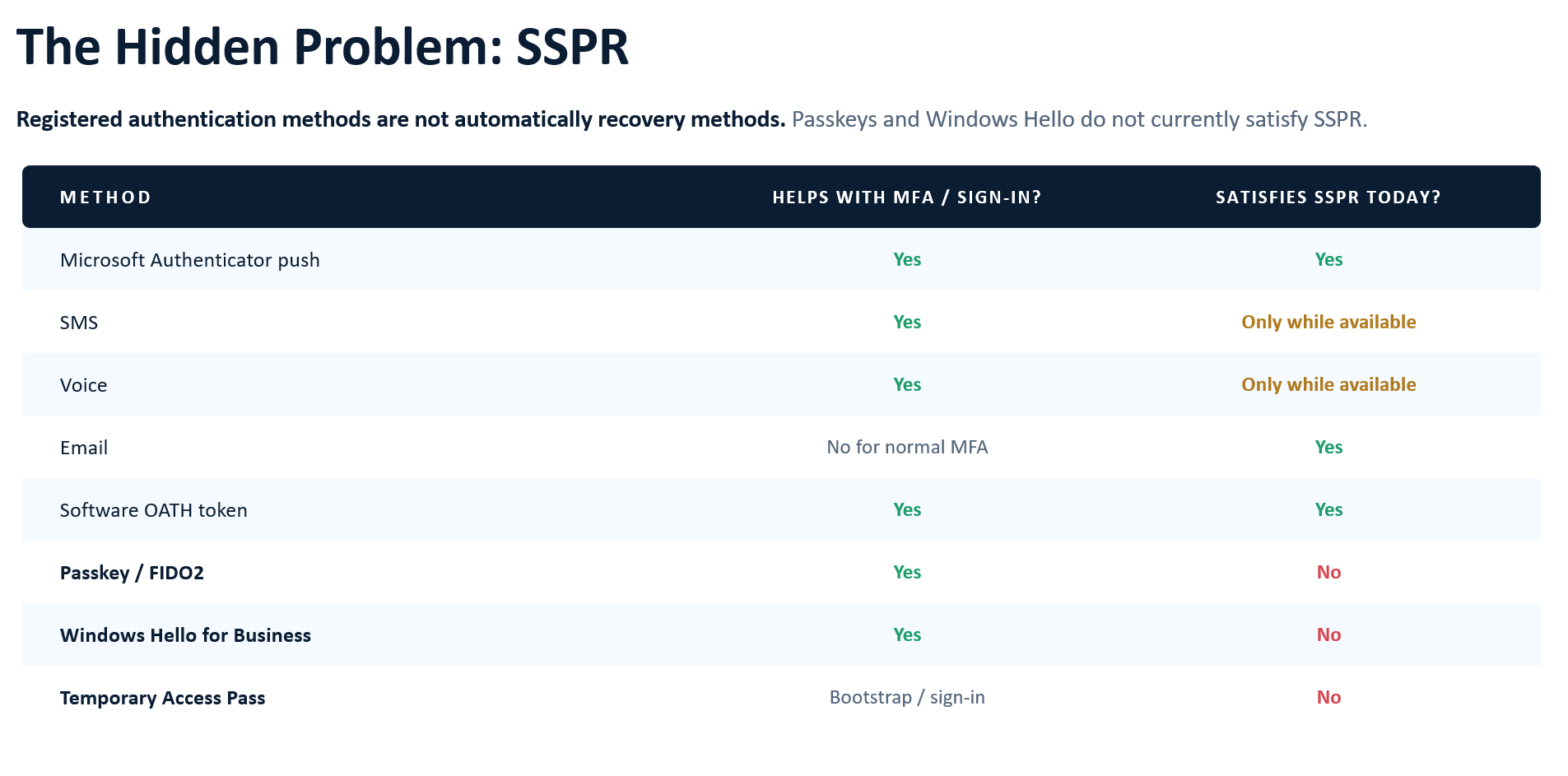
There is also a second dependency that is easy to miss: Self-Service Password Reset.
Imagine your SSPR policy requires two methods and a user has:
- Microsoft Authenticator
- SMS
Today, that can satisfy a two-method SSPR requirement.
Now add a passkey:
- Passkey
- Authenticator
- SMS
It looks like the user has three methods. But passkeys aren’t currently listed as an SSPR verification method, while Authenticator and SMS are. When SMS disappears, that user’s recovery posture may change even though their everyday sign-in is stronger. Microsoft recommends registering more methods than the minimum required for reset so users have alternatives when a method is unavailable.
Find Who Is Actually Using SMS
Before changing anything, build an inventory.
Check your Authentication Methods Policy
In the Entra admin center, go to:
Entra ID → Authentication methods → Policies
Review SMS and Voice call to determine whether they are enabled and which users or groups are targeted.
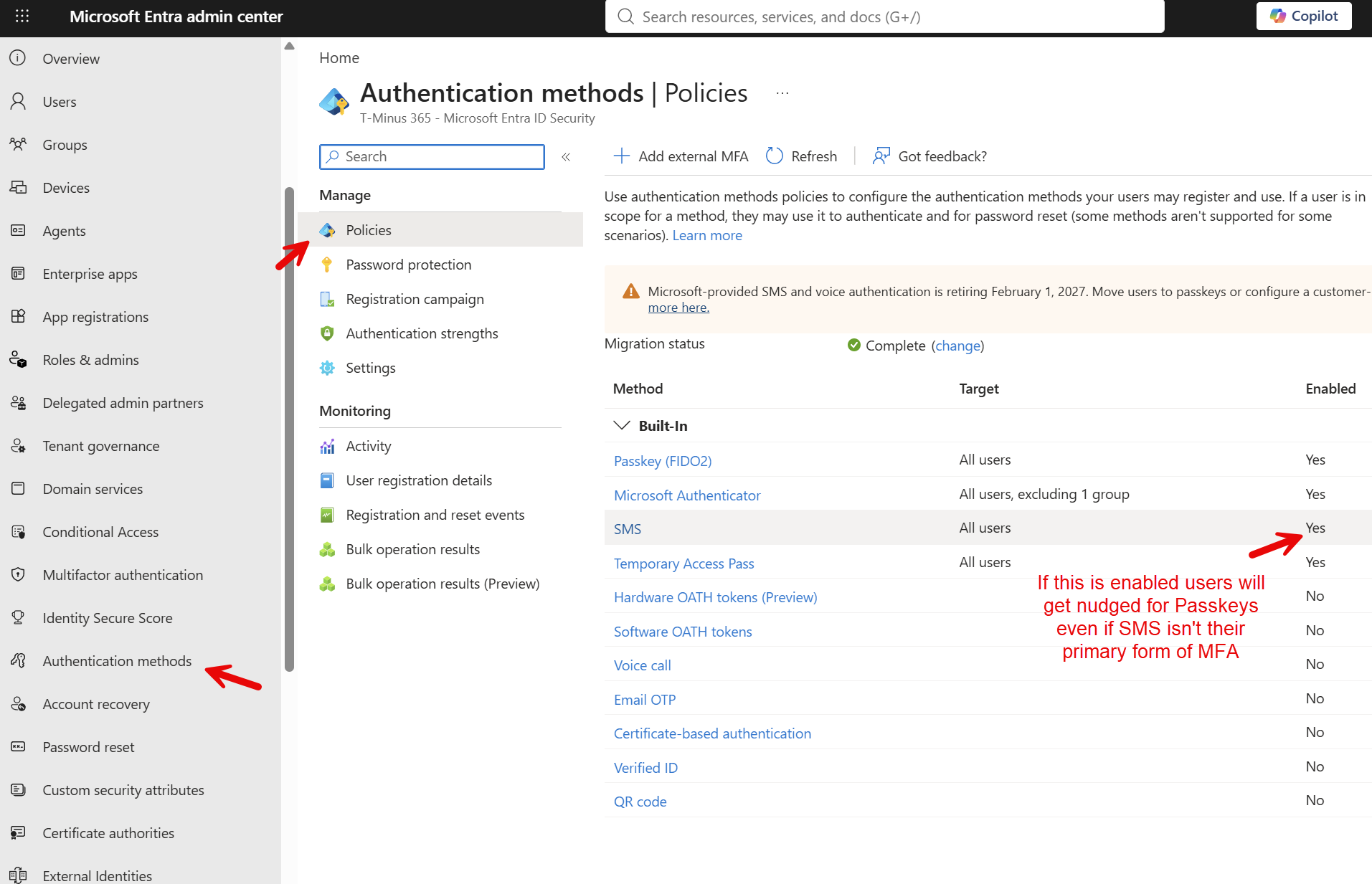
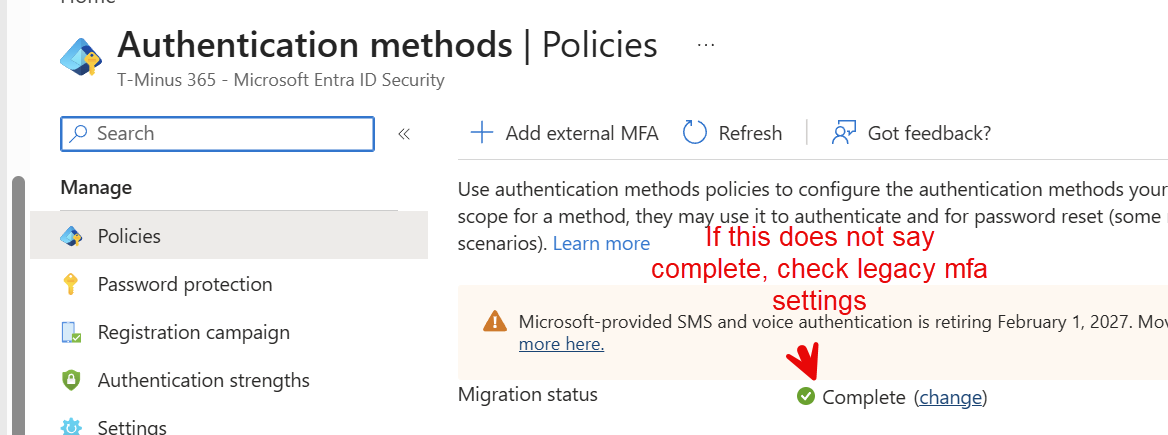
If the tenant hasn’t fully transitioned from legacy authentication-method settings, also review the legacy MFA configuration. Microsoft’s retirement scope specifically accounts for users enabled through either the modern Authentication Methods Policy or legacy MFA settings. Legacy MFA page: https://entra.microsoft.com/#view/Microsoft_AAD_AuthenticationMethods/MultifactorAuthenticationConfig.ReactView/tabId/users
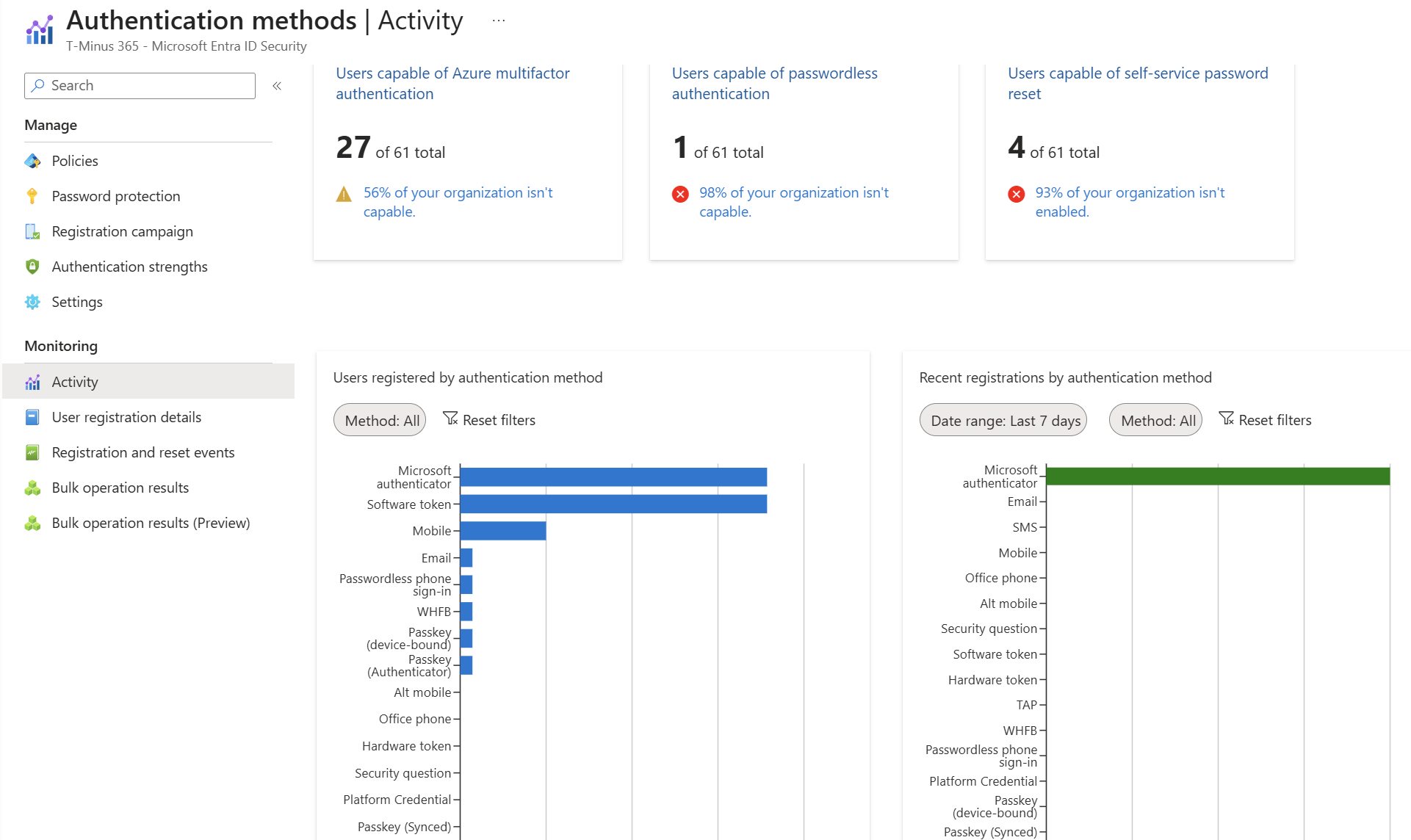
Check the actual users
Next go to:
Entra ID → Authentication methods → Activity → Registration
The User registration details report shows each user’s registered methods along with whether they are MFA capable, passwordless capable, SSPR enabled, SSPR registered, and SSPR capable. It also shows methods such as Mobile phone, Microsoft Authenticator, FIDO2, Email, Software OATH, and Windows Hello for Business.
Delay Microsoft's Automatic Nudge If You Aren't Ready
You may not want Microsoft suddenly prompting hundreds of customer users for passkeys on September 1.
Microsoft provides a temporary opt-out from the automatic passkey enablement and Registration Campaign changes during the migration period. This gives organizations time to complete their own transition plan. It does not delay the February 1, 2027 retirement of Microsoft-provided SMS and voice.
Another way to avoid the automatic SMS/voice-driven migration is to move users out of SMS and voice scope before September 1—but only after they have another working authentication method. Microsoft explicitly recommends removing users from SMS/voice scope before September 1 if you don’t want that automatic behavior.
So the MSP decision becomes:
Ready?
→ Start migrating now.
Not ready?
→ Temporarily delay Microsoft’s automatic rollout while you communicate and stage the migration.
PowerShell:
					# Delay the Sept 1, 2026 automatic passkey enablement + Registration Campaign switch
# Requires: Microsoft.Graph.Authentication module, Global Admin or Auth Policy Admin

Connect-MgGraph -Scopes "Policy.ReadWrite.AuthenticationMethod"

$body = @{
    optOutSettings = @{
        passkeyDynamicMigration = $true
    }
} | ConvertTo-Json -Depth 3

Invoke-MgGraphRequest -Method PATCH -Uri "https://graph.microsoft.com/beta/policies/authenticationMethodsPolicy" -Body $body -ContentType "application/json"

# Verify
(Invoke-MgGraphRequest -Method GET -Uri "https://graph.microsoft.com/beta/policies/authenticationMethodsPolicy").optOutSettings
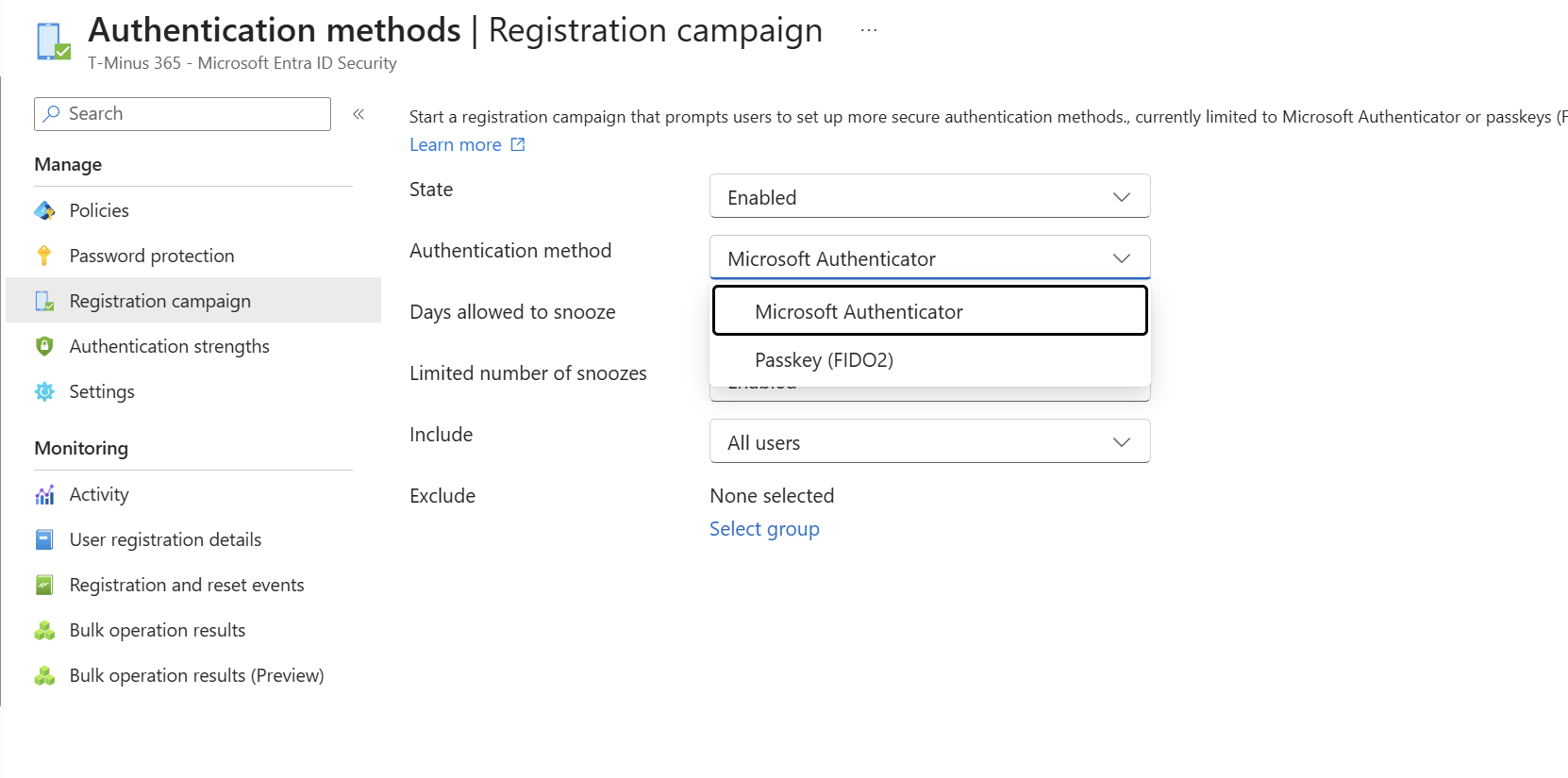
Control the Rollout With Registration Campaigns
You don’t have to accept Microsoft’s default user experience.
Go to:
Entra ID → Authentication methods → Registration campaign
A Registration Campaign can nudge users to register either:
- Passkey
- Microsoft Authenticator
You can include or exclude users and groups, configure the snooze experience when managing the campaign yourself, and gradually work through different populations.
One important limitation: a tenant can target only one method at a time. You can’t simultaneously run a Passkey campaign for one group and an Authenticator campaign for another.
That means staging matters.
Option A: Move directly to passkeys
For organizations ready for passwordless authentication:
SMS users → Passkey Registration Campaign → Validate → Remove SMS
Option B: Get users onto Authenticator first
If the organization isn’t ready to adopt passkeys broadly:
SMS users → Authenticator Registration Campaign → Validate Authenticator → Remove SMS
You can then run a passkey campaign later.
That gives MSPs a very practical intermediate state instead of forcing a passkey project before the customer is operationally ready.
Decide Who Gets Synced vs. Device-Bound Passkeys
If you do move to passkeys, not every user necessarily needs the same type.
Microsoft supports both:
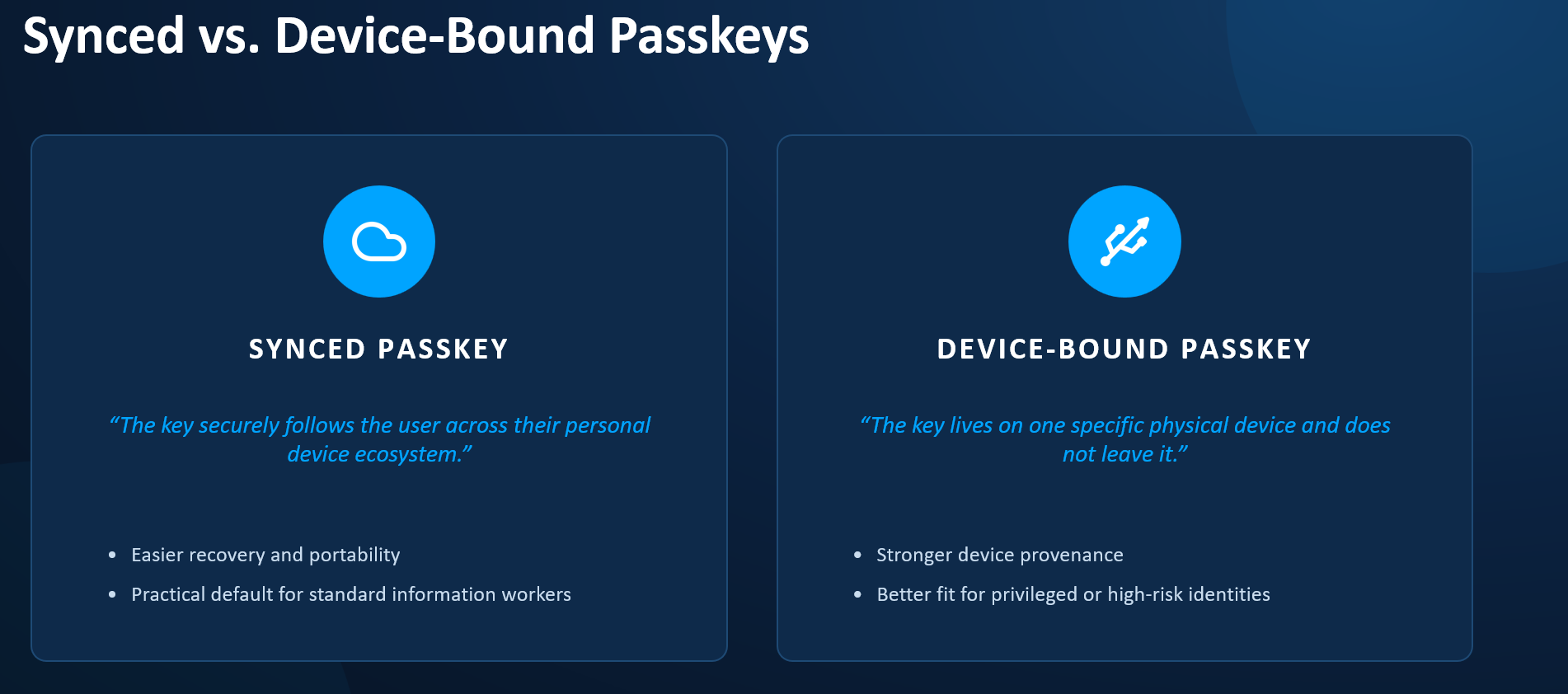
Synced passkeys
Stored through credential managers such as Apple iCloud Keychain or Google Password Manager and available across the user’s devices.
These provide a simpler experience for most information workers. Microsoft recommends synced passkeys for populations where strict device-boundary control isn’t required.
Device-bound passkeys
The private key stays with a specific device.
Examples include:
- Passkeys in Microsoft Authenticator
- FIDO2 hardware security keys
- Other device-bound credentials
These make sense where stronger control over the physical credential is required, especially for higher-risk or privileged populations.
The Registration Campaign itself targets “Passkey.” The Passkey/FIDO2 Authentication Methods Policy and its profiles determine which passkey types users are allowed to register.
A simple MSP strategy might be:
Standard Users
→ Synced passkeys
Privileged Users
→ Device-bound passkeys / security keys
Customers not ready for passkeys
→ Microsoft Authenticator first
Full Passkey Admin Guide: Microsoft_365_Passkey_Decision_Guide.pdf
What the End User Will See
When the registration campaign kicks off and users are nudged to passkeys, after the sign in they will see the following prompt:


When they click next here, the workflow they experience will depend on the passkey profile you have assigned.
If you chose Device-bound with requirements for Authenticator in iOS and Android, they will see the following:

If you chose synced passkeys, its possible that:
- An existing password manager will intercept and try to store the passkey
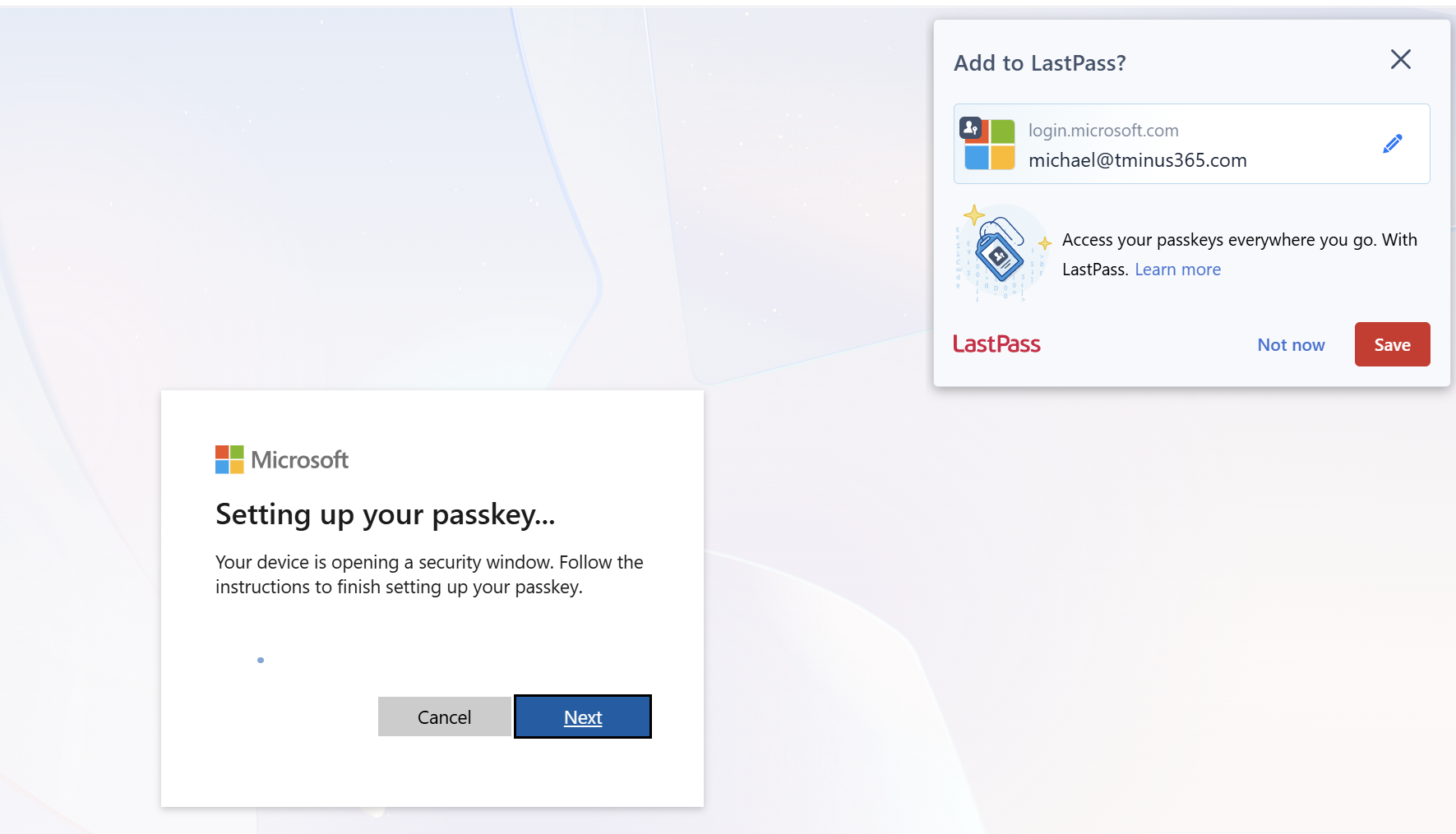
2. If the user is leveraging Chrome, Google Password Manager will try to store the passkey

3. If they are using edge browser with no password manager, they will still see the prompt with the QR code unless you used a profile specifically targeting Windows Hello For Business.
How-To Guides:
For End-Users:
Device-Bound Authenticator: Passkey_Guide_Microsoft_Authenticator.docx
Synced Passkeys: Passkey_Guide_Synced_Google_Apple.docx
For Helpdesk:
Troubleshooting: Passkey_Helpdesk_Playbook_Internal.docx
Don't Forget SSPR
Before removing SMS, go to:
Entra ID → Password reset → Authentication methods
Verify:
- How many methods are required to reset?
- Which methods are allowed?
- Do affected users actually have enough non-SMS methods registered?
Microsoft allows organizations to require either one or two methods to reset a password. Users without enough registered methods can’t complete SSPR and need administrator assistance.
Microsoft also recommends having users register at least one more authentication method than the number required to reset.
So if you require:
1 method to reset
try to have at least 2 recovery options registered.
If you require:
2 methods to reset
try to have at least 3 appropriate methods available where practical.
For many organizations, a reasonable recovery strategy may look like:
Authentication
→ Passkey / Windows Hello
SSPR
→ Authenticator + Email or another supported recovery option
Emergency recovery
→ Helpdesk verification + Temporary Access Pass
The important thing is to test the recovery path separately from the sign-in path.
We've Built a CloudCapsule Report for This
Doing this manually across one tenant is manageable.
Doing it across 50, 100, or 500 customer tenants is another story.
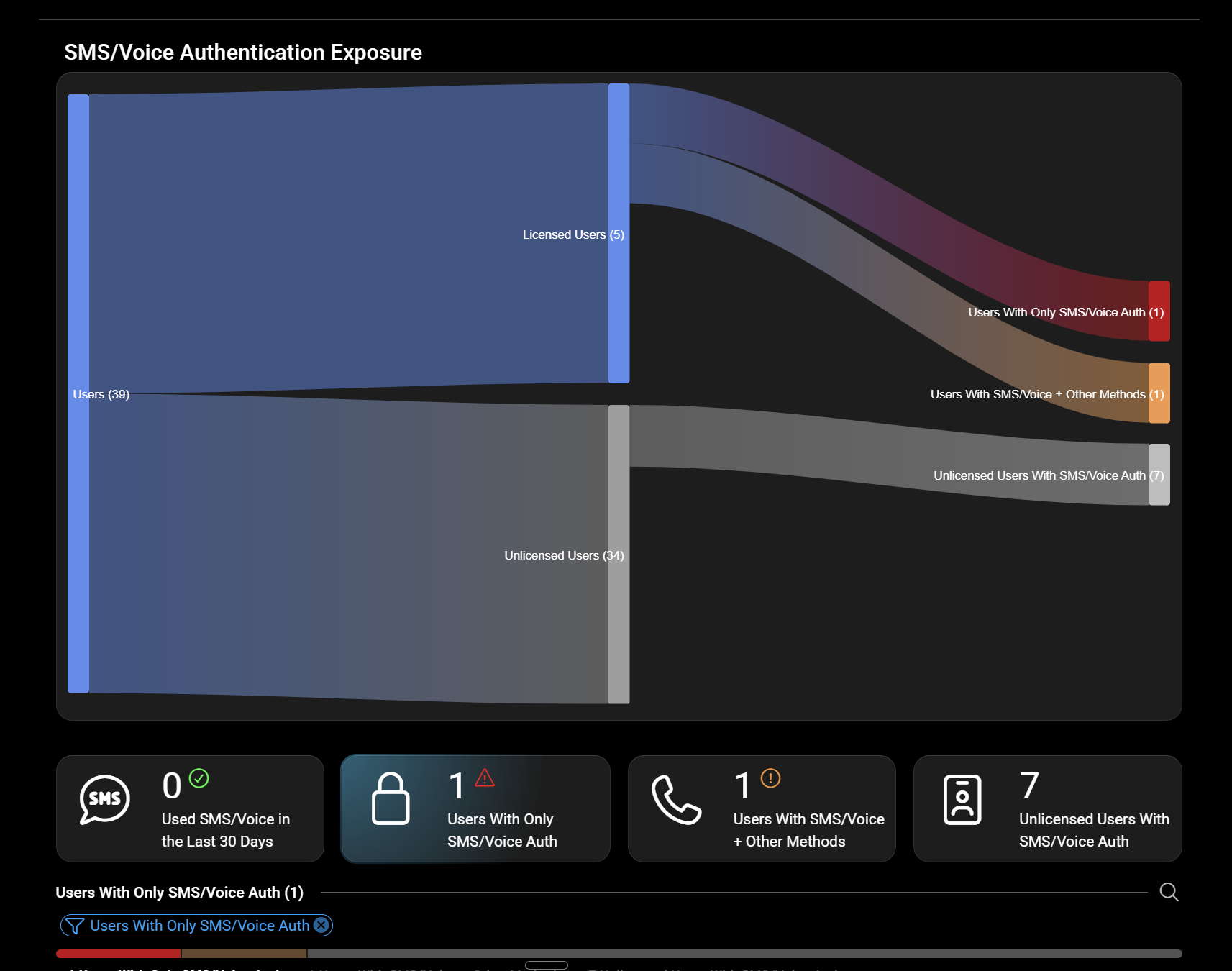
We’ve built a new SMS & Voice Retirement report in CloudCapsule designed to help MSPs quickly identify:
- Users affected by SMS/voice retirement
- Users who still have phone authentication methods
- Users who have already registered passkeys
We’re also working the Microsoft migration controls into the experience so MSPs can understand, and where supported, manage, the rollout without jumping between dozens of customer tenants.
The goal is simple:
Show me who is affected, why they are affected, and what I should do next.
Final Thoughts
February 1, 2027 sounds far away.
For an MSP managing dozens of customers, it isn’t.
The biggest risk isn’t necessarily that a user signs in with SMS every day.
It’s the SMS dependency you don’t know exists:
- SMS still allowed by policy
- SMS sitting behind Authenticator as another MFA option
- SMS satisfying part of a two-method SSPR requirement
- Users who have never registered anything stronger
- Customers who start receiving Microsoft’s passkey prompts before you’ve communicated the change
The good news is that Microsoft gives you tools to control the transition.
The MSP playbook is:
Discover
→ Find SMS/voice exposure.
Validate
→ Determine who actually depends on it and check SSPR.
Control
→ Delay the automatic rollout if necessary.
Migrate
→ Authenticator, synced passkeys, or device-bound passkeys depending on the population.
Verify
→ Confirm authentication and recovery work without SMS.
Enforce
→ Remove SMS/voice before Microsoft does it for you.
Don’t treat this as another Microsoft deadline.
Use it as an opportunity to modernize authentication across every customer you manage.
End User Notification Templates: https://www.microsoft.com/en-us/download/details.aspx?id=57600
Full Announcement: Passkeys by default and retirement of Microsoft-provided SMS and voice authentication – Microsoft Entra ID | Microsoft Learn