

I recently did a webinar on Token theft where I broke down one of the fastest growing attacks: Token theft via AiTM phishing. In this article, I will summarize that webinar and provide my top protections to both prevent and mitigate this type of attack.
Understanding the Kill Chain
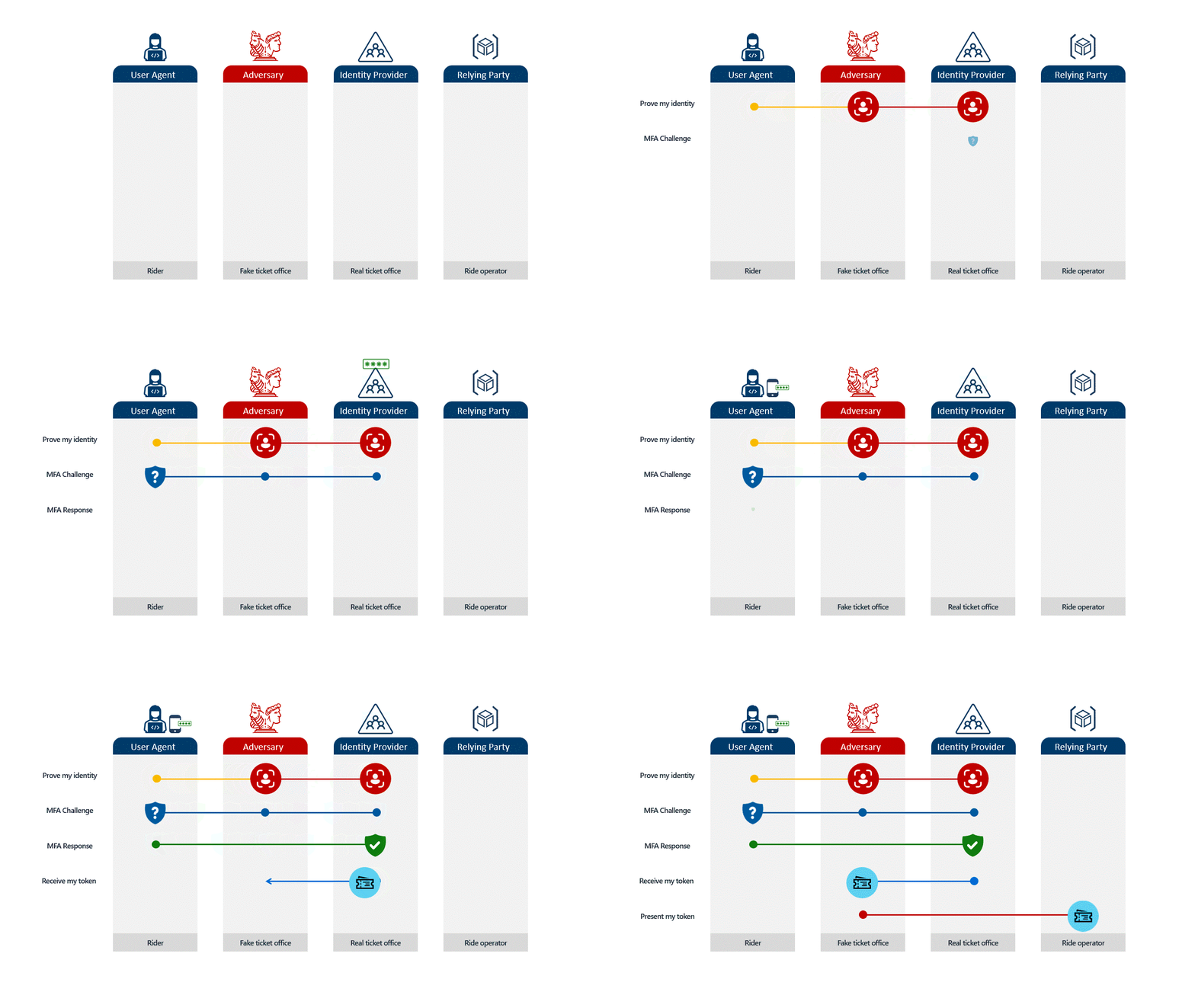
Token theft via AiTM is performed when a user is directed to a legitimate looking Microsoft page from a phishing email, enters their credentials, fulfills MFA, and is redirected to the legitimate website. The attacker is able to harvest the session token which can be replayed on a different device and compromise the account. The anology provided is a person going to a theme park, providing their identity to a fake ticket office that the attacker steals and uses to access various rides at the park.
Simulated using Evilginx
Users Clicking on a Link
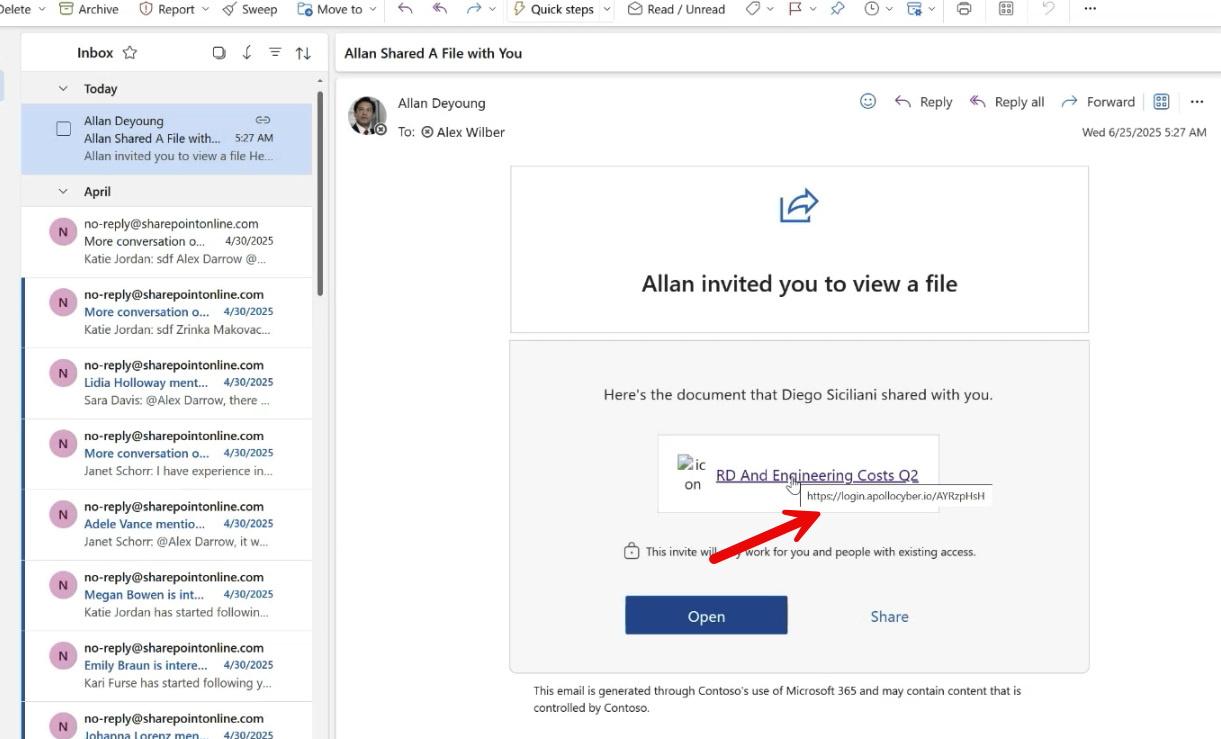
The phishing email users get can come in various forms but a common example is an attacker replicating a legitimate looking OneDrive/SharePoint email and embedding the man-in-the-middle link. EX:
Attack Continuation
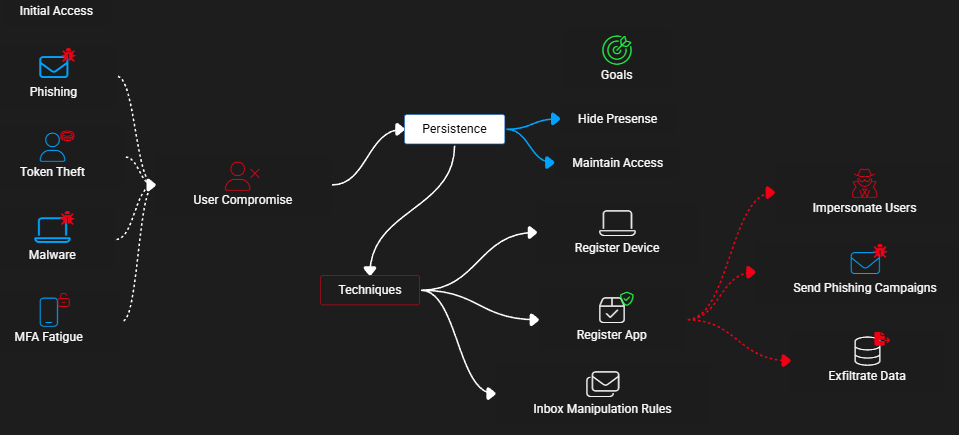
The goals of the attacker may vary but typically after the user is compromised via token theft and token replay, the attacker will try to play out some type of BEC that can lead to:
- Financial Loss (i.e. tricking users into wiring money to a fraudulent bank)
- Data Loss (downloading sensitive info/IP)
- Ransomware
These are just examples. There are more use cases. To get to these goals, the attacker will usually need to perform additional actions such as:
- Hiding their presence
- Maintaining persistence (token session lifetimes are limited)
- Moving laterally (i.e. compromising other accounts)
- Running more phishing campaigns using the newly compromised account
- Exfiltrating data
All of these actions can be audited, tracked, and/or blocked which is what I want to highlight. (i.e. Defense in Depth).
Understanding the Rising Threat

I had 259 people sign up for my webinar. I asked the question of “How many of you have had a token theft incident in the past year” as one survey question. 51% responded yes.
Thinking of Protections mapped to NIST CSF
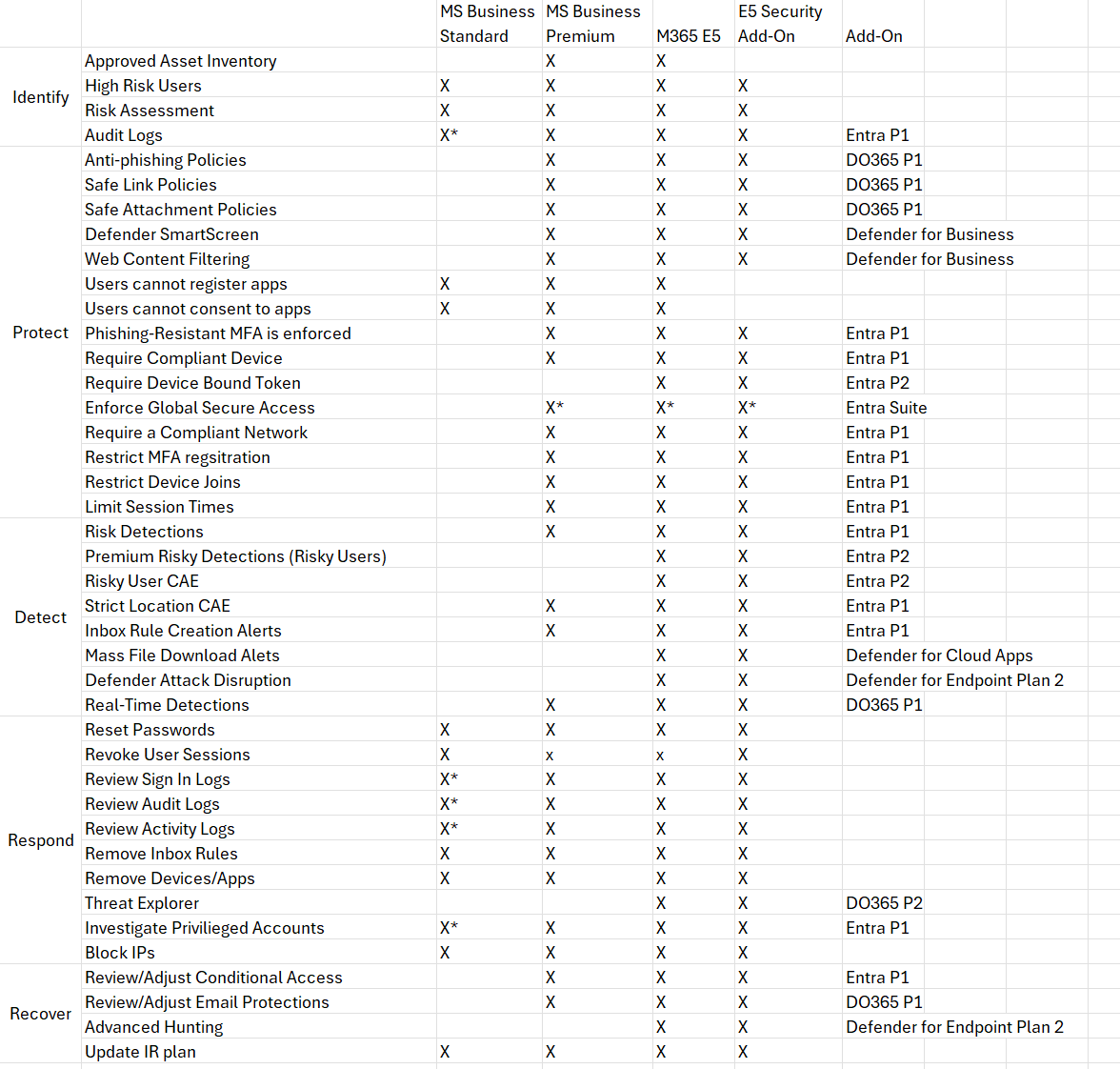
There are many protections/solutions I thought of to help break down these attacks. The availability is also limited by license. I have written an entire blog on Incident Response to token theft but instead of reacting, I want to focus on the posture you can put into place to PREVENT these attacks. For this reason, I won’t be going through all of these controls but instead providing some of the top protections you can put into place to stop and/or mitigate these attacks.
Top Policies for Prevention/Mitigation
1. Tune Defender for Office 365 for Email Security
Ideally, we stop the phishing email from coming through altogether so the user never has a link to click on. Here you should be reviewing:
- Anti-spam policies
- Ensure ZAP protections are in place. These can help remove malicious messages from inboxes post-delivery.
- Configure Message Sending limits to stop the potential of campaigns being sent post-breach
- Anti-phishing
- Configure impersonation protections and targeted user protections
- Ensure safety tips and disabling of auto-forwarding
- Safe Links
- Configure safe links policies for proper sandboxing of URLs
2. Configure Web-Filtering protections
This one requires that you have devices enrolled into Defender for Business or Defender for Endpoint. You can block newly registered domains or parked domains that attackers typically set up as part of the Evilginx/AiTM infrastructure.
Web content filtering – Microsoft Defender for Endpoint | Microsoft Learn

3. Configure Conditional Access Policies to prevent Token Theft
These policies are the most important and the most powerful in my opinion. I wrote an entire breakdown of conditional access policies I recommended but one of the easiest to achieve for most organizations/MSPs is requiring a managed device. This policy would prevent the token from being harvested from the AiTM page.
4. Stop Post-Breach Persistence
If an attacker does harvest the token, they will usually try to maintain persistence by:
- Registering a device or another MFA method (they have the user password too if they used the AiTM flow)
- Register an Application (creates a new identity with own set of permissions to take action.)
- Set up Inbox Rules (hides their presence as they try to do reconnaissance or phish/trick other users)
To combat this, you should:
- Require MFA to register security information or devices
- Requires that you adopt Temporary access passwords to support new user onboarding
- Would prevent an attacker from setting up or changing MFA or registering a device to the network
- Do not allow users to consent or register applications
- Prevents regular users from consenting to traitorware apps (i.e. emClient, PerfectData,CloudSponge, etc.)
- Prevents new app registrations that can have their own creds/permissions
- Set up Alerts for inbox rules to go to PSA
- While you can prevent the creation of inbox rules tenant wide, this is widely unfeasible to do for most organizations given their legitimate business purpose. Its better to monitor for these as leading indicators of potential compromise.
5. Automate Attack Disruption
The final recommended protection is having some automation in place for common things you would do as part of incident response such as suspending the user account, rotating passwords, rotating sessions, etc. This is where you run into what I have termed the Microsoft Paywall Problem (MPP) for SMB. The automated response features are going to be primarily gated behind P2 and E5. Otherwise, if a user is detected in Entra as High risk, no automated action will actually take place. This is why many of us turn to tools like Huntress or Blackpoint as they will do this on our behalf. To be clear, this is a defense in depth approach given you can stop token harvesting via AiTM with conditional access as I showed in step 3. If you do have E2 or E5 (or the E5 add-on that can be bolted on to business plans) you can configure the following:
- Require a user reset their password with Medium to High Risk AND/OR
- Block the user account with High Risk
- This one is tricky given if its a false positive and you lock an executive out because they are traveling overseas on a business trip, you better have a way to quickly respond. I think it better to be over protective here but at minimum you should enforce the password resets.
- Automated Attack Disruption
- This isn’t something you really need to configure. It comes with E5 and leverages signals from across the M365 security stack to analyze potential attacks and take automated actions.
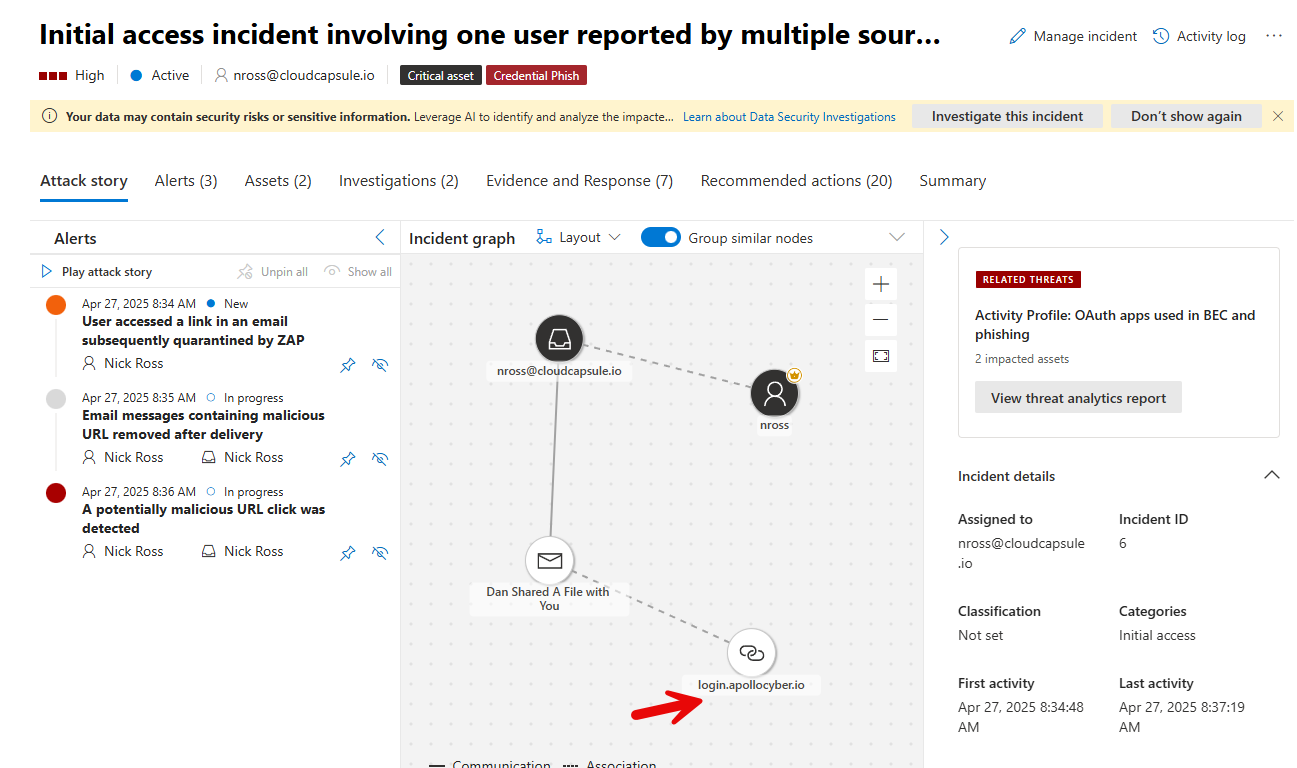
Automate Discovery of Policies in Tenants
At CloudCapsule, we have created a Token Theft Playbook that allows you to automate a tenant assessment to identify potential risk. This can be branded and used as a client-facing document to enable a project to uplift the tenant into better posture:
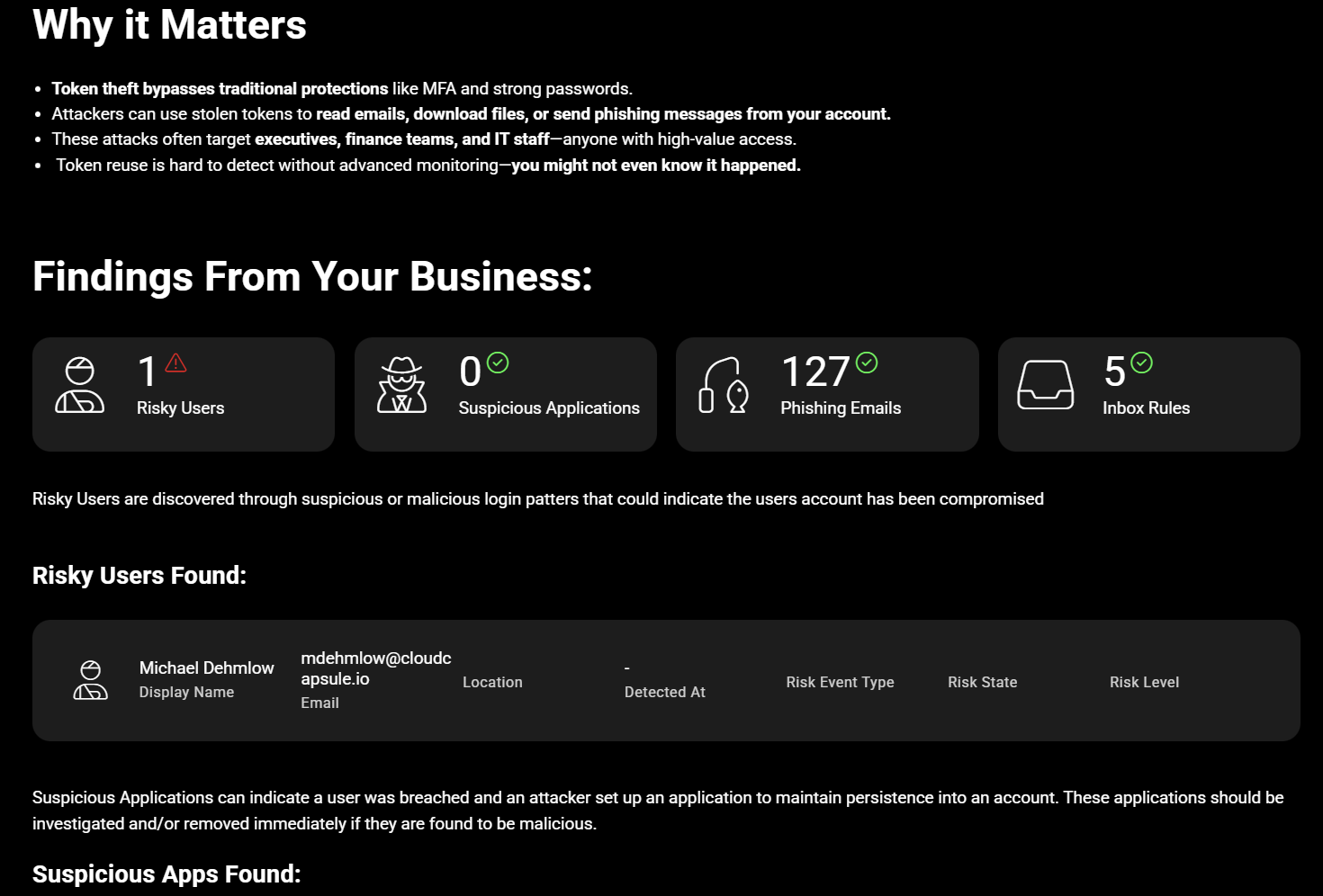
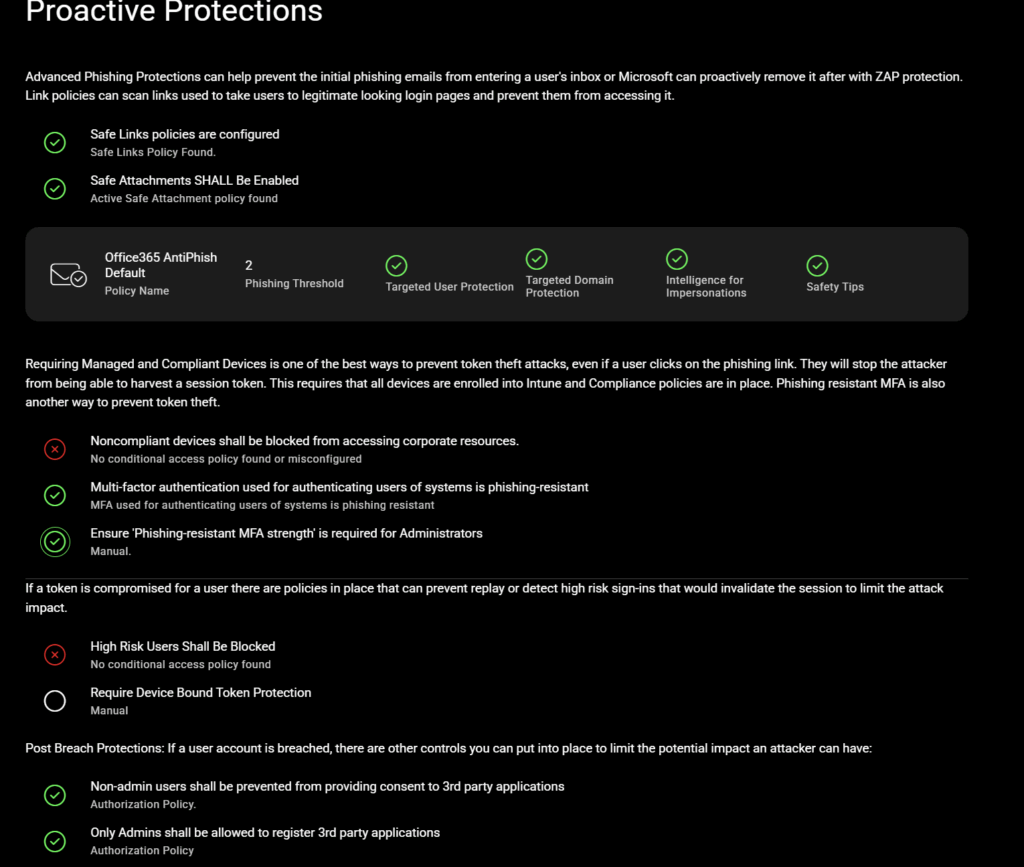
You can run a free scan to see where your tenant or a customer tenant sits today.